
A TikTok Shop promotion can look generous to a shopper and still fail the seller's margin check. The product page shows one price, the cart applies another offer, a coupon reduces the buyer's payment, and affiliate commission may use a different basis. If the team records only the shopper-facing price, it loses the audit trail behind the margin decision.
This guide gives US TikTok Shop sellers a practical way to review promotion stacking before launch. It reflects TikTok Shop US guidance checked on October 8, 2026, but the current terms and previews in your own Seller Center remain controlling. Eligibility, priority, fees, funding, and historical-price requirements can vary by account, SKU, campaign, market, and date.
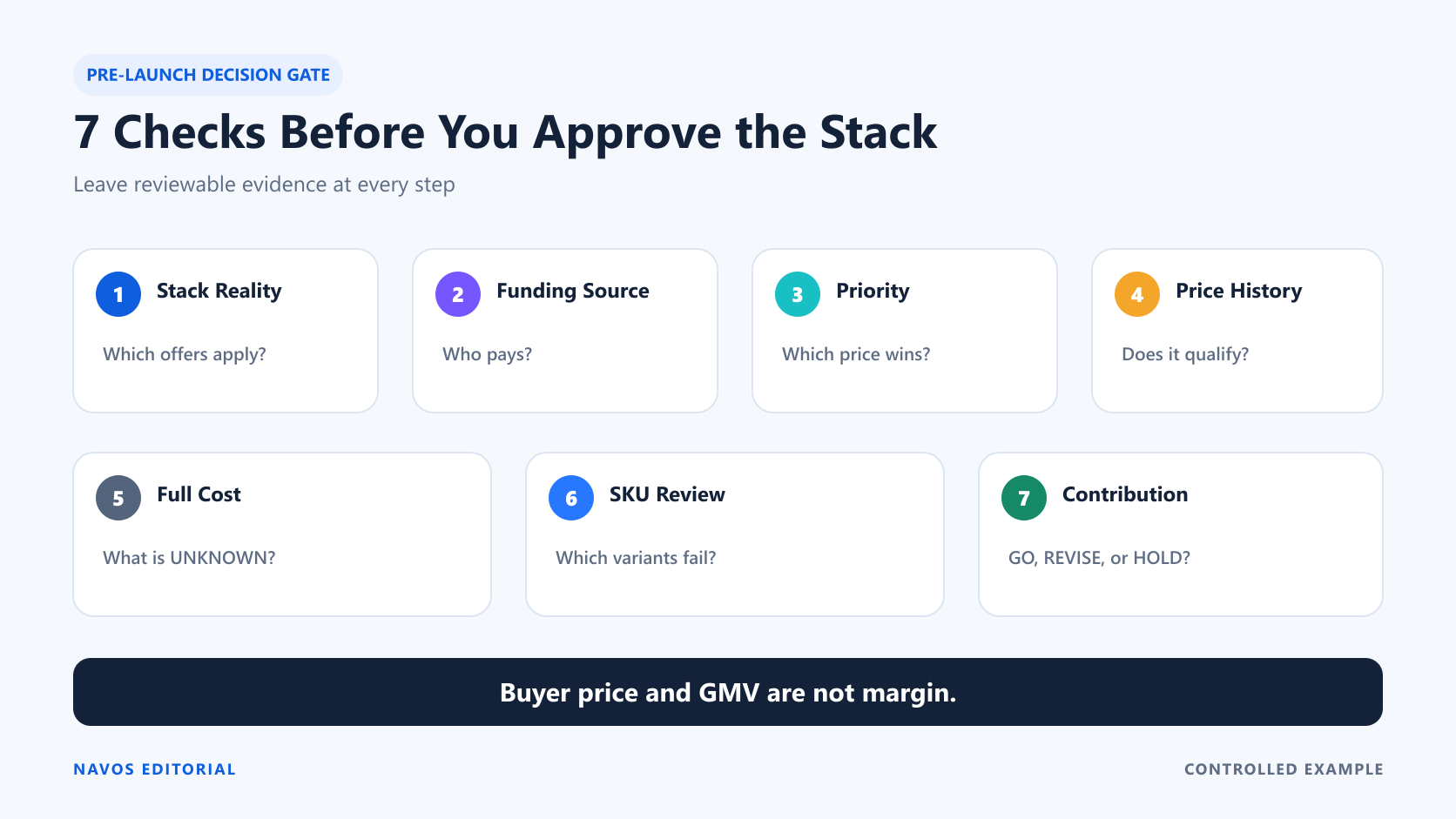
The goal is not to predict a guaranteed payout. It is to make the decision legible: which promotion may apply, who funds each reduction, what the buyer pays, which costs are known, and which unknowns should stop approval.
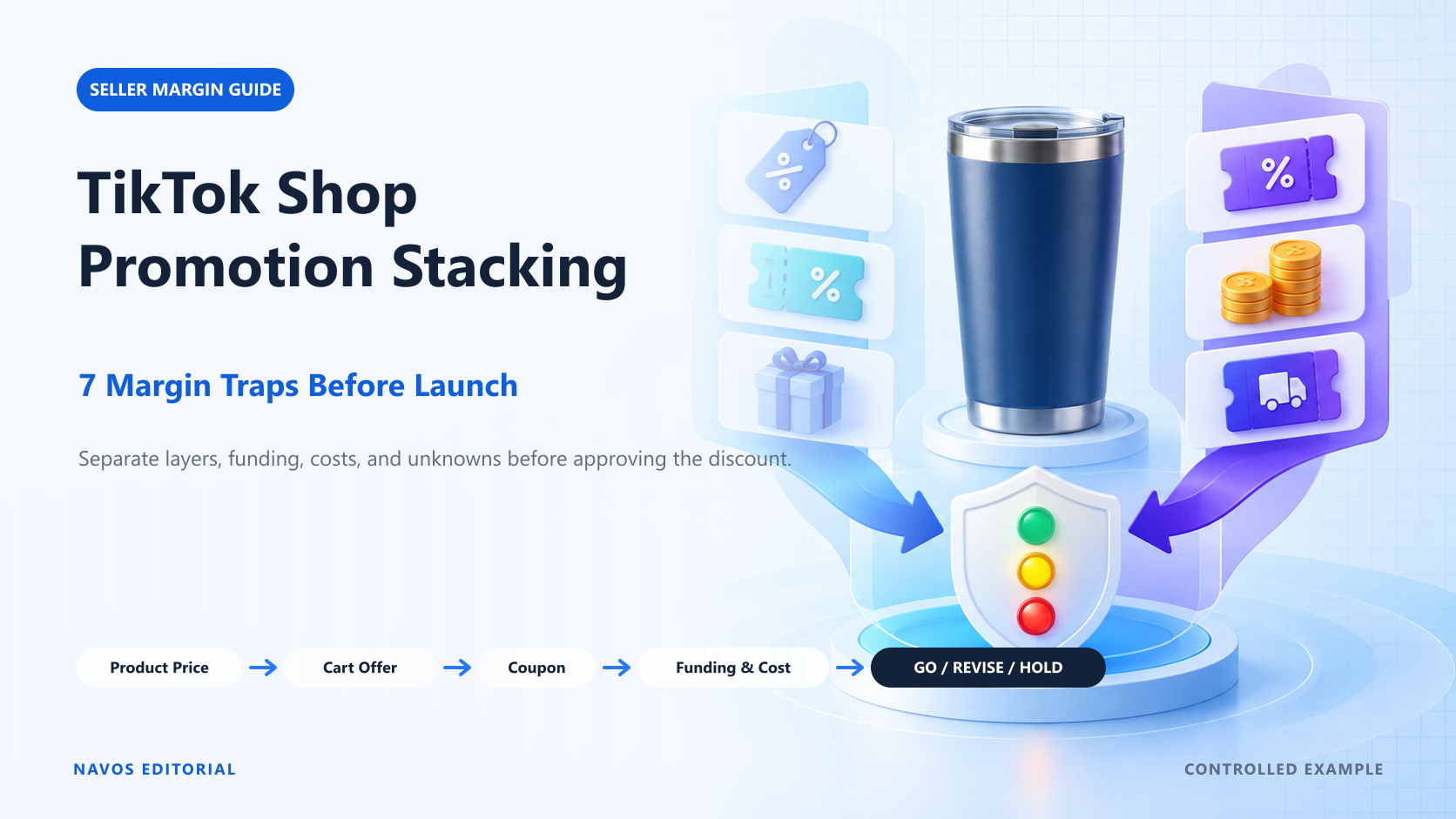
TikTok Shop Promotion Stacking at a Glance
Current US pricing guidance describes three broad promotion layers. Thinking in layers is more useful than keeping an unstructured list of coupon names.
Individual-product promotions
This layer changes the price of a specific product or SKU. It can include Product Discounts and campaign prices. More than one product-level offer may exist, but that does not mean the shopper receives every one. Eligibility, the optimal discount, and promotion priority determine which price is used.
Cart-level promotions
A cart-level offer is evaluated after eligible items enter the cart. It may depend on a minimum order value, selected products, quantity, or another condition. A cart offer can change the order total without changing the product-page price a teammate first copied into a margin spreadsheet.
Coupons and platform-funded support
Coupons form another layer. Some offers are seller-funded; others may be funded by TikTok. That distinction is not a footnote. It changes which party absorbs the reduction and what the seller must later verify in settlement.
Current US guidance describes cases in which TikTok-funded Product Coupons can combine with seller promotions. Other platform-funded incentives and LIVE promotion formats can have different priority or combination rules. Do not turn one example into a universal rule. Check the exact offer and account in Seller Center.
Buyer price versus modeled seller economics
Keep three numbers separate:
- Modeled buyer item price: the item price after the discounts included in the scenario, before unmodeled shipping, tax, or order-level adjustments.
- Modeled seller-funded price basis: the amount remaining after the seller-funded Product Discount and seller-funded coupon included in the model. This is an editorial field, not an official settlement field.
- Preliminary contribution: the modeled seller-funded price basis minus the known costs included in the calculation.
The third number is still not final profit when platform fees, campaign fees, refunds, tax treatment, or other costs are unknown. An unknown cost is not zero.
Trap 1: Assuming Every Promotion Stacks
The word “stack” can hide two different questions. First, can offers from different layers combine? Second, if several offers occupy the same layer, which one wins?
Same-layer selection
Current US guidance describes an optimal-offer or priority approach within a layer. A shopper may receive the most favorable eligible product-level offer rather than every product-level discount added together. A spreadsheet that simply sums all visible percentages can therefore invent a checkout price that never appears.
Build the scenario from the current preview, not from promotion names. For each layer, record the offer that applies, its eligibility condition, its funding source, and the evidence you saved. If the preview changes after another offer is added, preserve the revised state.
Cross-layer combinations
Eligible offers across different layers may combine. A product promotion, cart-level offer, and coupon can therefore produce a deeper buyer discount than any one promotion card suggests on its own.
The safe question is not “Does TikTok Shop stack discounts?” It is: “For this SKU, buyer, time, and campaign, which eligible offer wins in each layer, and which layers combine?” That question can be checked. A blanket stacking statement cannot.
Trap 2: Confusing Shopper Price With Seller Economics
A $3 reduction at checkout does not, by itself, tell you whether the seller funded $3. The buyer sees a price. The merchant needs a funding map.
Seller-funded reductions
When a Product Discount or coupon is seller-funded, subtract that reduction when calculating the modeled seller-funded price basis. Then calculate each percentage-based cost using the basis defined by the applicable program. Do not assume the affiliate, platform, or campaign fee uses the same basis unless the current terms say so.
TikTok-funded reductions
A TikTok-funded coupon may lower the buyer's payment without reducing the seller-funded price by the same amount. That can make the customer-facing offer look deeper without producing the same change in the controlled merchant model.
Verify the funding source instead of guessing from a coupon name. Save the applicable offer terms and any funding indication shown in the current account; after launch, reconcile those assumptions against the order-level settlement breakdown.
GMV Max Coupon uses a different access and cost-rate workflow; review the GMV Max Coupon guide before treating it as a standard Shop coupon.
Settlement evidence is still required
Even a clean pre-launch model is a forecast. Final validation requires order-level and settlement evidence after the promotion. Keep the original scenario ID, SKU, time window, and funding assumptions so the team can compare the model with what was actually paid and deducted.
Trap 3: Ignoring Promotion Priority
Two valid promotions do not necessarily have equal priority. If the team models the wrong winner, every downstream margin number inherits the error.
Campaign Price versus Product Discount
A campaign can impose its own price requirements while the product also has an always-on Product Discount. Under current US guidance, a Campaign Price usually takes priority over a standard Product Discount. The word “usually” matters: use the current campaign preview and terms, not a permanent assumption.
Before approval, identify the price that the campaign preview expects. Do not use the ordinary discounted price merely because it is the number the team already knows.
Flash Deal precedence
Current US Product Discount guidance describes Flash Deal taking precedence in the relationship covered on that page. That is useful evidence, but it is not permission to generalize the rule to every campaign or platform-funded offer. Campaign dates, inventory, price thresholds, and fees can change. Save the current terms beside the model.
Why the visible price can change
The product page, cart, and checkout can surface different stages of an offer. A platform-funded reduction can also make the buyer-facing price differ from the amount a seller first modeled. Review the full path and specify which screen each number came from.
Trap 4: Missing Historical Price Thresholds
Campaign eligibility can depend on pricing history, not just the discount entered today.
Recent-lowest-price requirements
Current US materials describe campaign windows that may use different historical periods, including examples such as 30, 60, or 90 days. A proposed campaign price can fail even when it looks reasonable against the retail price. The current campaign page's threshold and window are the evidence that matters.
Do not present one lookback window as permanent across every event. Record the campaign name, evaluation window, reference price, and timestamp. If any of those fields are missing, the price check is incomplete.
Reference-price and strikethrough-price risk
A dramatic strikethrough price is not a margin model, and an inaccurate reference price can create a separate compliance problem. Keep the product's actual pricing history, campaign threshold, and customer-facing display aligned. If the team cannot explain the reference price from records, stop before launch.
Trap 5: Leaving Costs Outside the Model
The fastest way to make a promotion look profitable is to calculate only revenue and COGS. The fastest way to make the decision unreliable is to treat everything else as zero.
Affiliate commission
If an affiliate earns a percentage of a defined price or revenue basis, show both the rate and the basis in the calculation. “15% affiliate commission” is not enough. Fifteen percent of $32 is different from 15% of $27.
For a deeper review of commission mechanics, use the Navos guide to the TikTok Shop affiliate program for sellers, then bring only the terms that apply to the current SKU back into the model.
Shipping and fulfillment
Separate warehouse or fulfillment cost from the shipping amount the seller subsidizes. If platform-funded shipping applies first and the seller funds a remaining amount, mark both components. A “free shipping” label does not identify the payer.
Campaign, platform, refund, tax, and other UNKNOWN costs
Current US materials describe fees for some programs and campaign contexts, but the applicable fee must come from the seller's current terms. A fee shown for one Flash Sale or Smart Promotion context is not a permanent fee for every promotion. Until confirmed, use
UNKNOWN.Do the same for platform fees, refund or return costs, tax treatment, payment adjustments, and any other unresolved deduction. A model can still show preliminary contribution, but it cannot call that number final margin or net profit.
Trap 6: Applying One Decision to Every SKU
A promotion is configured in a tool. Profit is earned or lost by specific products and variants.
Variant-level price and cost differences
A color or size variant can have a different COGS, shipping weight, retail price, or commission arrangement. Model the actual promoted variants. An average can approve a low-margin SKU that the campaign should exclude.
Reserved stock and inventory exposure
The current US guide says most Flash Sale campaigns require reserved stock, although the exact requirement varies by campaign. That creates exposure beyond per-order margin: units may be committed to a price and time window while demand elsewhere changes.
Record eligible quantity, reserved quantity, replenishment lead time, and the consequence of selling out. Leave unavailable fields as
UNKNOWN rather than inventing an inventory buffer.Different SKU economics inside one campaign
Use a separate row for each SKU or economically distinct variant. Give each row its own funding map, known costs, unknowns, and decision. Flag every required SKU that misses its threshold, even when the campaign-level aggregate appears acceptable. Document any exclusion or exception before approval.
Trap 7: Measuring GMV Without Contribution
GMV can answer whether more merchandise value moved. It cannot, on its own, answer whether the promotion produced acceptable economics.
Orders can rise while contribution falls
A deeper discount may improve conversion or order count and still reduce contribution per order enough to make the event unattractive. Conversely, a platform-funded discount may lower the buyer price without the same modeled seller-funded reduction. Both cases require the funding source and cost basis.
Pre-campaign, in-campaign, and post-campaign evidence
Before launch, save the model, preview, and missing fields. During the event, watch price application, eligible orders, cancellations, and stock. Afterward, reconcile orders and settlement, then compare contribution with the pre-launch threshold.
Use the TikTok Shop analytics guide to separate platform reporting, finance data, and uploaded-file analysis after the promotion. Analytics cannot repair a missing pre-launch funding record.
Worked Example: Three Promotion Scenarios
The following insulated-tumbler example is fictional. It tests the decision method; it is not a claim about a real account or TikTok Shop settlement.
Controlled inputs
- Retail price: $40.00
- COGS: $13.00
- Fulfillment: $3.00
- Seller-paid shipping subsidy: $4.00
- Affiliate commission: 15% of the modeled seller-funded item price basis
- Preliminary contribution threshold: $5.00
- Platform fee:
UNKNOWN
- Campaign service fee:
UNKNOWN
- Refund and return cost:
UNKNOWN
- Tax treatment:
UNKNOWN
The controlled formula is:
preliminary contribution = modeled seller-funded item price basis - COGS - fulfillment - seller-paid shipping subsidy - affiliate commissionIt deliberately excludes the unresolved costs listed above. Therefore, even a result above $5 is not final proof of profitability.
Scenario calculations
Scenario | Promotion set | Modeled buyer item price | Modeled seller-funded price basis | Affiliate commission | Preliminary contribution |
A | 20% seller-funded Product Discount | $32.00 | $32.00 | $4.80 | $7.20 |
B | 20% seller-funded Product Discount + $5 seller-funded coupon | $27.00 | $27.00 | $4.05 | $2.95 |
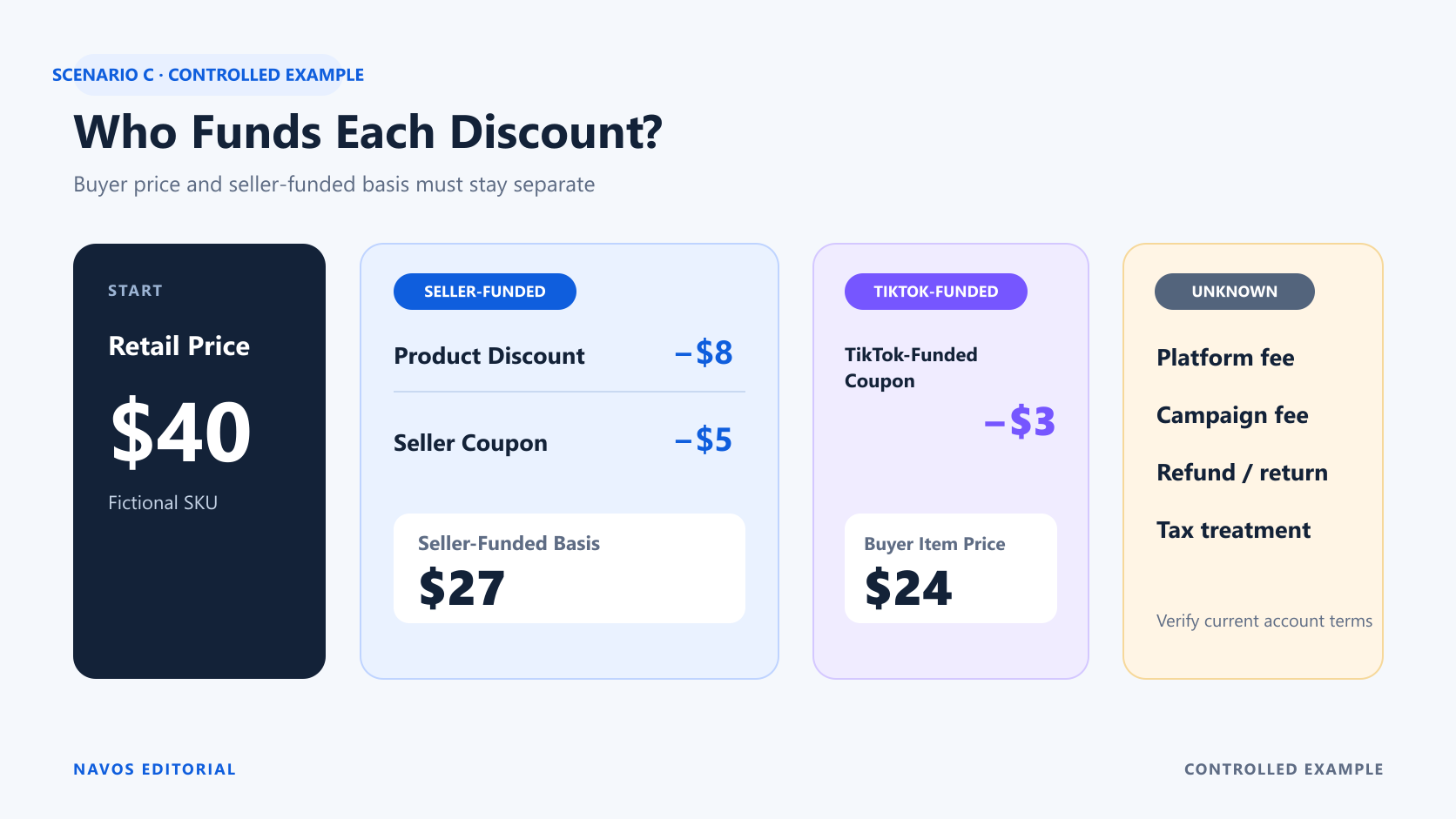
C | 20% seller-funded Product Discount + $5 seller-funded coupon + $3 TikTok-funded coupon (controlled assumption) | $24.00 | $27.00 | $4.05 | $2.95 |
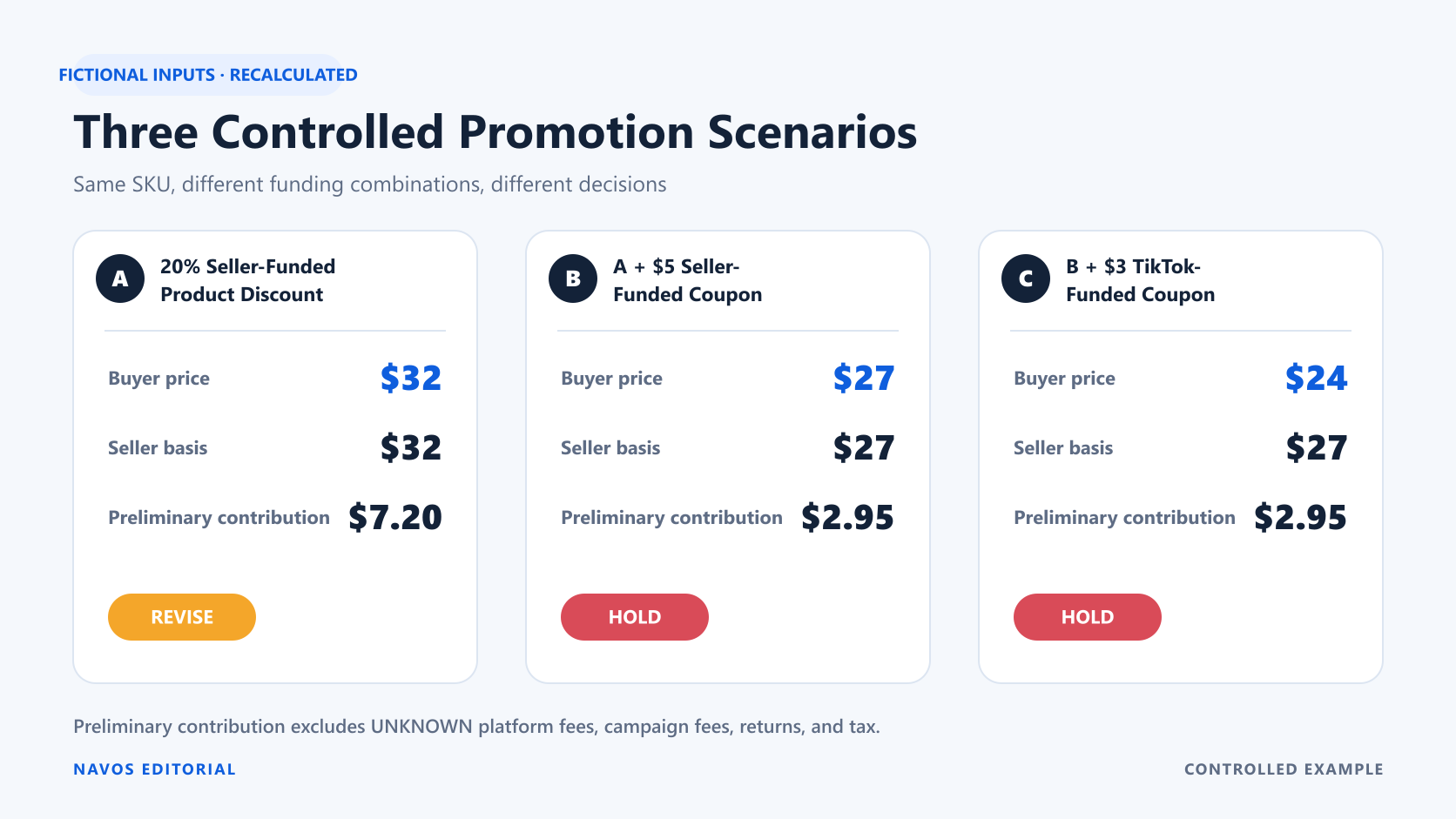
For Scenario A, the calculation is
$32.00 - $13.00 - $3.00 - $4.00 - $4.80 = $7.20.For Scenarios B and C, it is
$27.00 - $13.00 - $3.00 - $4.00 - $4.05 = $2.95.Scenario C has the lowest modeled buyer price, but its modeled seller-funded price basis and preliminary contribution are unchanged from Scenario B because the $3 coupon is defined as TikTok-funded in this controlled example. That assumption must be verified for a real offer.
The stop decision
- Scenario A: REVISE. It clears the preliminary $5 threshold by $2.20, but unresolved fees, return-related costs, and tax treatment prevent a final
GO.
- Scenario B: HOLD. It misses the preliminary threshold before unknown costs.
- Scenario C: HOLD. The buyer receives a deeper modeled offer, but preliminary contribution remains $2.95.
This is why “best price for the shopper” and “best approved promotion for the seller” are not interchangeable.
Use the Promotion Simulator Before Launch
Current US TikTok Shop guidance points sellers to Promotion Simulator or Price Forecast for visibility into promotion application. Use these previews to replace assumptions with account-specific evidence, while remembering that they do not prove final checkout, settlement, or profit.
What the preview can help you check
Depending on current account availability, the preview can help show which configured offers are eligible, which offer wins inside a layer, how eligible layers combine, and what buyer-facing price is estimated. Save the scenario, timestamp, SKU, visible funding labels, and the current terms used.
What still needs finance and settlement evidence
A promotion preview does not establish COGS, fulfillment expense, affiliate basis, refund cost, tax treatment, or every settlement deduction. Nor does it prove demand or post-campaign profit.
Pair the preview with a cost record before approval and with order-level settlement evidence afterward. If the two disagree, preserve the discrepancy and investigate it instead of rewriting the original forecast to match the outcome.
Compare Promotion Scenarios With Navos
For this guide, we tested the Ecommerce Growth Pricing Promotion Strategy Skill in Navos with a fictional $40 insulated tumbler and three controlled promotion combinations. The supplied inputs included SKU economics, each discount's funding source, a $5 preliminary-contribution threshold, and four unresolved cost fields marked
UNKNOWN.Navos organized those inputs into a funding-source matrix, explicit calculations for all three scenarios, an unknown-cost gate, and conditional
REVISE or HOLD decisions in one shareable HTML artifact. It kept the $24 modeled buyer item price separate from the $27 modeled seller-funded basis in Scenario C instead of using the lower buyer price as the affiliate basis.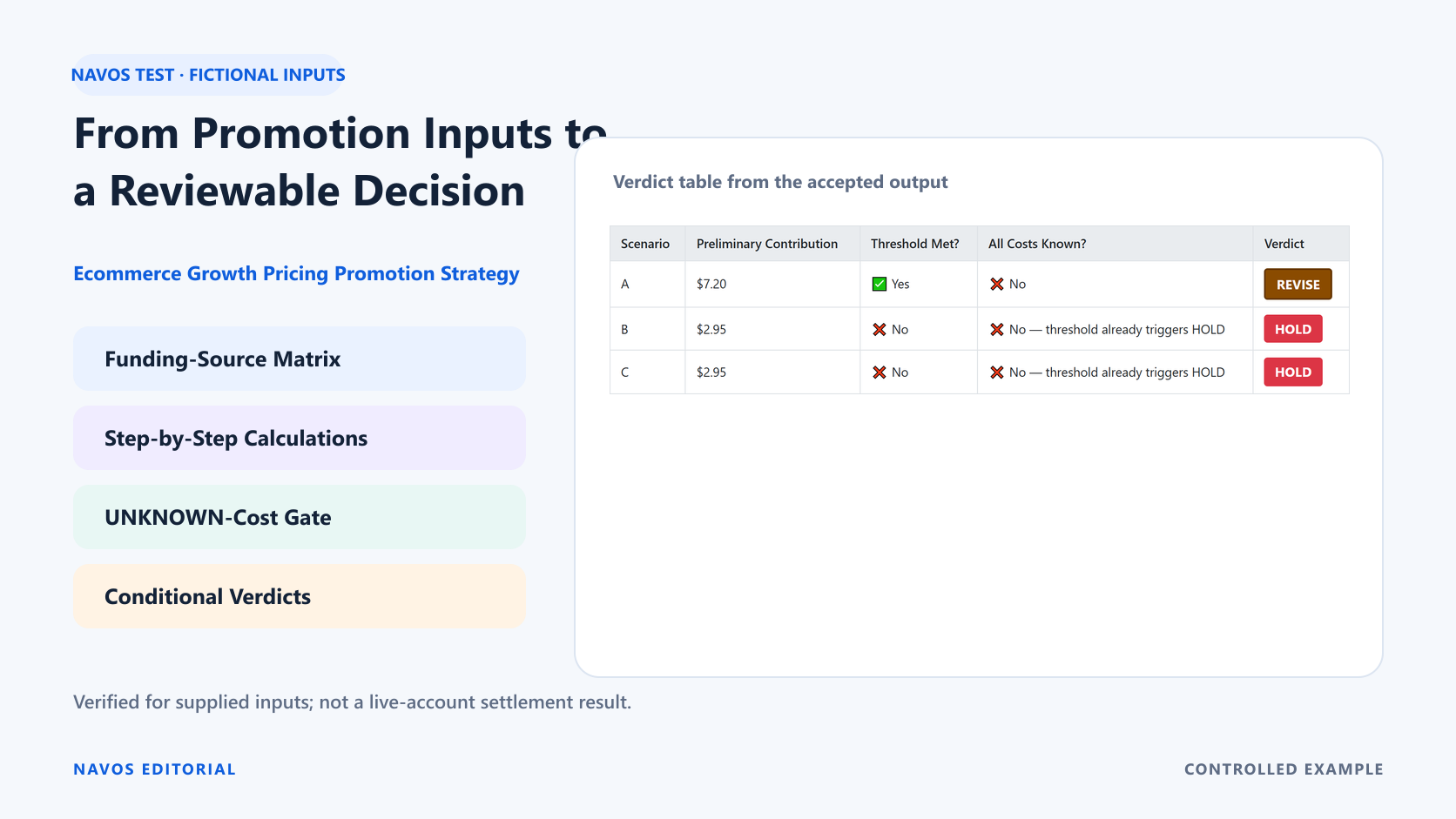
The resulting decision record made the next action clear:
- Scenario A remained REVISE because its $7.20 preliminary contribution cleared the threshold while material costs were still unknown.
- Scenarios B and C remained HOLD at $2.95.
- Platform fee, campaign service fee, refund and return cost, and tax treatment remained visible as
UNKNOWNinstead of silently becoming zero.
This controlled run verified supplied-input handling, calculation, structured HTML output, and explicit uncertainty for the provided example. It did not use a live shop or claim final settlement.
Ready to compare the same SKU under different promotion combinations? Download Navos and compare your promotion scenarios. In Square, open Ecommerce Hacks → Ecommerce Growth Pricing Promotion Strategy, then provide the SKU economics and funding source for each discount layer.
Frequently Asked Questions
Do all TikTok Shop promotions stack?
No. Current US guidance uses eligibility, layers, optimal discounts, and priority. Offers in the same layer may not all apply, while eligible offers across different layers may combine. Preview the exact SKU and offer set in the current Seller Center.
What is the difference between seller-funded and TikTok-funded discounts?
A seller-funded discount is absorbed by the merchant under the applicable terms. A TikTok-funded discount is funded by the platform in the described offer. The buyer price alone does not reveal this distinction, so preserve the visible funding label and verify settlement.
Does a lower buyer price always reduce seller economics by the same amount?
No. A platform-funded discount may reduce what the buyer pays without producing the same reduction in the modeled seller-funded amount. The exact treatment still needs confirmation for the current offer and account.
How can a seller preview overlapping promotions?
Use Promotion Simulator or Price Forecast in Seller Center when available. Record the SKU, time, applicable layers, winning offers, estimated buyer price, and funding source. Then compare the preview with actual settlement evidence after the event.
Which costs belong in a promotion margin check?
Include COGS, fulfillment, seller-paid shipping, affiliate commission, known platform and campaign fees, and explicit treatments for refund or return costs and tax. Add any business-specific deductions. If a value is missing, label it
UNKNOWN.Is Smart Promotion profitable for every product?
No universal answer is possible. Profitability depends on the seller's current fee terms, product economics, funding mix, campaign conditions, and actual settlement. Review each SKU instead of applying one shop-wide conclusion.
Make the Funding Source Visible Before You Approve the Discount
Promotion stacking becomes manageable when every layer has an owner, every reduction has a funding source, and every missing cost is visible. Start with the current Seller Center preview, calculate SKU-level preliminary contribution, and refuse to turn an unknown into zero just to reach a launch decision.
The disciplined outcome is not always
GO. A useful review can produce REVISE or HOLD and show exactly which price, fee, funding label, or settlement term the team needs next.