GMV Max Coupon is a coupon feature for TikTok Shop GMV Max campaigns. It lets TikTok decide which eligible shoppers may need a coupon to complete a purchase, while the advertiser sets a campaign-level coupon cost rate.
The feature is not universally available yet. TikTok's
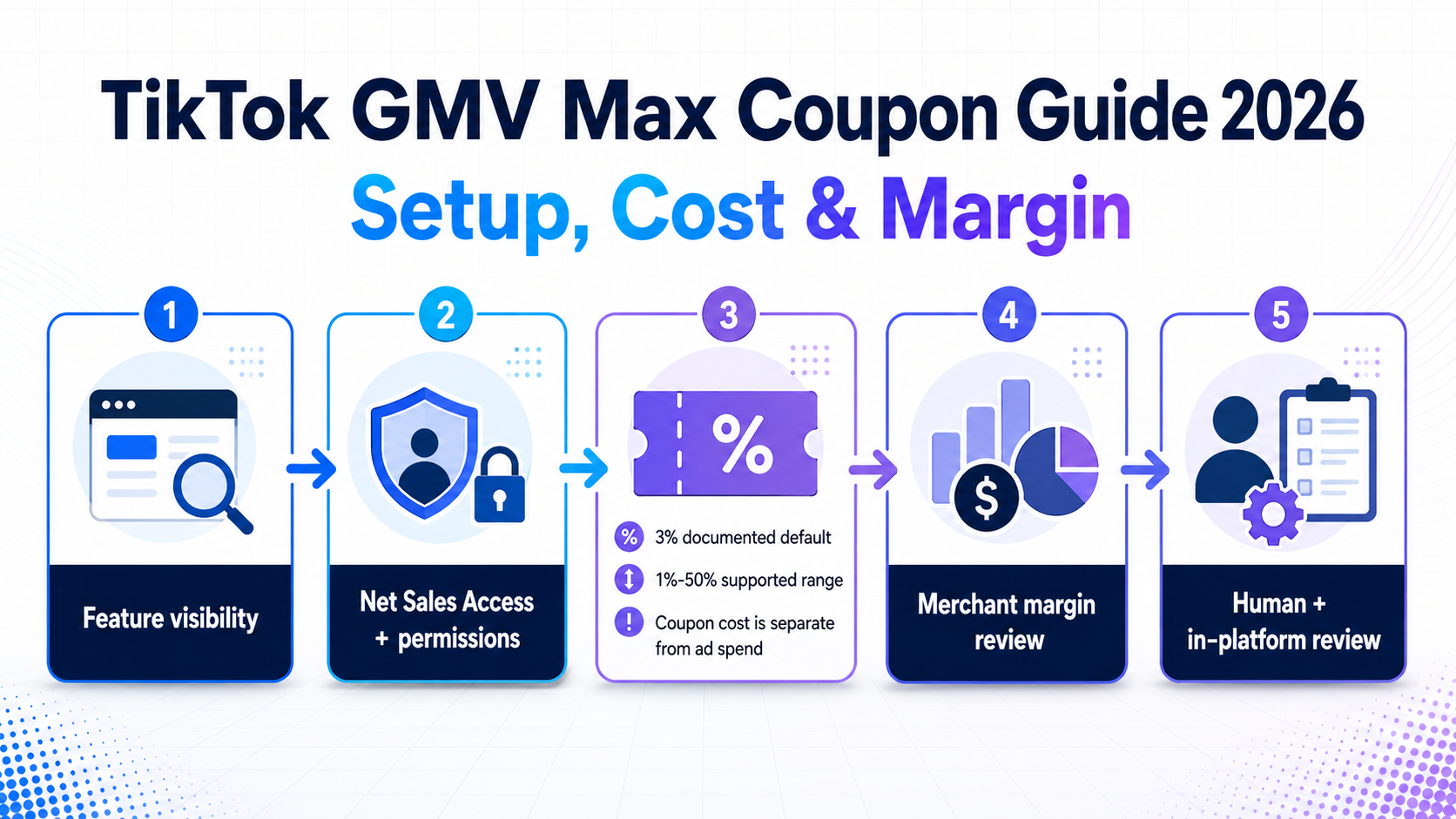
About GMV Max Coupon page, last updated in August 2026 and checked for this guide on September 7, 2026, says it is still rolling out to some advertisers. Access requires the feature to be visible plus the necessary shop and campaign permissions, including Net Sales Access.The money rule is equally important: the default coupon cost rate is 3%, the supported range is 1% to 50%, and coupon cost is charged separately from ad spend. A rate that is allowed by the platform is not automatically affordable for your product.
This guide shows US TikTok Shop teams how to check readiness, model the cost, protect a minimum margin buffer, and prepare a reviewable launch decision before anyone changes a live campaign.
Evidence boundary: The public rules in this guide come from TikTok's current Help Center. Exact labels, navigation, recommended rates, formats, values, placements, and account availability can vary by account and market. Where the current US interface has not been directly observed, the text says so.
GMV Max Coupon in 60 Seconds
GMV Max Coupon is not a blanket discount for every shopper. When it is enabled for a GMV Max campaign, TikTok evaluates eligible shopping requests and decides whether a coupon may help convert a shopper. Someone who is already likely to buy at the listed price may not receive one; a more price-sensitive shopper may.
TikTok says eligible shoppers may see and claim these coupons across supported shopping experiences, including the feed, search, Shopping Center, and eligible LIVE shopping surfaces. A claimed coupon can also appear in the shopper's TikTok Shop coupon wallet for a limited period.
Coupon format and value are not fully controlled by the advertiser. TikTok may issue a fixed-amount or percentage-discount coupon, and the system determines the format and value under market-specific rules. The advertiser controls the coupon cost rate allocated to the campaign.
GMV Max Coupon is easy to confuse with two separate TikTok incentives:
Term | Who or what receives the benefit | Why it is different |
GMV Max Coupon | Eligible shoppers selected dynamically within a supported GMV Max shopping journey | This guide's feature; the campaign has a Net Sales-based coupon cost rate |
New-advertiser incentive coupon or ad credit | The advertiser, after meeting the separate promotion's eligibility and spend rules | It offsets eligible advertising charges; it is not the shopper incentive described here |
Platform-campaign coupon subsidy | A seller or product participating in a separate TikTok Shop promotion under that campaign's terms | It is a campaign benefit or subsidy, not proof that the GMV Max Coupon cost-rate control is available |
If a result promises an advertising signup credit or describes a promotional-event benefit, it is answering a different question.
Who Can Use GMV Max Coupon?
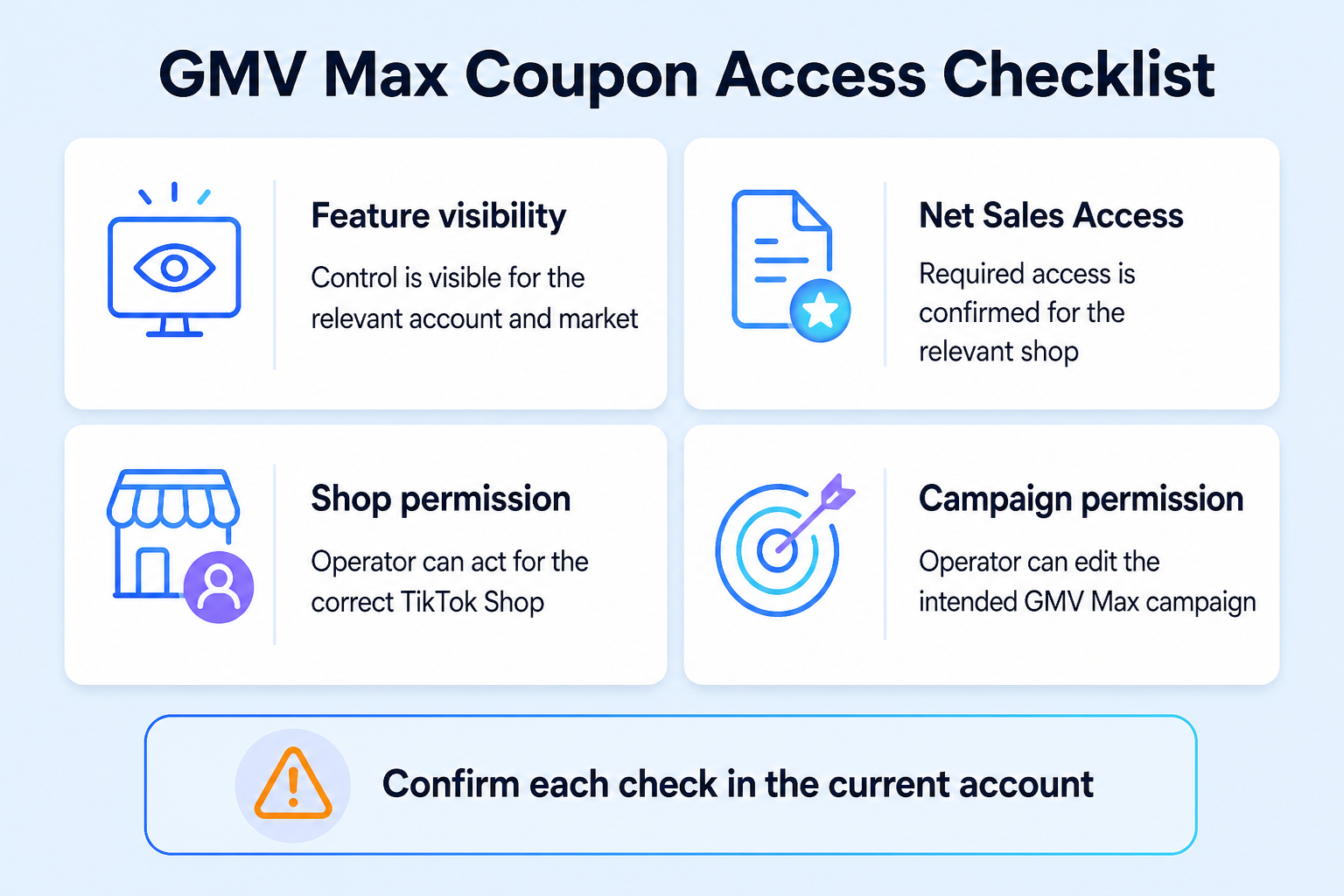
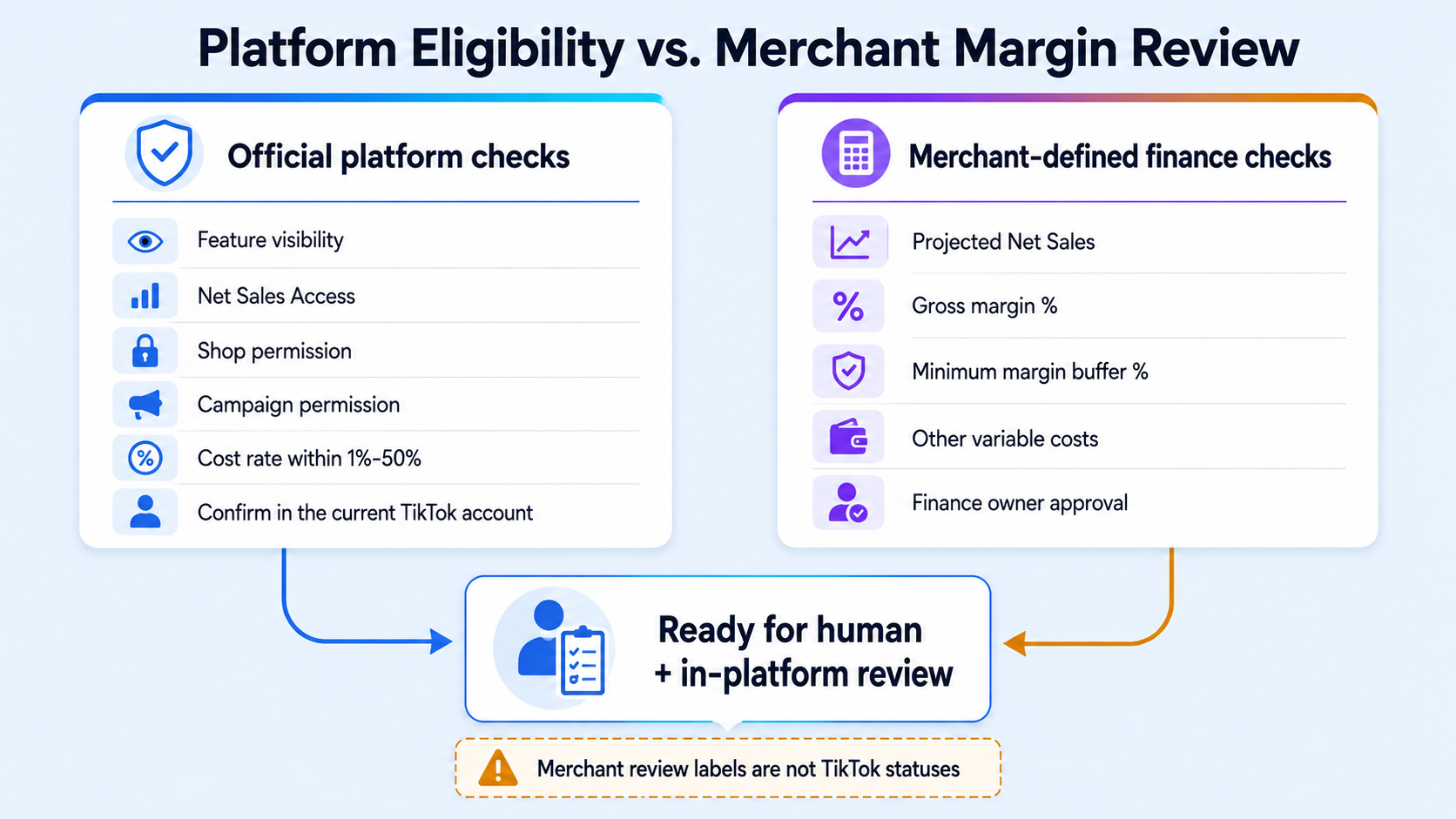
For an operational precheck, translate TikTok's rollout and permission statements into four recorded checks:
Readiness check | What you need to confirm | If the answer is no or unknown |
Feature visibility | The GMV Max Coupon control appears for the relevant account, market, and campaign flow | Treat it as a rollout or eligibility question; do not invent a workaround |
Net Sales Access | The relevant account has Net Sales Access for the shop | Request or route approval through the path shown in the current account |
Shop permission | The operator can act for the correct TikTok Shop | Send the request to the shop owner or admin |
Campaign permission | The operator can create or edit the intended GMV Max campaign | Have the campaign owner or authorized operator complete the review |
Feature visibility and rollout
GMV Max may be available while GMV Max Coupon is not. The August 2026 Help Center language says the Coupon feature is in rollout and available to some advertisers using GMV Max campaigns. A missing control therefore does not prove that your team configured the account incorrectly.
Capture the market, account, shop, campaign ID, interface surface, and date of the check. If the setting is absent, record
feature_visible: false rather than claiming that the feature has launched for the account.Net Sales Access
TikTok says Net Sales Access is required for the relevant shop. Depending on the account setup, the request may appear in the campaign creation flow, Seller Center account management, or Business Center account management. A shop owner or account administrator may need to approve it.
Those are possible routes, not guaranteed navigation for every US account. Follow the path shown in the current interface and save the approval state. Do not assume that having general Ads Manager access includes Net Sales Access.
Shop and campaign permissions
Net Sales Access is not the only permission check. The official availability statement also requires the relevant shop and campaign permissions. A media buyer may be able to view reporting but not edit a campaign; an agency account may be connected to an ad account but not authorized for the shop.
Assign an owner before setup:
Decision | Recommended owner |
Confirm feature visibility | Media buyer or campaign operator |
Approve shop / Net Sales Access | Shop owner or account admin |
Confirm campaign edit permission | Ad account or campaign admin |
Approve the commercial rate | Finance owner, founder, or ecommerce lead |
Confirm stock and fulfillment readiness | Ecommerce operations |
Coupon readiness does not replace broader shop compliance. If the account has active restrictions or unresolved shop-health issues, keep that review separate and use the TikTok Shop seller compliance checklist as a starting point.
GMV Max Coupon Readiness Checklist
Before opening a live campaign, create a small launch manifest. It should contain only the fields needed for the decision—no tokens, buyer data, or other personal information.
Field | Why it matters |
campaign_id | Identifies the intended campaign when the manifest is stored with its outputs |
market | Records the market context when the manifest is stored with its outputs |
feature_visible | Separates a missing rollout from a rate decision |
net_sales_access | Records the required access state |
shop_permission | Confirms the operator can act for the shop |
campaign_permission | Confirms the operator can create or edit the campaign |
cost_rate_pct | Records the proposed fixed percentage of Net Sales |
projected_net_sales | Supplies a planning base for estimated coupon cost |
gross_margin_pct | Supplies the merchant's pre-coupon margin assumption |
minimum_margin_buffer_pct | States how much simplified margin the merchant wants to retain |
projected_net_sales, gross_margin_pct, and minimum_margin_buffer_pct are merchant planning inputs. They are not presented here as TikTok platform requirements or verified account metrics. Keep the complete input manifest beside every generated result; the current local output does not repeat all campaign, market, or run context.How to Enable GMV Max Coupon
The public workflow is short, but every step has a decision gate.
- Confirm that you are working on the correct GMV Max campaign. Record the shop, market, campaign ID, account owner, and the date of the check.
- Check whether the GMV Max Coupon setting is visible. If it is not, stop and record the visibility result. The feature is still rolling out.
- Confirm Net Sales Access. Use the access route shown in the current account. TikTok says this may be available in the campaign flow, Seller Center account management, or Business Center account management.
- Confirm shop and campaign permissions. Route any approval to the shop owner, account admin, or campaign owner before continuing.
- Create or edit the GMV Max campaign. Find the GMV Max Coupon control and turn it on. The exact label and placement must be verified in the current interface.
- Enter the coupon cost rate. TikTok documents a 3% default and a supported range from 1% to 50%. A product-category recommendation may appear, but do not assume one will be shown.
- Run the commercial review. Compare the rate with projected Net Sales, gross margin, other variable costs, and a minimum margin buffer.
- Save the inputs and approval. Record what changed, who approved it, and which metrics will be reviewed later.
This guide does not recommend automating the final toggle. The correct finish line is ready for human and in-platform review, not “automatically approved.”
How the GMV Max Coupon Cost Rate Works
TikTok defines the coupon cost rate as the percentage of Net Sales allocated to GMV Max Coupon. Its current Help Center says all Net Sales within an active GMV Max campaign are charged at the fixed rate you set, even though the system decides which eligible shoppers actually receive a coupon.
For planning:
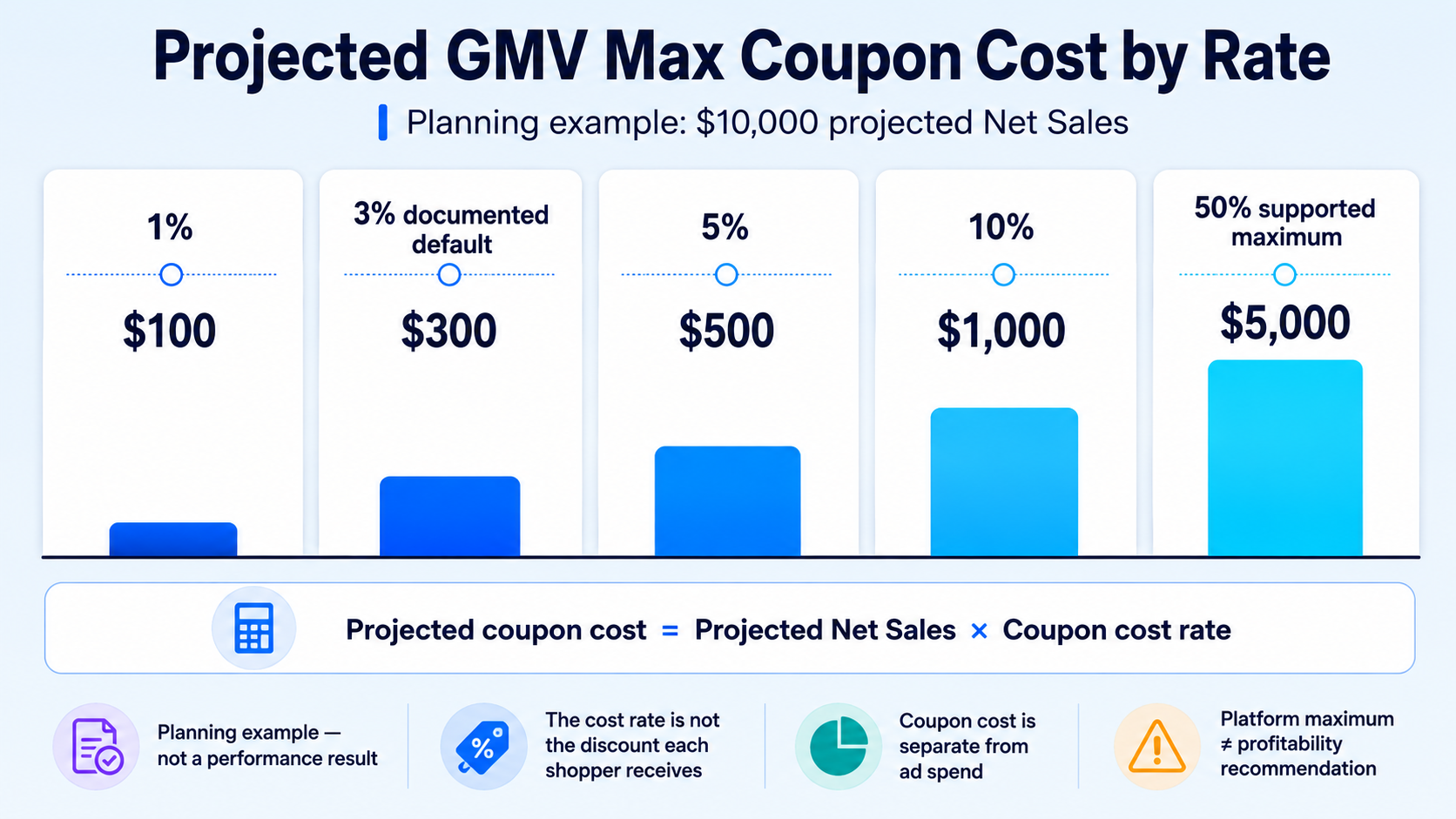
Projected coupon cost = Projected Net Sales × Coupon cost rateThis formula estimates the charge implied by the supplied planning base and rate. It does not predict the discount value an individual shopper will see or the value of any TikTok-funded subsidy. A 3% campaign cost rate does not mean each recipient receives 3% off.
At different rates, the same $10,000 projected Net Sales base produces very different cost exposure:
Coupon cost rate | Projected coupon cost | Simplified remaining margin on the same sales base if starting gross margin is 35% |
1% | $100 | 34 percentage points |
3% default | $300 | 32 percentage points |
5% | $500 | 30 percentage points |
10% | $1,000 | 25 percentage points |
50% maximum platform range | $5,000 | -15 percentage points |
The last row is deliberately uncomfortable. A platform limit is not a profitability recommendation.
Coupon cost is separate from ad spend
TikTok explicitly states that coupon cost is charged separately from ad spend. A team that looks only at the GMV Max ad budget can therefore understate the commercial cost of the campaign.
At minimum, keep GMV Max ad spend and GMV Max Coupon cost on separate lines. Then include every other applicable variable cost—such as product cost, commissions, platform fees, payment fees, fulfillment, shipping support, refunds, and returns—in the contribution model. Use the GMV Max ROI and profit guardrails for the broader profit framework.
Do not assume that your accounting system's “net revenue” equals TikTok's
Net Sales field. Save the platform definition and reporting basis shown in the current account before reconciling it with finance data.TikTok also says coupon-related reporting can include coupon cost and revenue from coupons. “Revenue from coupons” is a reporting metric; by itself, it does not prove that every reported dollar was incremental or profitable.
Set a Coupon Rate Without Breaking Your Margin
The official 1%-50% range answers what the interface may accept. Your margin model answers what the business can tolerate. Only subtract the percentages below when gross margin and the coupon cost rate use the same Net Sales base and accounting treatment. Otherwise, convert both to dollar amounts on a common base first.
A fast screening calculation is:
Remaining margin before other costs (%) = Gross margin (%) − Coupon cost rate (%)Then compare that result with a merchant-defined minimum buffer:
Simple maximum coupon rate (%) = Gross margin (%) − Minimum margin buffer (%)Example: a product with 32% gross margin and a 15% minimum margin buffer has a simple maximum of 17%. At the default 3% rate, the remaining margin before other costs is 29%.
This is a gate, not a full profit statement. It does not automatically subtract ad spend, affiliate commission, platform fees, payment fees, fulfillment, shipping support, refunds, returns, taxes, or overhead. If the 15% buffer is supposed to remain after those costs, include them in a complete contribution model before approval.
Use three merchant decision outcomes. These are internal review labels, not TikTok statuses:
Merchant outcome | Trigger | Next action |
Verify rollout or complete access setup | Feature visibility is unconfirmed, or required access or permissions are missing | Confirm rollout or resolve access before enabling |
Adjust the rate or obtain finance approval | The same-base margin screen or complete contribution review fails | Lower the rate or document explicit finance approval |
Ready for in-platform review | Evidence is attached, the rate is within 1%-50%, and a human reviewer accepts the economics | Review the current campaign interface and approve manually |
Do not compress these into a single green check. Platform eligibility, numerical validity, and commercial approval are different decisions.
Turn the Decision Into a Reviewable Launch Package
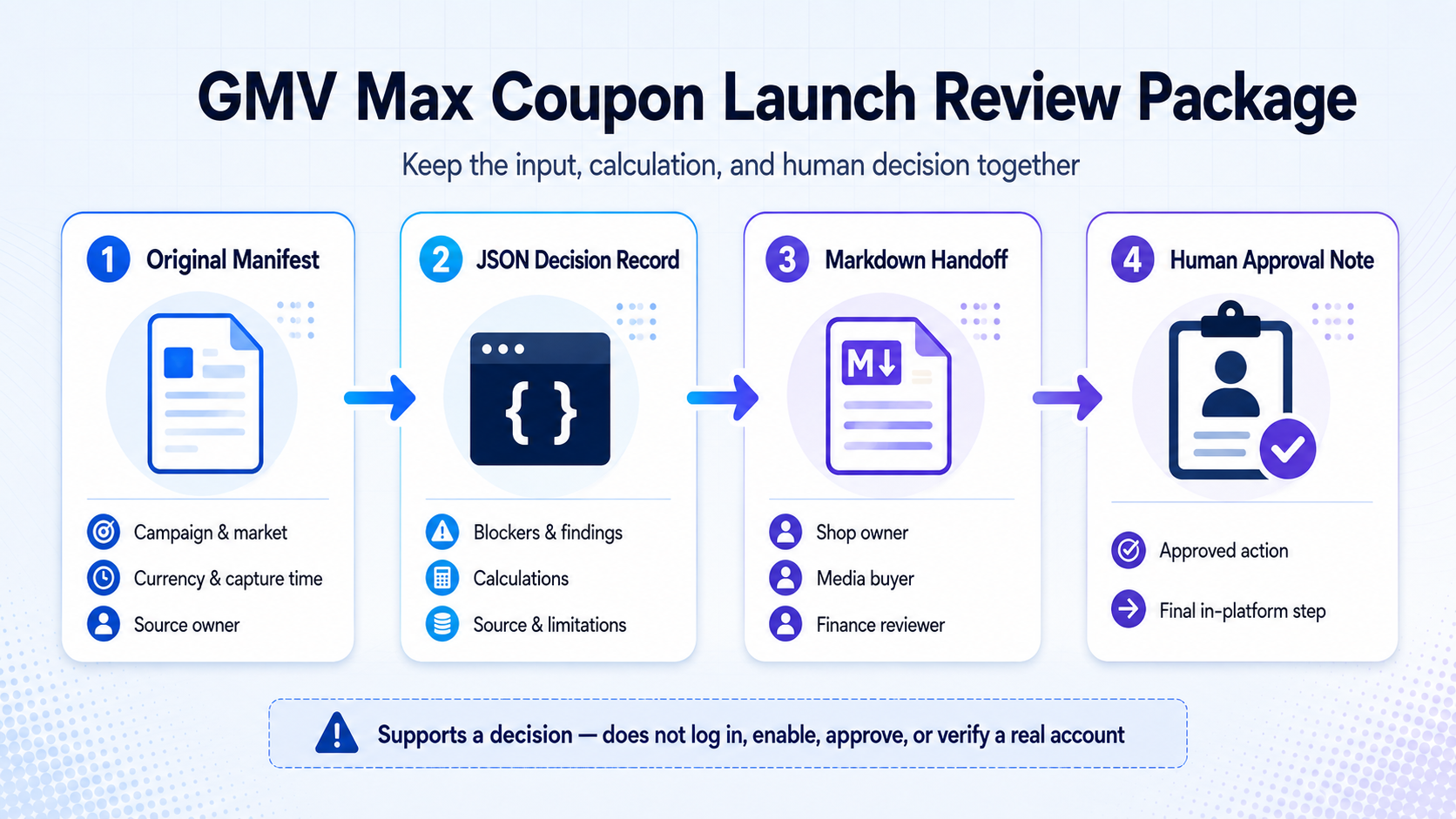
A screenshot shows what one person saw. A reviewable launch package preserves the input, computed result, and human decision. Keep four items together:
- the original manifest with campaign, market, currency, capture time, and source owner;
- a JSON decision record with blockers, findings, calculations, source, and limitations;
- a readable Markdown handoff for the shop owner, media buyer, and finance reviewer;
- the human approval note and final in-platform action.
Before relying on any generated record, schema-validate real booleans, finite percentages, non-negative money values, required fields, currency, and calculation base. The package supports a decision; it does not log in to TikTok, verify a real account, request access, enable the feature, approve a campaign, or prove that TikTok accepted the setup.
What to Review After Launch
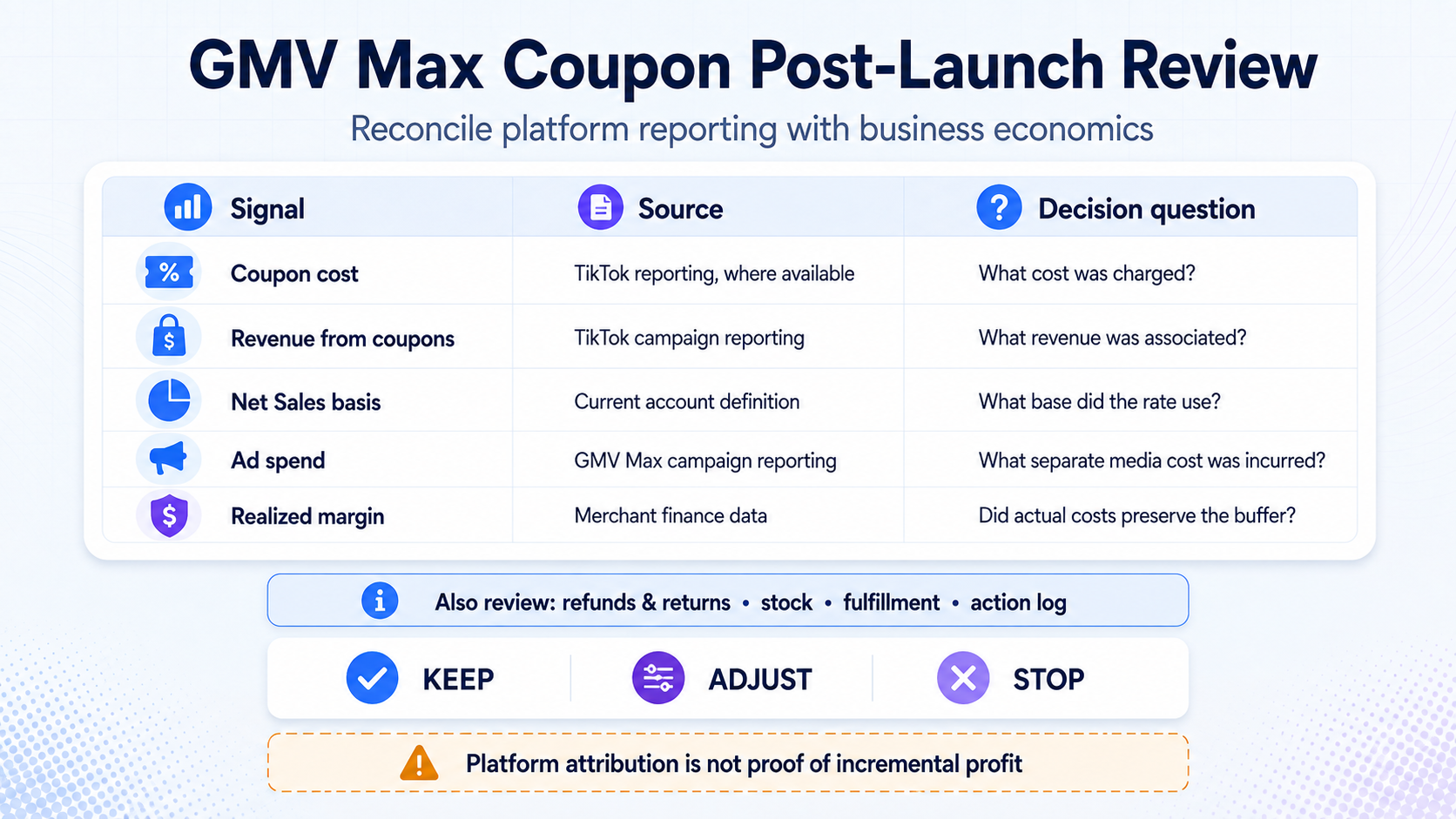
TikTok says campaign reporting may show coupon cost and revenue from coupons, while Seller Center finance and transaction records may show coupon-cost details where available.
Bring platform reporting and business economics into one review:
Field | Source class | Decision question |
Coupon cost | TikTok campaign/finance reporting where available | How much coupon cost was charged? |
Revenue from coupons | TikTok campaign reporting | What revenue did the platform associate with coupon activity? |
Net Sales basis | TikTok definition in the current account | What base did the fixed cost rate apply to? |
Ad spend | GMV Max campaign reporting | What separate media cost was incurred? |
Realized gross/contribution margin | Merchant finance data | Did the campaign preserve the approved buffer after actual costs? |
Use the TikTok Shop analytics workflow to keep first-party reporting, finance data, external estimates, and uploaded-file analysis in the correct evidence layer.
Do not decide from coupon revenue alone. Reconcile coupon cost, ad spend, realized margin, refunds, and operating health before keeping, adjusting, or stopping the setup.
Common GMV Max Coupon Mistakes
Mistake | Correction |
Assuming Coupon is available because GMV Max is available | Coupon is still rolling out; check the actual control in the intended account and market |
Treating general account access as Net Sales Access | Record Net Sales Access, shop permission, and campaign permission separately |
Reading the 3% default as a recommendation | Treat it as a documented default, then test your unit economics |
Treating 50% as commercially safe | It is a platform maximum, not a profitability recommendation |
Folding coupon cost into the ad budget | Keep coupon cost and ad spend as separate cost lines |
Calling projected cost an actual result | Replace planning estimates with platform and finance records after launch |
Treating a readiness record as platform approval | The current TikTok account remains the authority for availability and activation |
Publishing one market's screenshots as universal | Date, market-label, and reverify every screenshot |
Frequently Asked Questions
What is TikTok GMV Max Coupon?
It is a GMV Max feature that lets TikTok dynamically offer coupons to eligible shoppers who may need an incentive to convert. The advertiser sets a campaign-level coupon cost rate rather than choosing one coupon for every shopper.
Is GMV Max Coupon available to every US advertiser?
No universal availability is documented. TikTok's Help Center said in August 2026 that the feature was still rolling out to some advertisers. Confirm the setting in the current account.
What is the default GMV Max Coupon cost rate?
The documented default is 3% of Net Sales. TikTok supports rates from 1% to 50%, and a category-based recommended range may appear in some interfaces.
Is GMV Max Coupon cost included in ad spend?
No. TikTok says coupon cost is charged separately from ad spend.
What is Net Sales Access on TikTok?
For GMV Max Coupon, it is a required access state for the relevant shop. TikTok says the request route may appear in the campaign flow, Seller Center account management, or Business Center account management. Use the current account's definition and approval path rather than assuming a universal screen.
How do I enable GMV Max Coupon?
First confirm feature visibility, Net Sales Access, shop permission, and campaign permission. Then create or edit the GMV Max campaign, switch on the GMV Max Coupon setting, enter a rate within 1%-50%, review the commercial impact, and save the approval record. Exact labels and navigation must be checked in the current account.
Does every shopper receive the coupon?
No. TikTok says the system decides which eligible shopping requests may benefit from a coupon. Shoppers already likely to buy at the listed price may not receive one.
Can TikTok subsidize part of the coupon cost?
TikTok's August 2026 Help Center says merchants who enable GMV Max Coupon can access more TikTok-funded coupon subsidies, up to 60% of their own coupon cost. Treat that as a platform-reported maximum opportunity, not a guaranteed subsidy for every advertiser or market; verify the terms shown in the current account.
How should I choose a GMV Max Coupon rate?
Start with the documented range, then test the rate against your own projected Net Sales, gross margin, minimum margin buffer, and complete variable-cost stack. Use the platform default only if the business can afford it.
What should I measure after enabling it?
Review coupon cost, revenue from coupons, the Net Sales basis, ad spend, realized margin, refunds/returns, stock, fulfillment, and the action log. Keep platform attribution separate from incremental-profit claims.
Final Decision
GMV Max Coupon adds a targeted incentive layer to GMV Max and a separate cost line. Confirm rollout visibility and permissions, model the fixed rate on a defined Net Sales base, protect a merchant-set margin buffer, record the evidence, and complete the final review in the current TikTok account.
A visible toggle is not an approval process. The useful outcome is a decision that media, ecommerce, finance, and operations owners can inspect—followed by a post-launch review that reconciles coupon cost with ad spend and actual business economics.