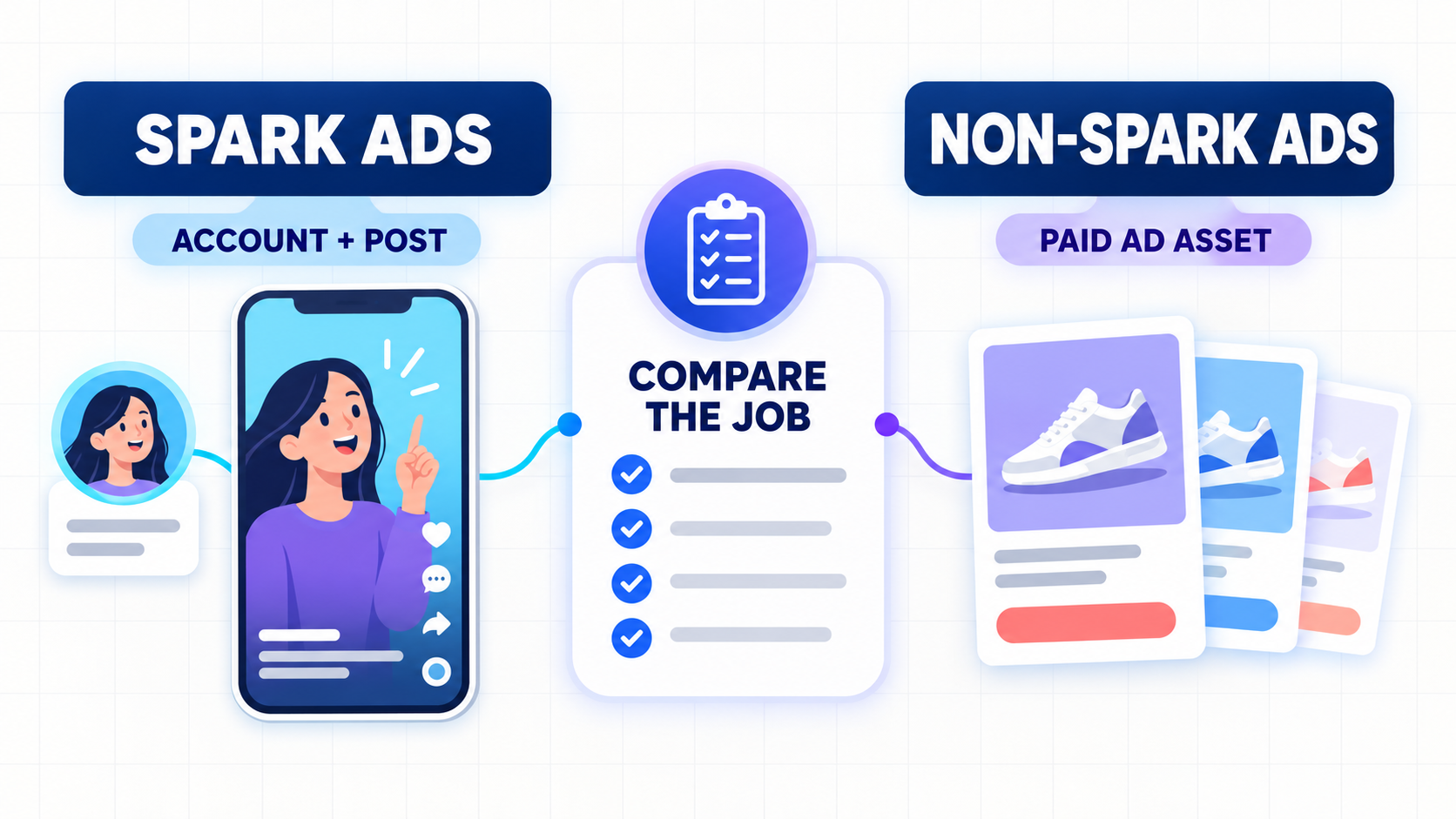

TikTok ads can spend, attract clicks, and still show zero sales. When that happens, resist the reflex to rewrite the creative. A click only proves that someone tapped; the leak could sit in reporting, the page load, the product decision, checkout, or the event that records the sale.
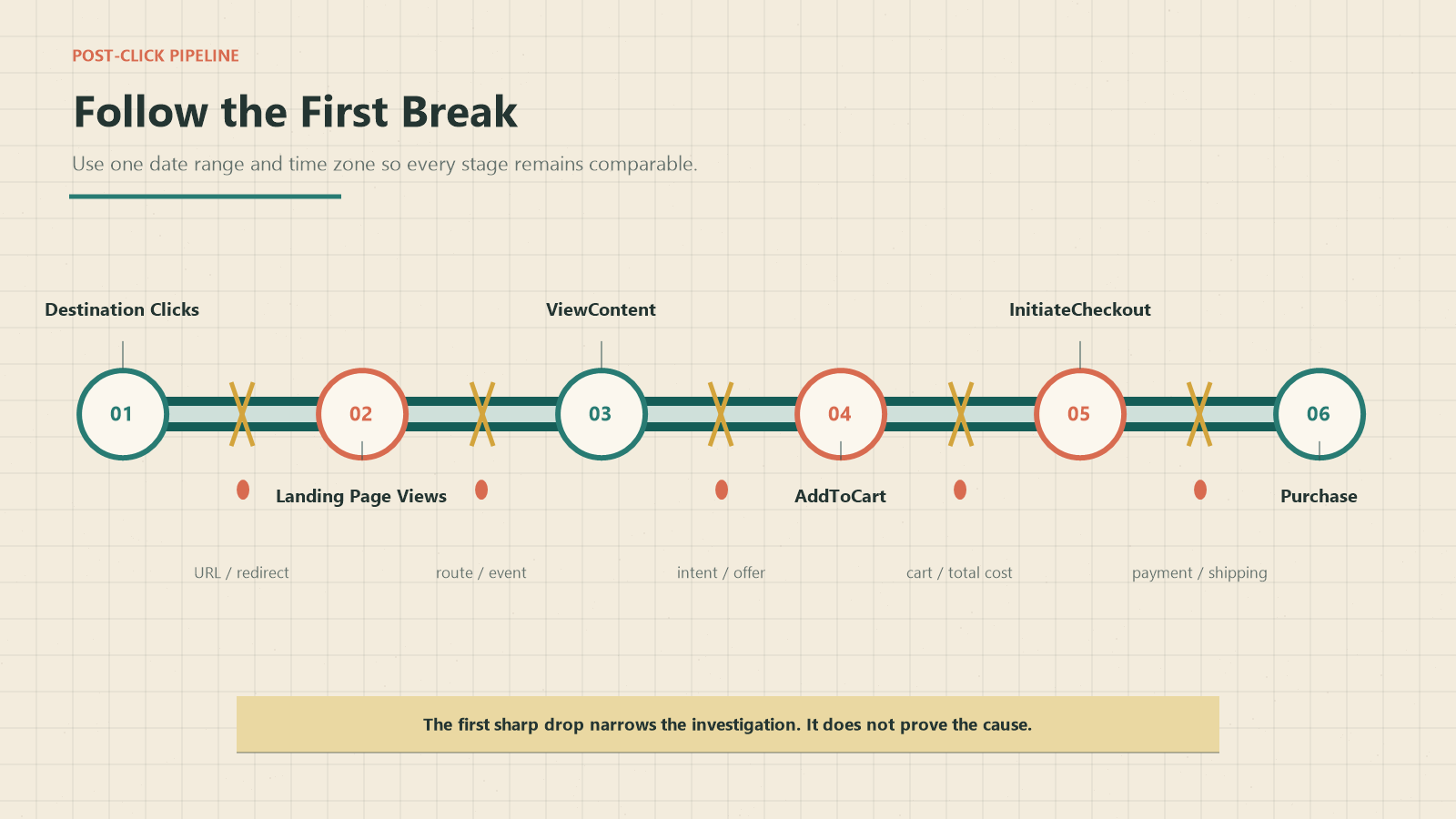
Answer two questions first: Are sales actually absent, and where does the post-click journey first break down? Line up first-party orders with TikTok reporting, then compare Destination Clicks, Landing Page Views, ViewContent, AddToCart, InitiateCheckout, and Purchase across the same reporting window. The earliest meaningful break tells you where to look next. It does not prove the cause on its own.
This guide covers standard TikTok campaigns that send people to an external website. If the purchase happens inside TikTok Shop or the campaign uses GMV Max, use the TikTok Shop Ads and GMV Max ROI guide instead; those campaigns follow a different reporting and optimization path.
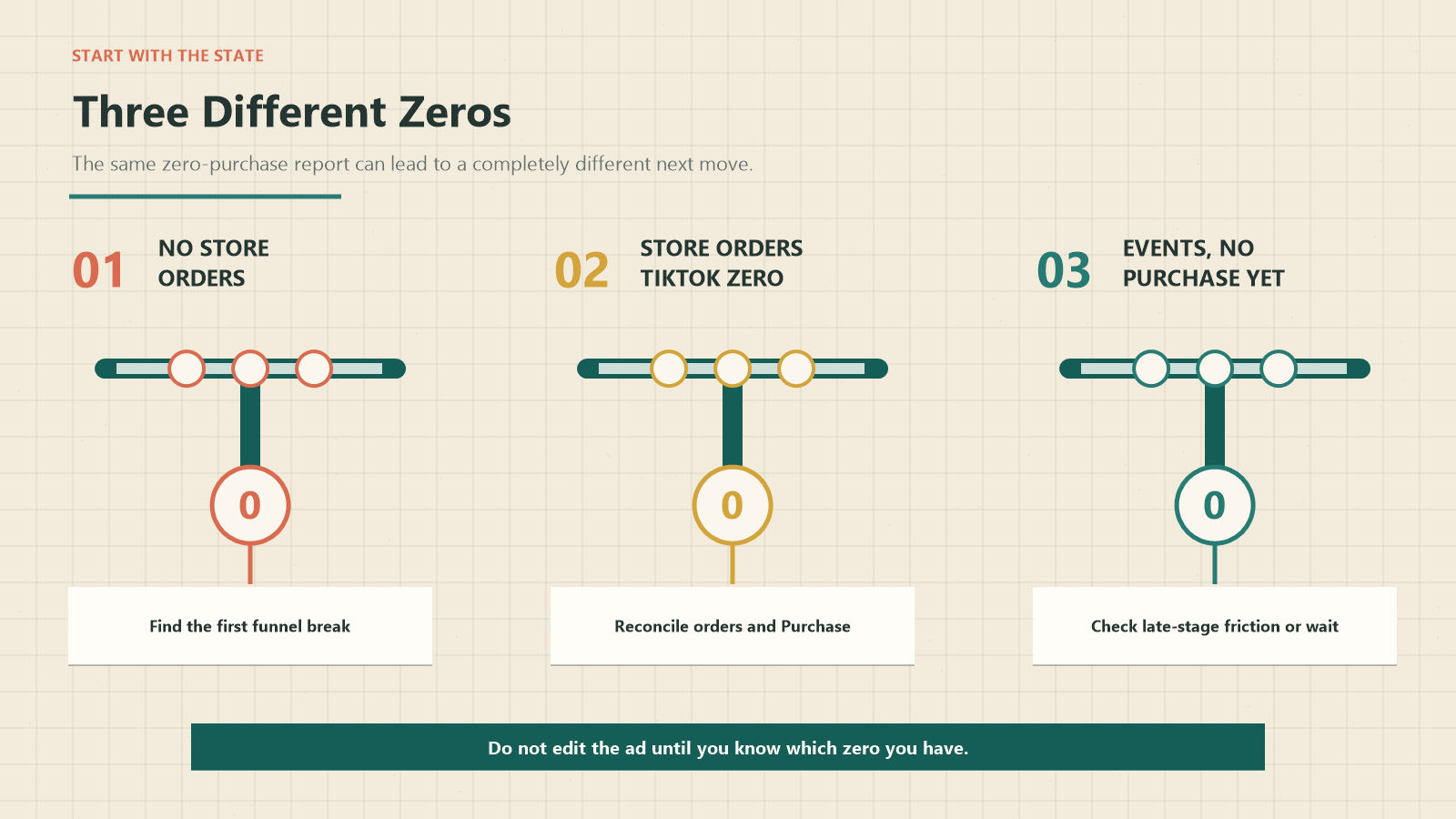
First, Decide Which “Zero” You Have
Before touching the campaign, work out which kind of “zero” you are looking at.
What you can see | What it may mean | First check |
The store and TikTok both show zero purchases | A real post-click conversion problem may exist | Locate the first funnel stage that loses users |
The store has source-tagged orders, but TikTok shows zero Purchase events | Measurement, event mapping, or attribution may be hiding sales | Reconcile order IDs, dates, time zone, source, and Purchase-event status |
ViewContent, AddToCart, or InitiateCheckout exists, but Purchase is zero | The break may be later in the journey—or the sample may still be inconclusive | Compare the last successful stage with first-party checkout evidence |
Line up the store and TikTok views before changing delivery. A zero in Ads Manager does not necessarily mean the store received no orders, and an order in the store is not necessarily attributable to TikTok. Use the same date range, time zone, campaign or source convention, and attribution interpretation in both systems.
Save the original snapshot too. Without it, a later result can look better simply because the reporting window, traffic mix, or processing delay changed.
Map the Post-Click Funnel Before You Edit the Ad
CTR is an attention signal, but it stops at the click. It cannot tell you whether the destination loaded, the visitor saw the product, the cart worked, or TikTok received the purchase event.
Build the funnel from Destination Clicks, not Clicks (all). Clicks (all) may include social interactions; Destination Clicks track clicks toward the selected destination, and Landing Page Views are counted after that destination loads. ViewContent and the commerce events that follow depend on the site's event implementation.
Use this denominator chain:
Destination Clicks → Landing Page Views → ViewContent → AddToCart → InitiateCheckout → Purchase → TikTok-reported PurchaseQuestion | Calculation | What the result helps locate |
Did the destination load after the click? | Landing Page Views ÷ Destination Clicks | Redirect, browser, consent, or page-load investigation |
Did the loaded page produce a product-view signal? | ViewContent ÷ Landing Page Views | Page route or event-trigger investigation |
Did product viewers progress toward a cart? | AddToCart ÷ ViewContent | Traffic intent, product-page, offer, or interaction investigation |
How many loaded visits reached a cart overall? | AddToCart ÷ Landing Page Views | Page-level rollup; use beside the stage rate, not instead of it |
Did carts reach checkout? | InitiateCheckout ÷ AddToCart | Variant, cart, total-cost, or checkout-entry investigation |
Did checkout starts become orders? | Purchase ÷ InitiateCheckout | Payment, shipping, stock, authentication, or purchase-event investigation |
Did clicks become recorded purchases? | Purchase ÷ Destination Clicks | End-to-end result, not the location of the break |
Keep the raw numerator and denominator beside every percentage. Mark a rate Unknown when an input is missing. If the inputs are present but the denominator is explicitly zero, use N/A. An empty field should never become a 0% rate.
For a broader view of how awareness, consideration, and conversion stages fit together, see the full-funnel marketing framework. This diagnosis is narrower: it starts after an ad already has spend and destination clicks.
7 Places Sales Can Leak After the Click
Use these seven areas as an investigation map. They are common failure points, not definitive or mutually exclusive root causes; two or more can be present at once.
1. Reporting Windows or Attribution Make Sales Look Missing
When first-party orders and TikTok purchases disagree—or the picture changes with the report's time zone or attribution view—leave campaign delivery alone for the moment. The mismatch could come from another source, a conversion outside the selected window, or an event that is still being processed. A wider attribution window may change who receives credit, but it cannot create an order that never happened.
Export or capture the TikTok and store views for the same dates and time zone. Then reconcile order timestamps, source or UTM data, campaign identifiers, and attribution settings. You have something actionable when the aligned views produce a repeatable order-level match or mismatch. The TikTok Shop analytics guide offers a broader reporting workflow, but website campaigns still need to be checked against their own first-party order source.
2. The Purchase Event Is Missing, Duplicated, or Mapped Incorrectly
If the store records completed orders while TikTok shows zero purchases—or the order count, value, or currency is wrong—trace one test order from checkout to the event report. First rule out a reporting delay, date-range mismatch, different attribution source, or test-order noise.
Do not let an “active” data connection provide false reassurance. It only shows that recent activity exists; it does not confirm the Purchase trigger, amount, currency, product IDs, domain mapping, or deduplication logic. Inspect the current
Purchase event and its parameters. If Pixel and Events API both send the same event, confirm that the matching pair uses the same event_id.A clean result is one completed order appearing once, with the expected value and currency, in both the first-party system and the appropriate TikTok event view. Older implementations may still use the legacy name
CompletePayment, but new checks should use TikTok's current Purchase name.3. Destination Clicks Do Not Become Loaded Landing Pages
A sharp fall from Destination Clicks to Landing Page Views points toward the destination path—provided the denominator is actually Destination Clicks rather than Clicks (all), and both metrics use the same reporting window.
Test the exact ad URL on the main mobile devices and regions represented in the report. Follow every redirect and check consent behavior, in-app browser rendering, query parameters, server errors, and the final destination. The issue is confirmed when device or browser logs reproduce the failure and an isolated page or redirect fix improves loaded visits under a comparable traffic mix. A universal “good” Click-to-LPV rate is less useful than the change around a fault you can reproduce.
4. The Campaign Is Optimized for the Wrong Stage
If a Traffic campaign optimized for Destination Clicks produces visits but very few commerce events, the objective deserves inspection. It still does not prove that the audience would never buy; the product, offer, page, measurement, sample size, or checkout may be the tighter constraint.
Check the campaign objective, optimization location, optimization event, and the health of that event. If the goal is a website purchase, set up a side-by-side test with the appropriate website-sales configuration instead of changing several settings at once. Judge the result by deeper events and first-party orders, not by CTR or click cost alone. For campaigns still in setup or early learning, see the ad launch and optimization guide.
5. The Ad Promise and Landing Page Do Not Match
Put the ad's first-frame promise beside the first screen of the mobile landing page. Compare the product, variant, price, discount, shipping, availability, proof, and CTA wording. If the ad makes one offer and the destination presents another, the mismatch is visible without waiting for another dashboard report.
That confirms a message mismatch, not its effect on sales. Test a version that restores the promised experience, then watch the next downstream event and first-party orders. If the message already matches, move on to page speed, audience fit, or checkout rather than forcing this explanation.
6. The Product Page or Offer Does Not Resolve Buyer Doubt
When Landing Page Views and ViewContent are present but AddToCart remains weak, move the investigation to the product decision. Avoid reducing the problem to a vague claim that the page “lacks trust.” Low-intent visitors, a broken AddToCart event, difficult variant selection, or off-site price comparison can create the same pattern.
Review the mobile page for what a buyer needs to make the next decision: what the product is, who it is for, how it works, total cost, shipping timing, returns, compatibility, available variants, and credible proof. Test the AddToCart interaction and event as part of the same review.
Session recordings, customer feedback, event tests, or a single page or offer variant can support the diagnosis. Keep the traffic source comparable so the page change is not confused with a different audience.
7. Checkout, Payment, Shipping, Stock, or Region Rules Block the Order
If AddToCart and InitiateCheckout are present but Purchase remains at zero, leave the ad dashboard and open the first-party checkout evidence. The funnel shows where the journey stopped; it cannot tell you whether the reason was payment, shipping, stock, authentication, or a missing Purchase event. Some shoppers may also finish later on another device or through another source.
Review failed payment attempts, unavailable payment methods, shipping-rate coverage, address rules, discount conflicts, inventory, authentication, and the order-confirmation trigger. Confirmation comes from a reproducible error or log entry followed by a successful test order after the relevant owner fixes it. On non-Shopify stores, use the equivalent checkout and payment logs rather than assuming the same interface.
Read the First Break, Not the Loudest Metric
CTR gets attention because it is easy to see. The more useful question is where the expected journey first stops when every stage is measured on comparable terms.
First observed pattern | Investigation priority | What not to conclude yet |
Store orders exist; TikTok Purchase is zero | Measurement and reporting | Demand is zero |
Destination Clicks exist; LPVs collapse | Destination load and redirect path | The creative attracted the wrong people |
LPVs exist; ViewContent collapses | Page route and event trigger | The offer is weak |
ViewContent exists; AddToCart collapses | Intent, product page, offer, interaction | Price alone caused the loss |
AddToCart exists; checkout starts collapse | Cart, variant, total cost, checkout entry | Payment failed |
Checkout starts exist; Purchase collapses | Payment, shipping, stock, authentication, Purchase event | The ad is the cause |
Every stage has only a handful of observations | Evidence collection | The campaign has definitively failed |
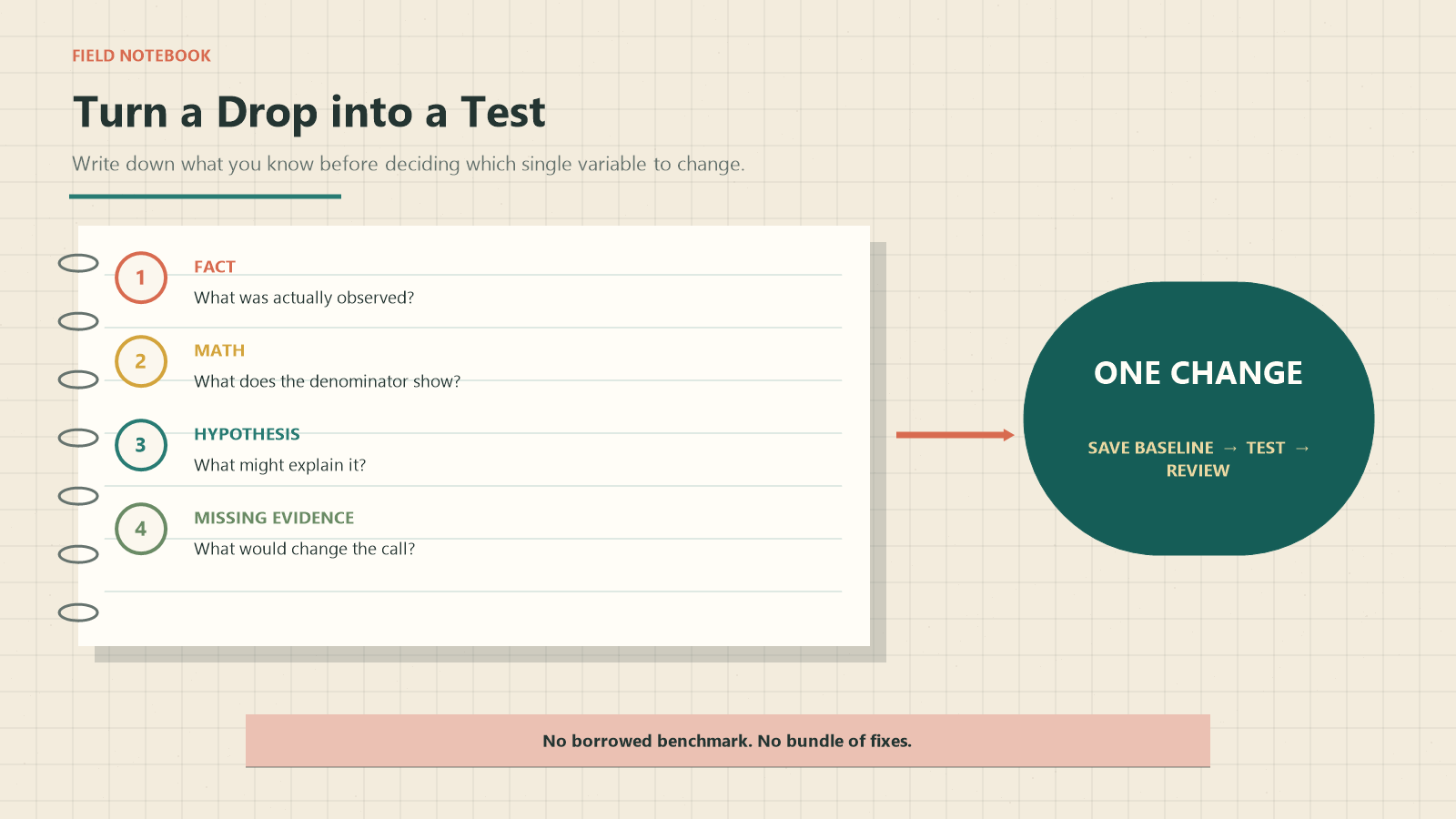
For each finding, write down four things:
- What you saw: the value, page detail, or log that is actually available.
- What you calculated: the arithmetic derived from those inputs.
- What might explain it: a hypothesis that still needs a test.
- What is missing: the next field, log, recording, screenshot, or comparison needed to decide.
This small discipline keeps a plausible story from hardening into a diagnosis before the proof exists.
Run a One-Variable Recovery Test
Once you locate the first break, save the baseline and resist changing several things at once. Test one variable tied to that stage. A redirect failure calls for a redirect test. An ad-page contradiction calls for a message-match test. A checkout error belongs with the checkout owner—not with another round of creative hooks.
Use a recovery log:
Timestamp and time zone | Campaign/page and ID | Saved baseline | One change | Why this change | Observation window | Result | Next decision |
Status-specific |
Set the observation window around the issue you are testing, the normal reporting delay, the purchase cycle, available traffic, and the team's decision cadence. There is no universal number of clicks or days that guarantees a sale. A $20 impulse item, a considered purchase, and a broken payment flow should not share the same stop rule.
If the evidence points to a broader campaign redesign rather than a page fault, the Navos AI Ad Strategist is the relevant adjacent workflow. Keep diagnosis and redesign as separate decisions so the team can tell what actually changed.
Our Navos Landing-Page Diagnostic Test
On September 15, 2026, we tested this method with seven fictional website-campaign cases in Navos Desktop → Square → Compliance Check → Diagnose Landing Page. To keep the run controlled, we used sanitized fictional inputs rather than a live account.
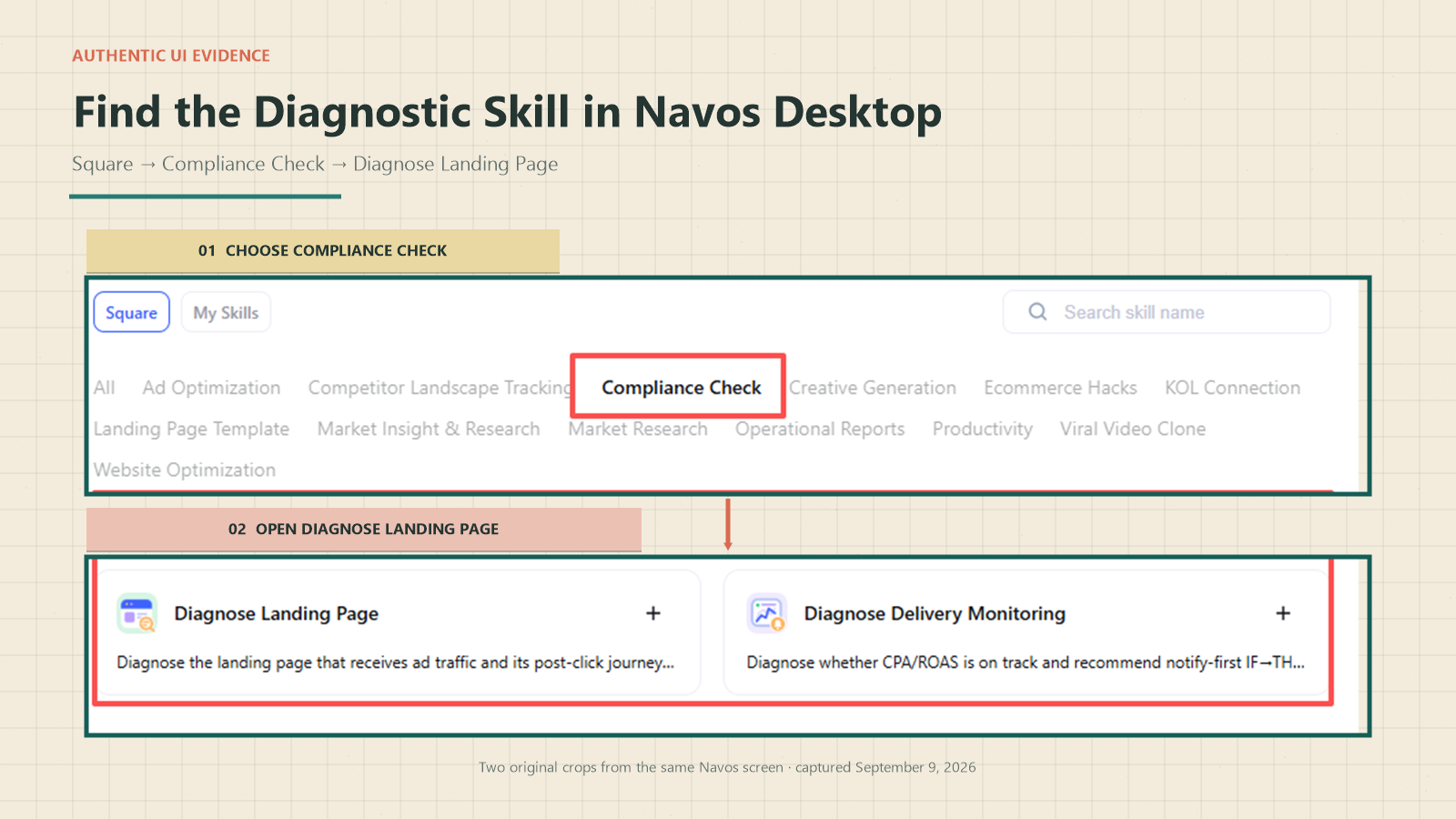
The result was a standalone diagnostic, not a campaign change. It calculated eight funnel rates per case—56 altogether—and kept the numerator and denominator visible. We checked every calculation independently. More importantly, the report kept what the prompt supplied separate from what it inferred, then attached one investigation priority and one next action to each case.
Fictional case | What the report found | One next action |
L01: Clicks fail to become loaded pages | Click-to-LPV was 30.0%. Redirect failures affected 17% of the sampled Android sessions. That supported a P0 investigation, but did not explain the full 70% gap. | Run one device-stratified final-URL audit. |
L02: Store orders and TikTok reporting disagree | The inputs contained 14 first-party UTM-tagged orders and zero TikTok Purchase events. That supported a P0 measurement investigation, while the report stopped short of treating those orders as proven TikTok-attributed purchases. | Test the Purchase event on the migrated checkout confirmation page. |
L03: Traffic optimization serves a purchase goal | The mismatch between the Traffic objective and the purchase goal was treated as a P1 hypothesis. It did not prove that lower-intent delivery caused zero purchases. | Run a Traffic-versus-Website-Sales comparison with one planned setup difference. |
L04: Ad and destination offers conflict | The ad promised 30% off and free shipping; the destination offered 10% off and charged $8 for shipping. The mismatch was confirmed, but its effect on Purchase was not. | Obtain an owner-approved source-of-truth offer before changing either surface. |
L05: Product-page confidence may be weak | The captured mobile viewport showed three visible reviews and no shipping, return, or warranty details. Navos treated weak buyer confidence as a P2 hypothesis, not a confirmed cause. | Collect mobile session recordings before redesigning the page. |
L06: Checkout logs contain blockers | Across the 51 captured checkout attempts, the logs confirmed 35 payment-method failures and 16 shipping-rate failures. The conclusion remained limited to that supplied cohort. | Test the payment-method fix while leaving shipping settings unchanged. |
L07: The sample is inconclusive | Thirty-eight clicks and one AddToCart over 20 hours were not enough to support a root-cause diagnosis. The report did not invent a universal click or time threshold. | Keep collecting the same funnel fields until the team reaches a business-specific review point set in advance. |
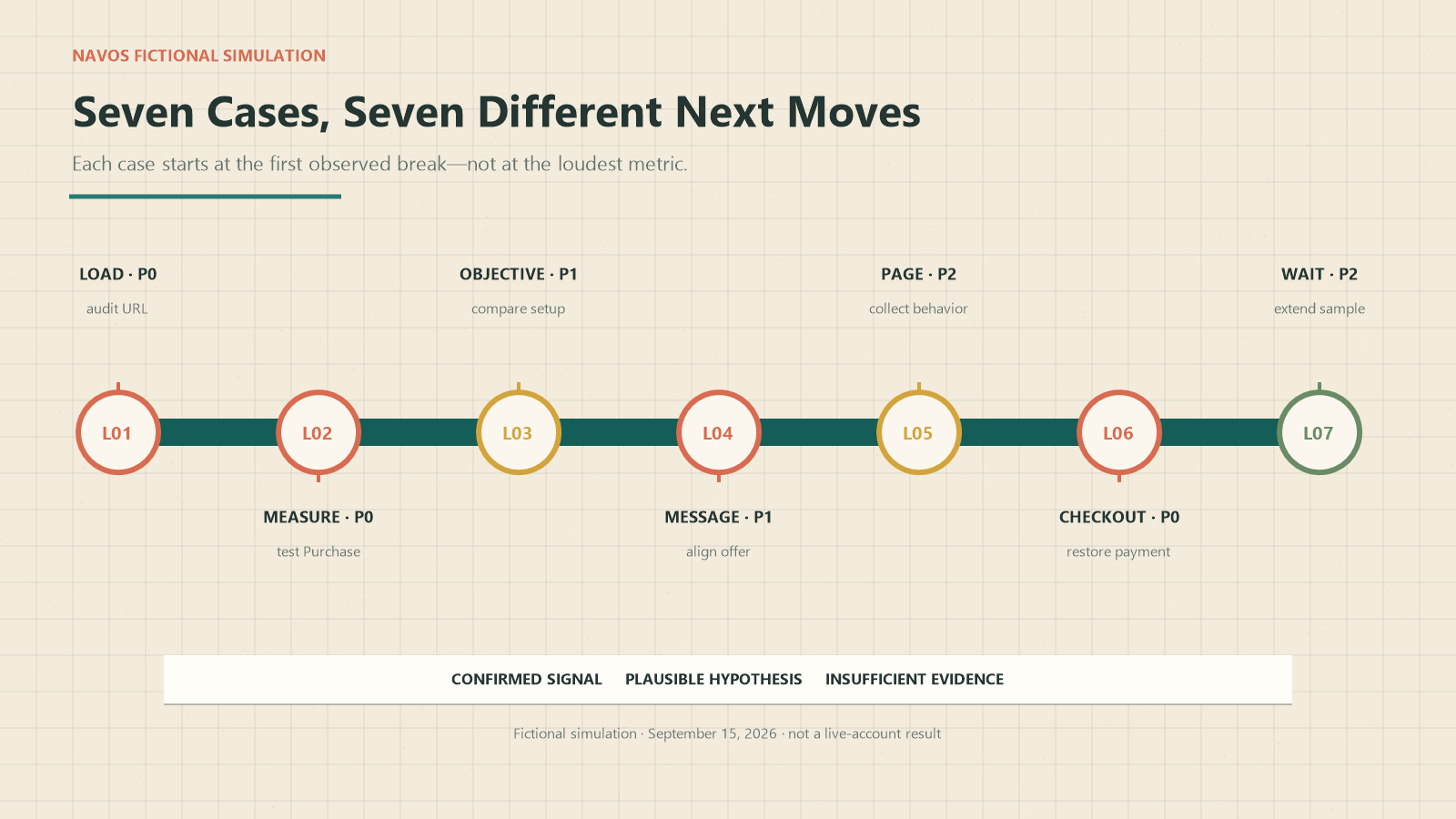
The run produced a prioritized investigation queue, not a universal conversion benchmark or a promise to recover sales. It kept known facts separate from hypotheses, identified the proof still missing, and tied one next action to the first observed break. The relevant media, analytics, engineering, merchandising, or checkout owner should still verify that action against the live system before making a campaign change.
When to Keep Collecting Data, Investigate, or Escalate
State | Evidence pattern | Appropriate response |
Keep collecting | Small or short sample; no reproducible blocker; key denominator missing | Preserve the setup, define the missing evidence, and review again at a business-relevant checkpoint |
Investigate | A stage drop repeats, but competing explanations remain | Run one targeted event, page, segment, or message-match check |
Escalate to the owner | Logs show a broken redirect, Purchase event, payment method, shipping rate, stock rule, or access dependency | Send the exact object, timestamp, evidence, and reproduction steps to engineering, analytics, media, merchandising, or checkout owner |
Escalating a blocker does not always mean pausing every ad. If traffic is being sent to a broken checkout, the team may decide to limit exposure while the owner fixes it. If the only issue is a small sample, pausing can remove the evidence needed to judge the campaign. Let the confirmed failure and the business risk drive the decision.
Frequently Asked Questions
Why do TikTok ads get clicks but no sales?
The break can occur in reporting, Purchase tracking, the transition from click to loaded page, traffic intent, ad-to-page consistency, the product decision, or checkout. Start by reconciling first-party orders and locating the first funnel stage that drops.
Can a TikTok ad have a high CTR and no conversions?
Yes. CTR measures clicks relative to impressions. It does not show whether the page loaded or whether visitors added to cart, reached checkout, purchased, or were reported correctly. High CTR is an attention signal, not proof of purchase intent.
What is the difference between a click and a Landing Page View?
A destination click records the action toward the destination. A Landing Page View requires the destination to load. “Clicks (all)” may also include social interactions, so confirm which click definition your report uses before calculating the rate.
Why does my store show orders while TikTok shows zero purchases?
First align the date range, time zone, source/UTM, and attribution view. Then test the current Purchase event, its parameters, domain mapping, and deduplication. Do not diagnose weak demand until the first-party order and platform records have been reconciled.
Should I switch from Traffic to Website Sales?
Check whether the current objective and optimization event match the business goal, but do not treat a switch as a guaranteed fix. First verify that Purchase measurement works, then design a side-by-side test that evaluates deeper events and orders rather than click cost alone.
How many clicks are enough before expecting a sale?
There is no universal click threshold. The useful boundary depends on target CPA, price and margin, purchase cycle, traffic source, downstream events, and whether a technical blocker exists. Use your economics and funnel evidence rather than a borrowed number.
What should I test first?
Test the earliest stage supported by evidence. Reconcile orders before diagnosing demand; fix a reproducible redirect before rewriting creative; verify Purchase before judging ROAS; and inspect checkout logs when checkout starts exist without completed orders.
Final Diagnostic Checklist
Confirm that the campaign has active spend and Destination Clicks; otherwise use a no-spend diagnosis.
Compare first-party orders with TikTok using the same dates, time zone, source, and attribution interpretation.
Validate the current Purchase event, parameters, domain mapping, and deduplication.
Calculate Destination Click → LPV → ViewContent → AddToCart → InitiateCheckout → Purchase with raw counts.
Mark missing inputs as Unknown and explicit zero denominators as N/A.
Compare the ad promise with the mobile page and checkout reality.
Check first-party page and checkout evidence before naming a cause.
Change one variable tied to the first observed break.
Record the baseline, result, and next decision.
To build a similar evidence-first snapshot, download Navos Desktop and open Square → Compliance Check → Diagnose Landing Page. Add funnel counts measured over the same date range and time zone, along with the ad promise, destination evidence, and any available first-party logs. Leave account and customer identifiers out of the input. Before changing the campaign, verify each recommendation against the relevant live system.