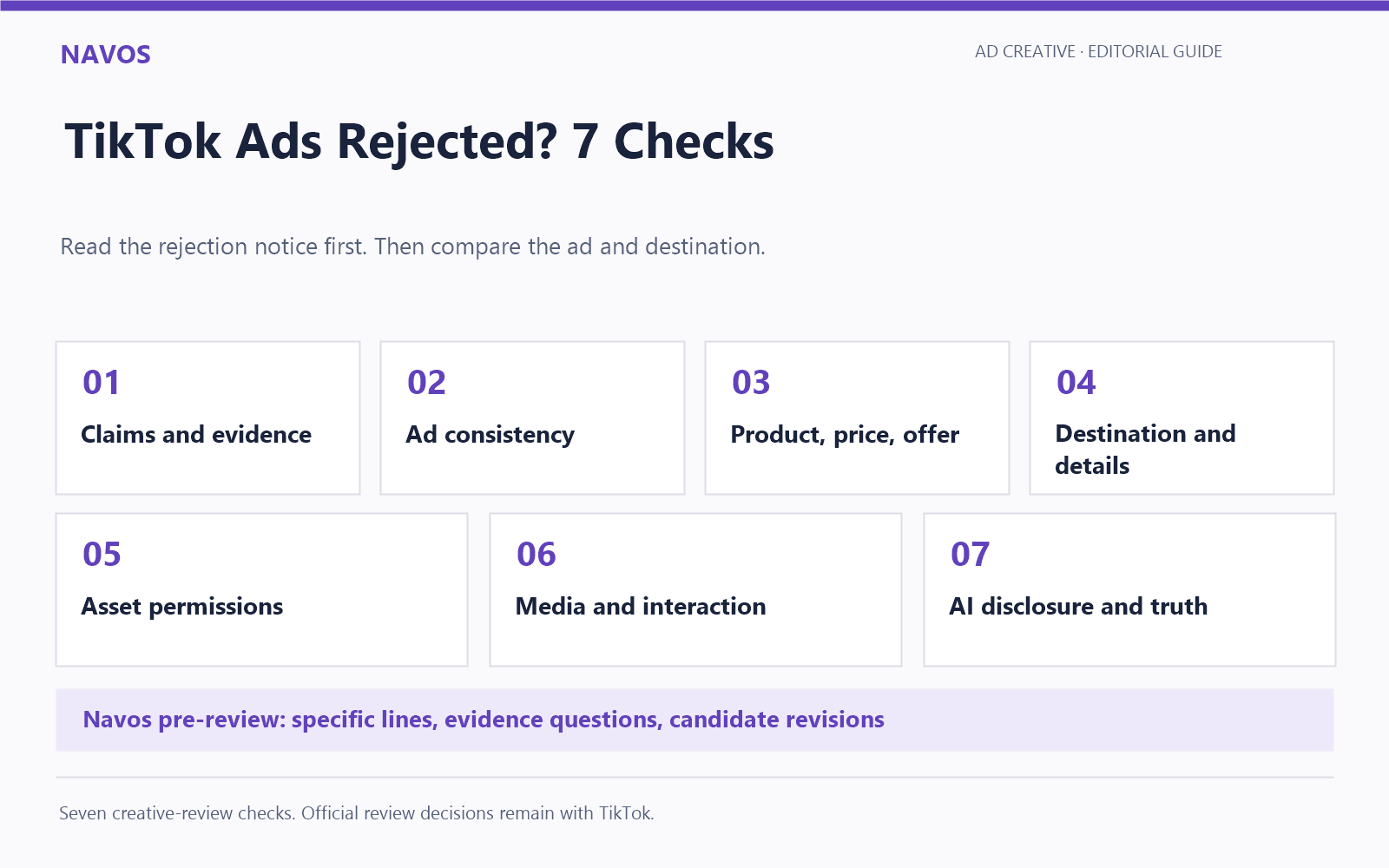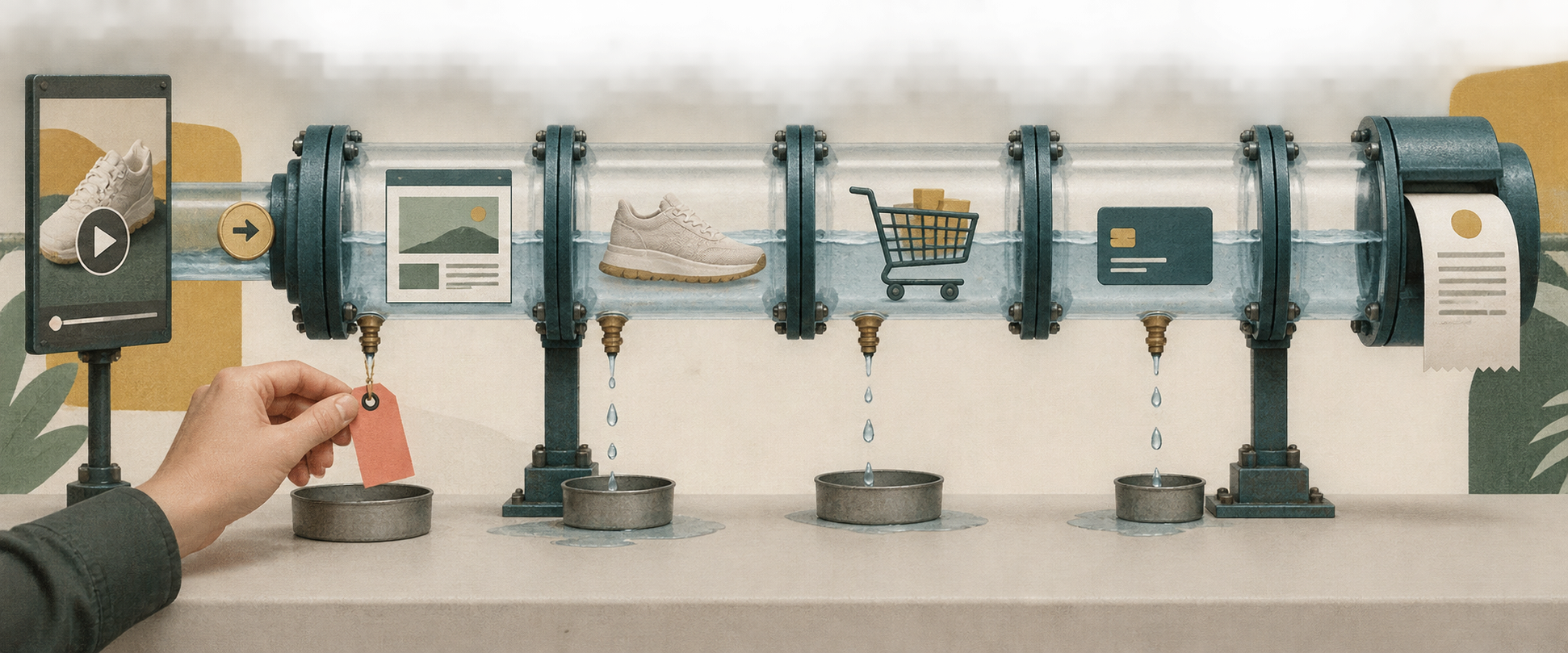

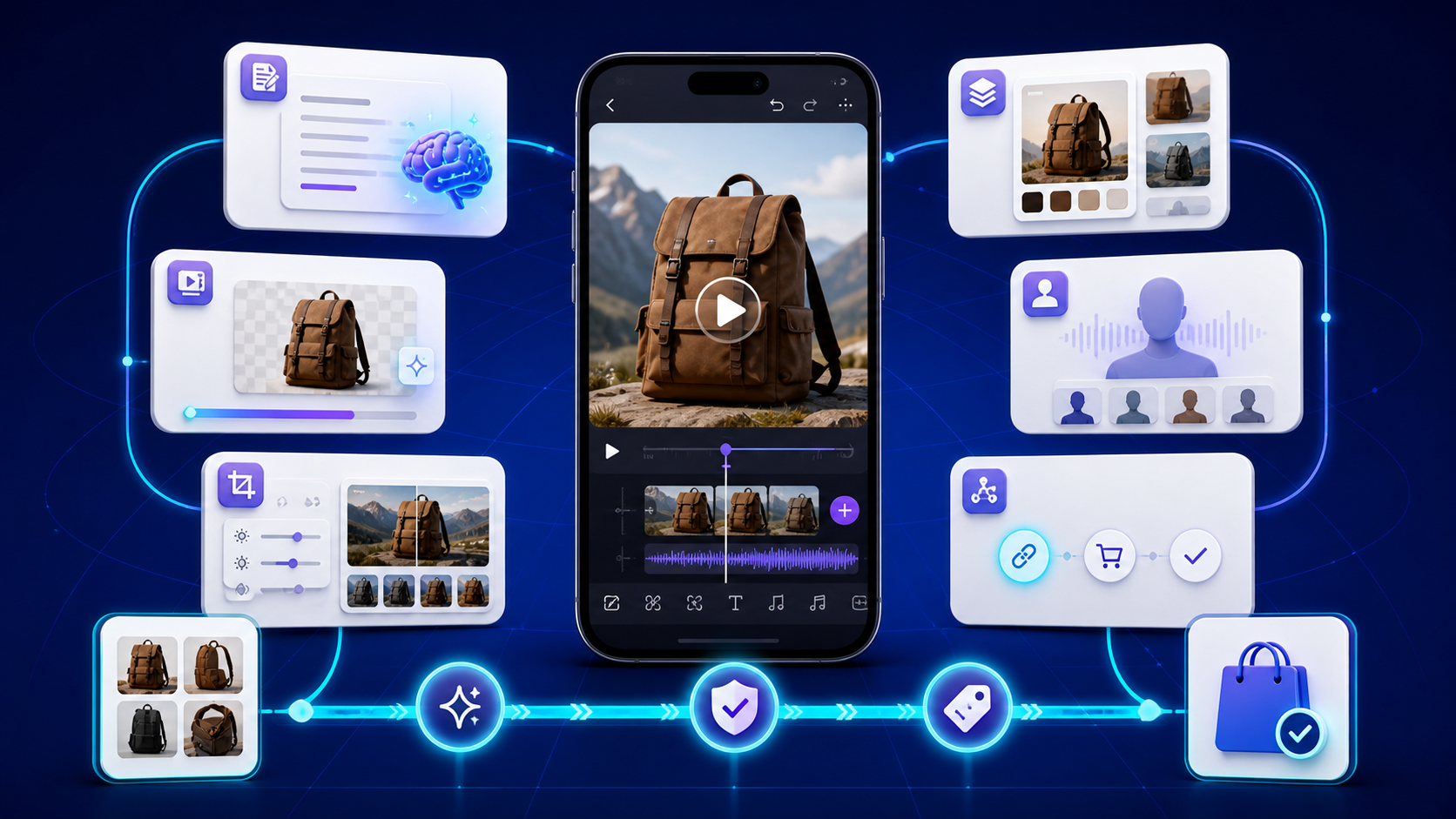
The best TikTok Shop AI tool depends on what is slowing you down. ChatGPT can turn approved product facts into hooks and scripts. Canva can rapidly assemble product-image ads, although our first result looked more like a landscape presentation than a TikTok product demo. CapCut gives creators more editing control, but the tested Seedance route required payment. HeyGen can build an avatar-led preview, although our free test did not produce a faithful product demonstration or a free downloadable file. TikTok’s Symphony Creative Studio brings creation closer to the platform, while Navos TikTok Shop AI Studio is designed to connect product selection, video generation, official pre-review, product linking and shoppable-video publishing in one workflow.
Most of these tools offer a free plan, a free creation path, or an included account quota. That does not make them interchangeable—or unlimited. The important questions are whether a tool preserves the physical product, avoids unsupported claims, produces an editable asset, and lets you export or publish without an unexpected paywall.
This guide compares six tools for U.S. TikTok Shop sellers using one shared product brief. It separates what providers document from what we can observe in a hands-on run.
Quick comparison: the best TikTok Shop AI tools by job
Plan information was checked on August 7, 2026. Free quotas and feature access can vary by account or region, so confirm them inside the product before starting a large batch.
Tool | Best candidate for | Free starting point | TikTok Shop-specific? | Evidence boundary or main limitation |
Navos TikTok Shop AI Studio | End-to-end product-to-shoppable-video workflow | Earned credits and paid credit packs observed; not an unlimited free plan | Yes | Connects generation, official TikTok Shop pre-review, product linking and direct shoppable-video publishing; generated product details still need human review |
TikTok Symphony Creative Studio | Official TikTok-native creative generation | Basic account observed with 1,000 free credits/week | TikTok-native, but not limited to Shop | The tested Video 1.5 Pro route maxed out at 12 seconds; its first output had major product-geometry errors |
CapCut AI TikTok Video Generator | Seedance-based generation inside an editor | No usable free generation path in the tested desktop account | TikTok-native, not Shop-data-native | Seedance 2.5 opened a subscription wall; the first free attempt produced 0 outputs |
Canva Free | Fast landing-page or display-style product visuals | $0 plan with capped AI use | No | Run 1 returned a landscape, music-led product slideshow rather than a TikTok product demo and added unsupported sustainability copy |
ChatGPT Free | Hooks, scripts and structured creative briefs | $0 plan with usage limits; hands-on run used Pro | No | Pro produced 3/3 usable scripts, but Free-plan speed and access were not tested; no native Shop data or publishing path |
HeyGen Free | Guided avatar-video previews | Free account showed 3 videos/month, up to 1 minute | No | Seedance and download were paid; the watermarked 12-second preview was a stiff avatar-and-product-photo montage with no product action |
Quick recommendation: use the free official tools and one flexible editor when you are still exploring formats. If your bottleneck is moving a selected SKU from product assets to a pre-reviewed, product-linked and publishable shoppable video, Navos is the clearest integrated workflow in this comparison.
Do not buy every tool in the list. Choose the smallest combination that completes your next measurable task.
How we selected and compared these tools
We included a tool only if it met three conditions:
- It solves a real TikTok Shop seller task: scripting, product creative, short-video generation, editing, review or publishing.
- Its current product or free-access claim could be checked on an official page.
- Its role could be evaluated with the same U.S. product facts, frozen script or approved source video.
We excluded broad market-intelligence and analytics platforms from the main six because Navos already has dedicated guides for TikTok Shop product research tools and TikTok Shop analytics. Those jobs still matter; combining them into this list would duplicate the existing search intent and make the creative comparison less useful.
The shared test
Each applicable generator received one approved, non-regulated SKU, the same U.S. audience, three frozen product facts, the same restrictions, and the closest equivalent vertical-video brief. The target was 15 seconds, with a 12-second exception for Symphony Video 1.5 Pro because its tested duration menu offered only 5, 10 or 12 seconds. The generative-video prompt requested one continuous scene so tools could be compared without stitching multiple clips.
We evaluated the available evidence across the following dimensions:
Criterion | Weight |
TikTok Shop task fit | 20% |
Output usability | 20% |
Product and claim fidelity | 15% |
Time to first usable result | 15% |
Editing, export and publishing path | 10% |
Compliance controls and disclosure support | 10% |
Free-plan value | 10% |
Product fidelity is a hard gate. A polished video fails if it changes the SKU’s color, size, shape, components, material, branding or performance—or invents a discount, certification, rating or result.
We did not calculate a single overall score. The six tools solve different stages, one tested route stopped at a paywall, and the hands-on ChatGPT run used Pro rather than Free. A precise-looking total would hide those evidence differences. Instead, every review below labels whether the evidence came from an output run, an access/paywall test, current provider documentation or a product-owner confirmation.
Tool | Evidence used in this comparison |
Navos TikTok Shop AI Studio | Hands-on generated output plus local file inspection; TikTok Shop API pre-review, product linking and direct publishing are connected product capabilities |
TikTok Symphony Creative Studio | Hands-on generated output plus local file inspection |
CapCut AI TikTok Video Generator | Hands-on setup and subscription-wall test; no generated output |
Canva Free | Hands-on editor-preview run plus local screen-recording inspection |
ChatGPT Free | Official Free-plan evidence; hands-on script-quality run used Pro |
HeyGen Free | Hands-on free preview, screenshots and local screen-recording inspection |
What TikTok Shop AI tools can—and cannot—automate
The tools in this guide cover different layers of one content workflow.
Workflow step | AI can help with | Human decision that remains |
Product context | Read a product page, images or supplied facts | Confirm that the source information is current and approved |
Ideation | Generate hooks, angles, scripts and storyboards | Reject generic, risky or unsupported angles |
Production | Create images, avatars, voiceovers, captions and video variations | Check the physical product and commercial rights |
Editing | Reframe, cut, subtitle, resize and assemble | Decide whether the result is clear, credible and on-brand |
Pre-publish review | Send eligible content into an integrated platform pre-review and surface possible violation flags | Interpret the result, correct the asset and remember that pre-review does not guarantee final approval |
Publishing | Export, share, attach a product or prepare a direct posting action | Confirm account permissions, the linked SKU and final approval |
Measurement | Organize exported performance data | Decide what to iterate, pause or investigate |
AI cannot prove that a product has demand, guarantee approval, predict virality, or promise profitable GMV. A provider’s “TikTok-optimized” label is a workflow claim, not a performance result.
The 6 best TikTok Shop AI tools in 2026
The order follows the seller workflow, from product-to-creative generation and platform-native creation to editing, scripting and avatar video. It is not a claim that every tool was tested to the same depth. Every review distinguishes hands-on observations from documented product capabilities.
1. Navos TikTok Shop AI Studio — best for an end-to-end product-to-shoppable-video workflow
Best for: sellers who want to reduce handoffs between product selection, AI creative, product linking and shoppable-video publishing.
Navos TikTok Shop AI Studio presents a product-photo-to-AI-creative workflow. Its public page says a signed-in user can connect an account, sync TikTok products, generate AI creative and publish shoppable videos. It also presents precheck and one-click publishing as part of the experience.
After generating a video, a user can authorize the relevant TikTok Shop and ad account, attach the product and publish the shoppable video from the same Navos workflow. The operational advantage is fewer handoffs: the seller does not have to export the asset, reopen a separate publishing backend or rebuild the product association before publishing.
Through its TikTok Shop API integration, Navos can send the generated video into TikTok Shop's official video pre-review environment before publication. The user can see whether the platform flags a potential violation, review the issue and continue to product linking and publishing from the same workflow. The pre-review is a risk signal, not a guarantee of final approval or future policy compliance.
This is a more TikTok Shop-specific advantage than a general video editor: the selected SKU, generated creative, pre-review feedback and final product link stay in one workflow instead of being rebuilt across separate tools.
Observed credit boundary on August 7, 2026: the signed-in account showed earned credits and paid packs rather than an unlimited free plan. A 15-second, 720p video cost 240 credits. Promotional packs displayed at the time were 600 credits for $5, 1,500 for $10 and 3,500 for $20, including the stated bonuses. At those displayed rates, one 240-credit run represented roughly $1.37–$2.00 in purchased credits before any earned credits. The page also showed 80 credits for a five-second 720p video, 180 for a five-second 1080p video and three credits for an image. These account-screen prices and bonuses can change.
Navos also has a separate PC workflow. Naomi reported that the corresponding PC generation consumed 2,200 PC-side credits, while the TikTok Shop AI Studio web run consumed 240 web-side credits. The two interfaces use different credit systems, so those figures should not be converted or compared one-to-one. We did not use the PC route as quality evidence because the supplied video attachment matched the Symphony test file rather than the PC result shown in the screenshots.
The product also displayed growth rewards for a starter recharge, connecting a TikTok account and completing a first TikTok publish. Historical transaction rows included entries labelled “Refund for Failed Generation,” but this single screen does not prove that every failed run is refunded automatically.
Observed TikTok Shop AI Studio run: we uploaded the same three backpack images, used the same approved product facts, selected Seedance, 15 seconds and 720p, and generated one video in about four minutes for 240 credits. The result was saved to the workspace and exported as a 5.16 MB MP4. Local inspection confirmed 15.0 seconds, 1,256 × 720, 30 fps and an audio stream.
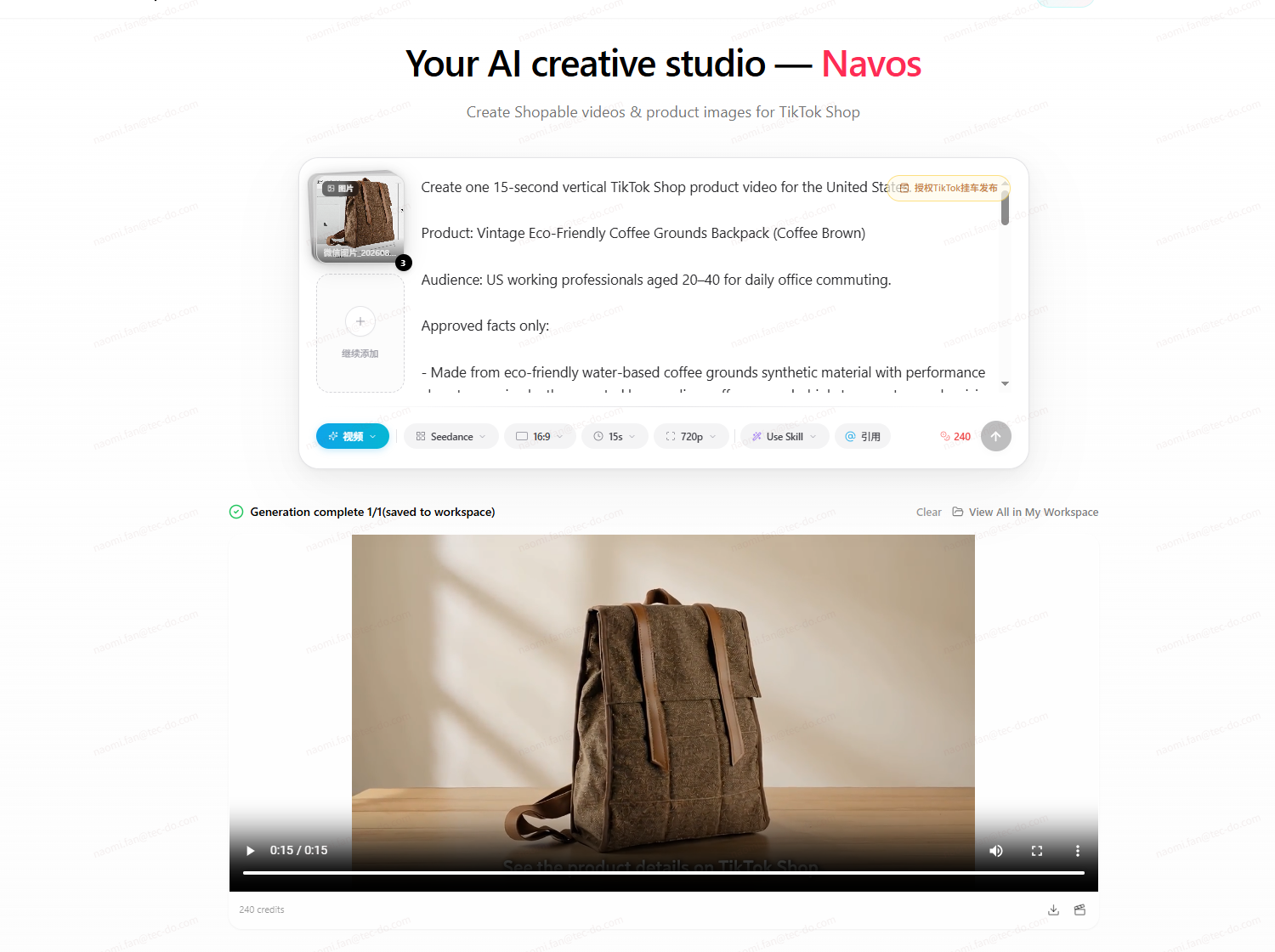
Our Navos run generated one 15-second, 720p backpack creative in about four minutes for 240 web-side credits
The merchandising sequence was substantially more coherent than the first Symphony output. It opened the bag, showed the interior and laptop compartment, placed a laptop inside, moved closer to the material, and ended on a wider product view with the approved TikTok Shop CTA. Exterior color, texture and overall bag shape remained much more stable, and no visible watermark appeared in sampled frames. The result used several framing changes and a wider final angle rather than following the requested single continuous scene exactly; that improved product coverage but still counts as a brief-adherence deviation.
Run 1 produced a publishable 16:9 file. Although that landscape ratio did not match our vertical test brief, TikTok videos do not have to be 9:16 to publish; this is a creative-format difference, not a publishing failure. The product-accuracy check still matters: the source images did not show the bag interior, so the generated lining, pockets and exact compartment construction should be compared with the real SKU. The surface motif and buckle geometry also need comparison with approved product photos.
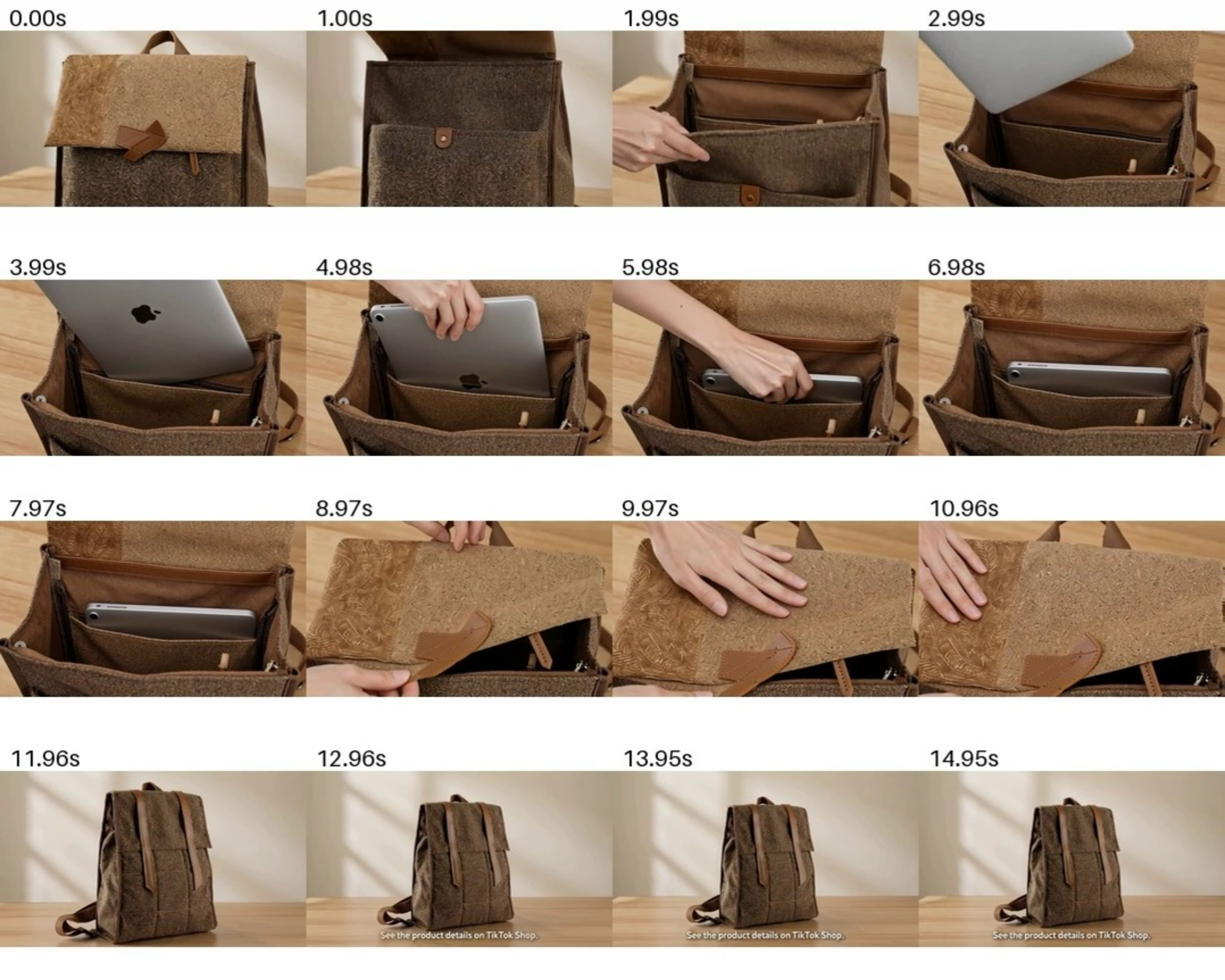
The Navos output followed a coherent product-demo sequence, but generated interior details still required comparison with the real SKU.
Navos is strongest when the seller wants to move from generation to an official TikTok Shop pre-review, product linking and direct publishing without rebuilding the asset elsewhere. Before approval, review the pre-review feedback, confirm the linked SKU and check every generated product-specific visual. The workflow itself is connected; the human decision is whether this particular creative is accurate and suitable for the campaign.
2. TikTok Symphony Creative Studio — free official creative candidate
Best for: brands and sellers that want an official TikTok creative workspace before adding another paid generator.
TikTok describes Symphony Creative Studio as a free creation tool for TikTok-optimized organic and paid content. Its documented features include video and image generation, TikTok-oriented scripts and captions, voiceover and product avatars, translation and dubbing, editing, and a prompt-led Symphony Agent workflow.
The strongest reason to test Symphony is platform fit. It is designed around TikTok scripts, visual elements, trends and best practices. That does not guarantee Shop-specific product accuracy. A product avatar holding an item is also a higher-risk test than a simple script because the model has to preserve the product while generating a realistic person and scene.
Observed access on August 7, 2026: the tested account was on Symphony's Basic plan with 1,000 free credits per week. The account page said credits refresh every Monday and do not roll over. It defined one credit as one second of generated video and said credits cannot be purchased. Image-to-video, text-to-video, reference-to-video and Agent consumed credits; image generation, product and voiceover avatars, Remix, Translate & dub, and the editor did not.
Dreamina Seedance 2.0 appeared in the model menu but was disabled for this account. The interface said no active Ads Manager advertiser ID was linked and offered an eligibility review. Video 1.5 Pro was the available generation model. Model access can change by advertiser eligibility and refresh cycle, so this review names the model and account condition used instead of treating every Symphony account as identical.
Observed reference-to-video test on August 7, 2026: we uploaded three product images of a brown coffee-ground-material backpack, selected Video 1.5 Pro and chose the maximum 12-second duration. The run used 12 credits, reducing the displayed balance from 1,000 to 988. It generated one 1080 × 1920 MP4 in about four minutes. The downloaded file was 12.07 seconds at 30 fps and carried a visible “AI-generated” label.
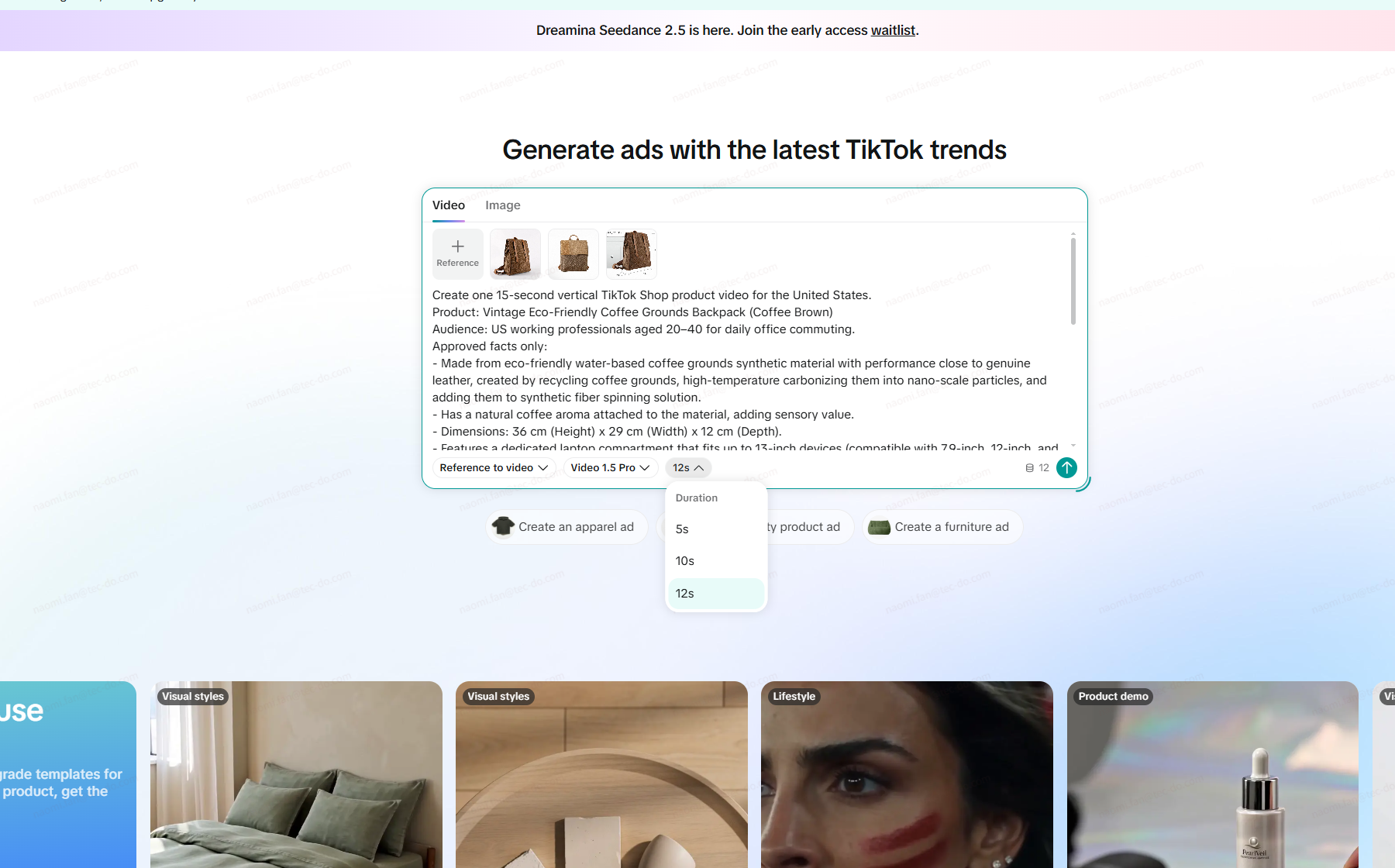
In our Basic-plan test, Symphony Video 1.5 Pro offered 5-, 10- and 12-second outputs
The result was not publishable. The video repeated the laptop-in/laptop-out action, while the backpack's front flap, pockets, buckles, straps and opening changed shape between frames. The laptop also changed scale and position, and hands or objects intersected unnaturally with the product. This left zero usable outputs from the first run. The failed output is useful evidence: free credits and fast generation do not reduce review work if the SKU itself is not preserved.
The exported MP4 and a TikTok share page were both available. We will host any article video on a Navos-controlled media destination instead of linking to the external review page, which exposes share-page account information and is not under Navos editorial control.
Use Symphony when official TikTok-native production features and low-cost concept generation matter. Treat product fidelity as a hard acceptance gate: structural morphing requires rejection or regeneration, not a cosmetic edit in CapCut.
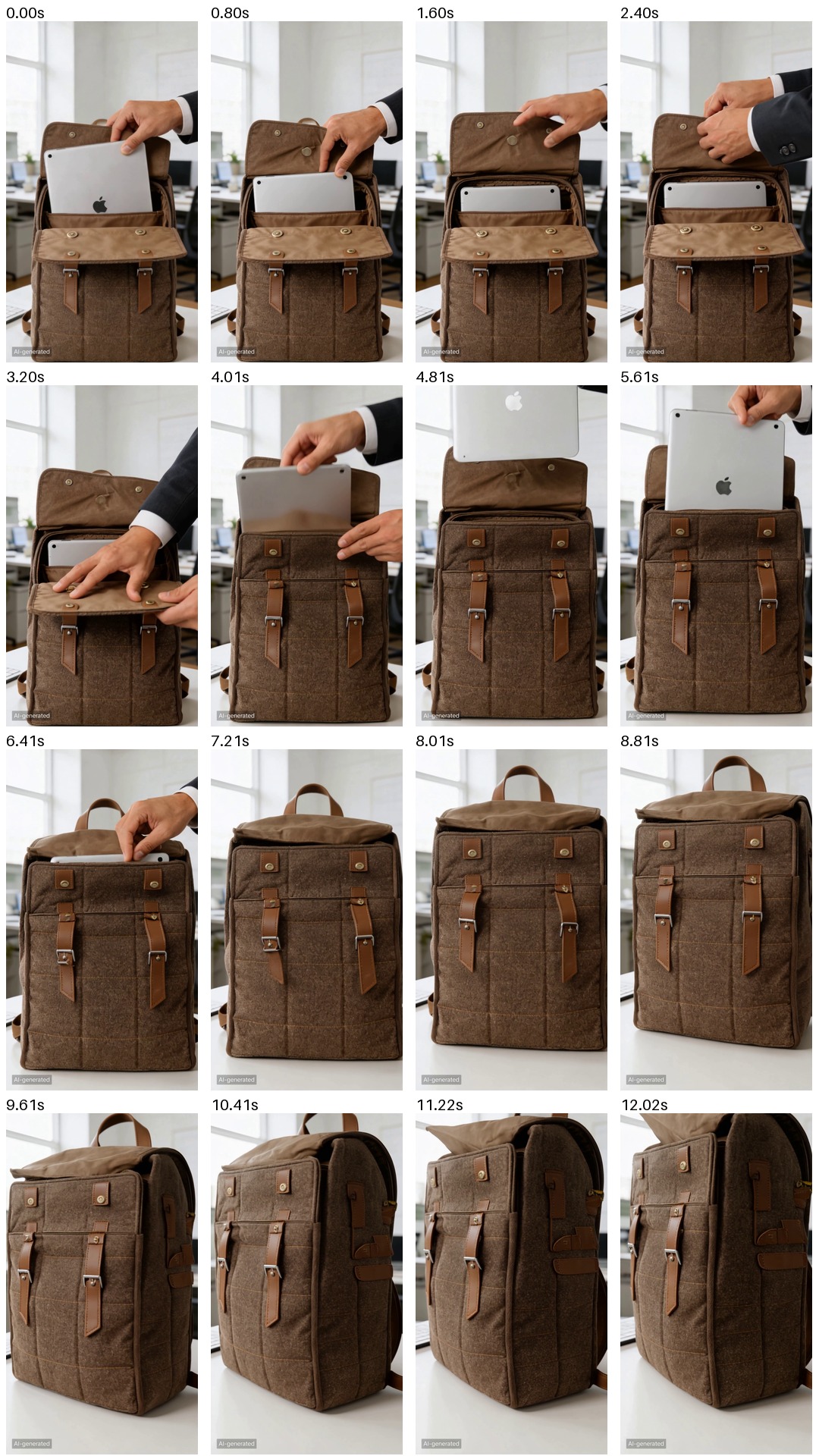
The first Symphony output repeated the laptop action and changed several parts of the backpack, leaving 0 of 1 outputs usable
3. CapCut AI TikTok Video Generator — paid Seedance generation candidate
Best for: sellers who need an editable script-to-video workflow and more control over the final short-form asset.
CapCut’s official AI TikTok Video Generator page covers script-to-video creation, customizable templates, voices and avatars, long-video clipping, editing, export and TikTok sharing. Its broader product may offer free editing features, but that does not mean every AI generation route can be completed without payment.
CapCut’s advantage is not TikTok Shop data. It is the ability to keep working after the first generation. A seller can adjust scenes, captions, pacing, music and transitions instead of accepting a one-click output as final.
That flexibility also creates a review burden. Templates, generated stock scenes and AI effects can make a generic video look energetic while weakening product fidelity. Music, stock assets, export resolution, watermarks and AI-model access may also differ by account or region.
Observed desktop access on August 7, 2026: we uploaded the same three backpack images, entered the same product-fidelity restrictions and selected Dreamina Seedance 2.5. The interface allowed a 15-second, 720p setup and displayed a 735-credit generation cost. It also showed a
Try free badge. Clicking Generate opened the Subscription Service purchase screen instead of starting the job. No video was generated, so the free-run result was 0 outputs and output quality could not be scored.The purchase screen used
S$ and showed account- and promotion-specific prices. Pro displayed S$19.48 monthly or S$70.90 for the first year, with 850 monthly credits. Ultra displayed S$56 for the first month, then S$94 per month, or S$539 for the first year, with 11,580 monthly credits. For a selected two-seat Teams workspace, the screen displayed S$23.48 monthly or S$209.98 yearly. These are dated in-product offers, not universal U.S. list prices.Use CapCut when its editing workflow is valuable enough to justify the applicable plan. Free-only users should not count the tested Seedance 2.5 route as a free AI video generator. Do not treat a template match as proof that the video is accurate or ready to publish.
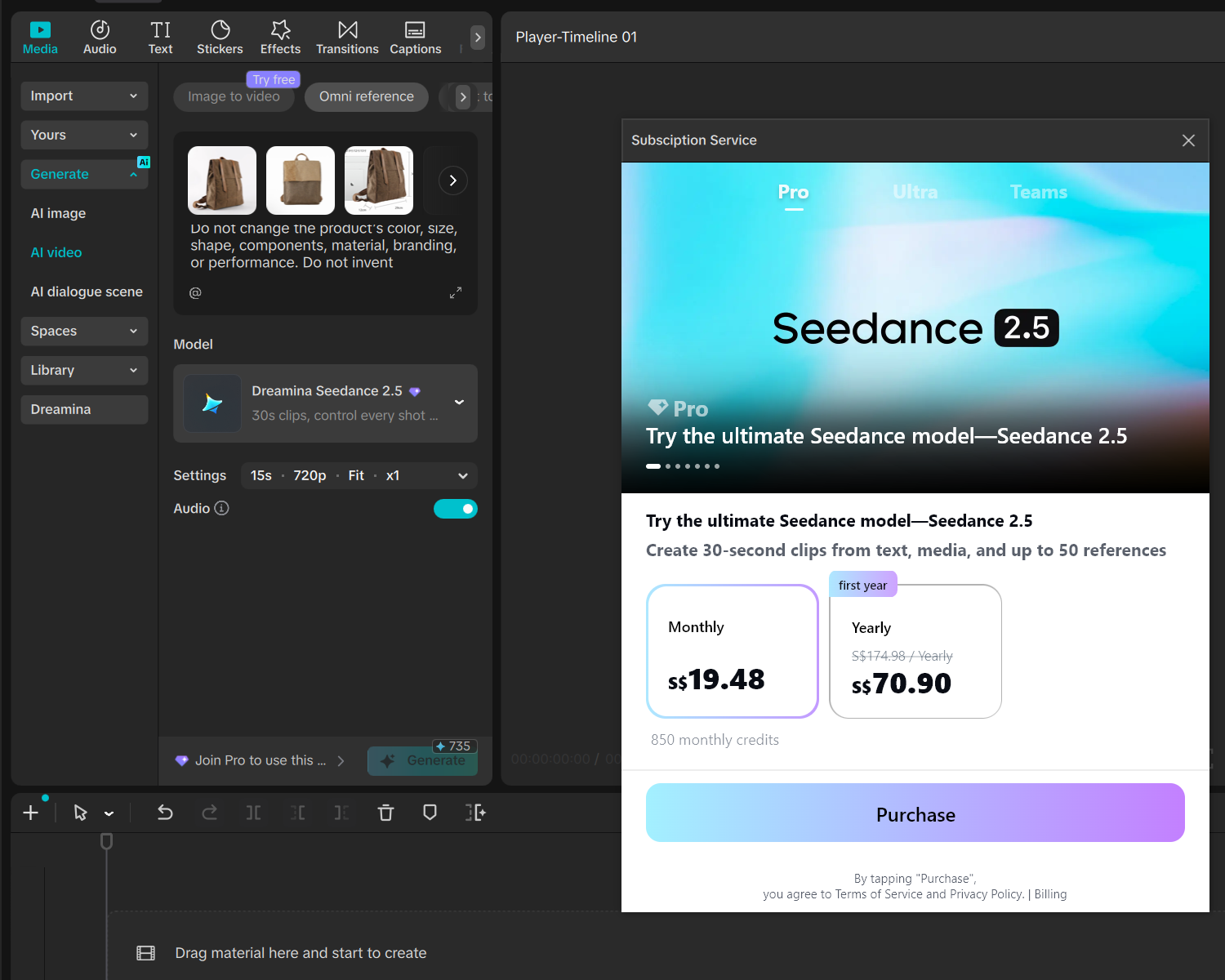
The tested Seedance 2.5 route opened a subscription screen despite the visible Try free label
4. Canva Free — fast product slideshow, not a TikTok Shop demo
Best for: beginners and small teams that need fast product-image layouts, simple display ads, text overlays and reusable templates.
Canva Free includes a large template and media library, basic brand controls, social formats and a capped AI allowance. On August 7, 2026, Canva’s pricing page listed up to 200 uses of Standard AI tools or up to 20 uses of Premium AI tools in a shared monthly allowance for Free accounts. “Create a video with Canva AI” and image-to-video were classified within the AI feature table, but the exact allowance consumed can depend on the tool and task.
Canva is useful when a seller wants to assemble approved product images and copy into a clean, editable design. It is less compelling when the job requires realistic product action, live TikTok Shop product data or direct Seller Center publishing.
Free access: ongoing $0 plan with capped AI use. Premium templates, assets or functions can still introduce a paywall inside a project.
Observed Canva run on August 7, 2026: we added the same three backpack images and the shared fact-and-fidelity brief to Canva's AI-assisted video workflow. The editor still displayed a
Start your trial for $0 prompt rather than an active Pro label. Naomi reported that Canva returned the design in about 15 seconds. The generated project timeline showed approximately 18 seconds and a 16:9 landscape canvas, despite the brief requesting a 15-second 9:16 video.The output preserved the supplied product photos because it mainly animated and cropped those images instead of generating a realistic product action. It used fades, image crops, simple shapes and background music. It did not show the requested opening, device placement, magnetic-closure action or material interaction. In practical terms, it looked like a polished product-image presentation rather than a TikTok Shop product demonstration.
The copy also failed the approved-facts gate. Canva introduced
Your daily commute, elevated., Eco-Coffee Backpack, Sustainable style for the modern professional and Sustainable Carry, even though the frozen brief did not approve a sustainability outcome. Its final Shop now on TikTok! also replaced the exact lower-risk CTA, See the product details on TikTok Shop. The supplied 15.07-second, 2,560 × 1,440 recording is a screen capture of the editor preview, not a clean exported asset; the editor timeline shows the project itself was about 18 seconds. No watermark was visible inside the sampled design frames, but clean MP4 export, asset licensing and export-time paywalls remain unverified.We count Run 1 as 1/1 usable layout concept for a simple landing-page or display ad, but 0/1 for the assigned TikTok Shop product-demo test. It did not follow the requested 9:16 format, lacked realistic product action and failed the approved-copy requirements. The landscape ratio alone does not prevent TikTok publishing.
Use Canva when template speed and manual control matter more than product demonstration. Check every asset's license and plan marker, rewrite generated copy against the approved fact sheet, and set the canvas to the format intended for the campaign—9:16 when a full-screen vertical creative is the goal. No paid rerun is needed for this comparison.
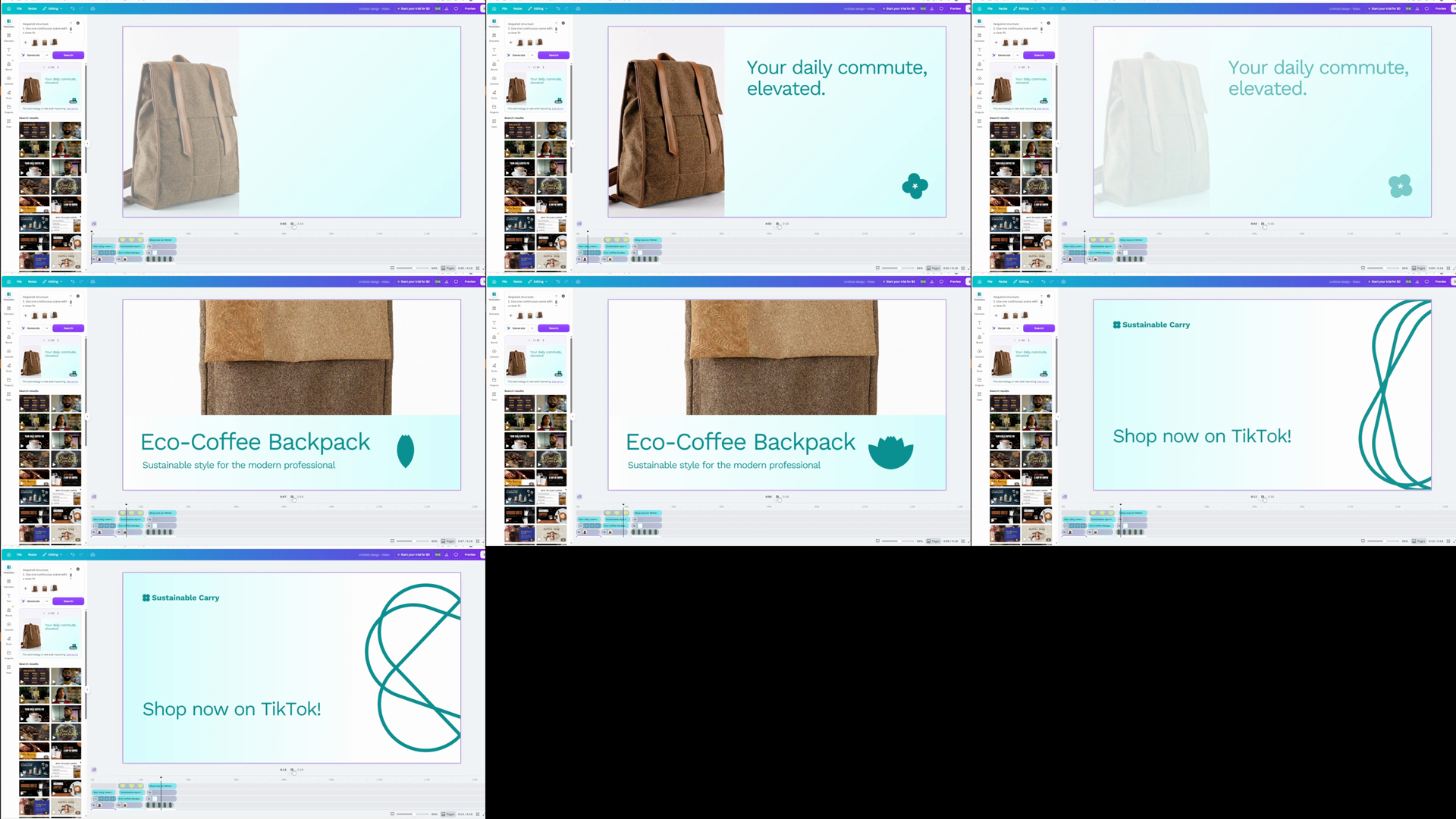
Canva assembled the images quickly, but the result behaved more like a presentation-style product slideshow than a TikTok Shop demonstration
5. ChatGPT Free — script and brief candidate
Best for: turning approved product facts into hooks, scripts, shot lists, captions and reusable prompts for downstream tools.
ChatGPT Free provides text chat plus limited access to uploads, image generation, search, vision and data analysis. It is the only tool in this list whose assigned test ends before video production: three 15-second scripts under 35 words, each with a hook, one-scene direction, voiceover, on-screen text and a non-guaranteed CTA.
The value of a general AI assistant is flexibility. The limitation is the same. ChatGPT has no verified native connection to the seller’s TikTok Shop listing, stock, price, policies or publishing workflow in this comparison. If the seller provides incomplete facts, a fluent script can still invent a promotion or overstate a feature.
Free access: $0 plan with usage limits that vary over time and by feature. Our first hands-on run used a ChatGPT Pro account, so it tests script quality but not Free-plan speed, image limits or model access.
Observed Pro run on August 7, 2026: we uploaded the same three backpack images and sent the frozen prompt once, without follow-up coaching. The screenshot showed ChatGPT Pro and an interface-reported thinking time of 5 minutes 6 seconds; the model name was not visible. The first answer listed ten categories of missing or risky facts, then produced three distinct one-scene scripts focused on recycled-coffee-ground material, device fit and dimensions, and magnetic closures. Independent recount confirmed the stated voiceover lengths of 24, 32 and 25 words. All three ended with the exact CTA and introduced no unsupported price, promotion, protection, certification, rating, endorsement or performance claim.
We count 3/3 usable script candidates. There was still one review miss: the final self-check said no human verification was needed, even though Script 2 asks the downstream video tool to show an open interior compartment that is not visible in the supplied exterior images. That shot needs a real interior reference or physical-product check. Script 3 was the preferred Canva transfer candidate because its 25-word closure-and-texture concept relies on visible exterior details and carries the lowest visual-hallucination risk. Canva Run 1 later used the shared full brief instead, so it did not validate this script-transfer route.
Use ChatGPT to structure approved information. Never use it as the source of truth for the product, price, promotion or platform policy, and do not treat this Pro run as first-hand evidence of Free-plan performance.
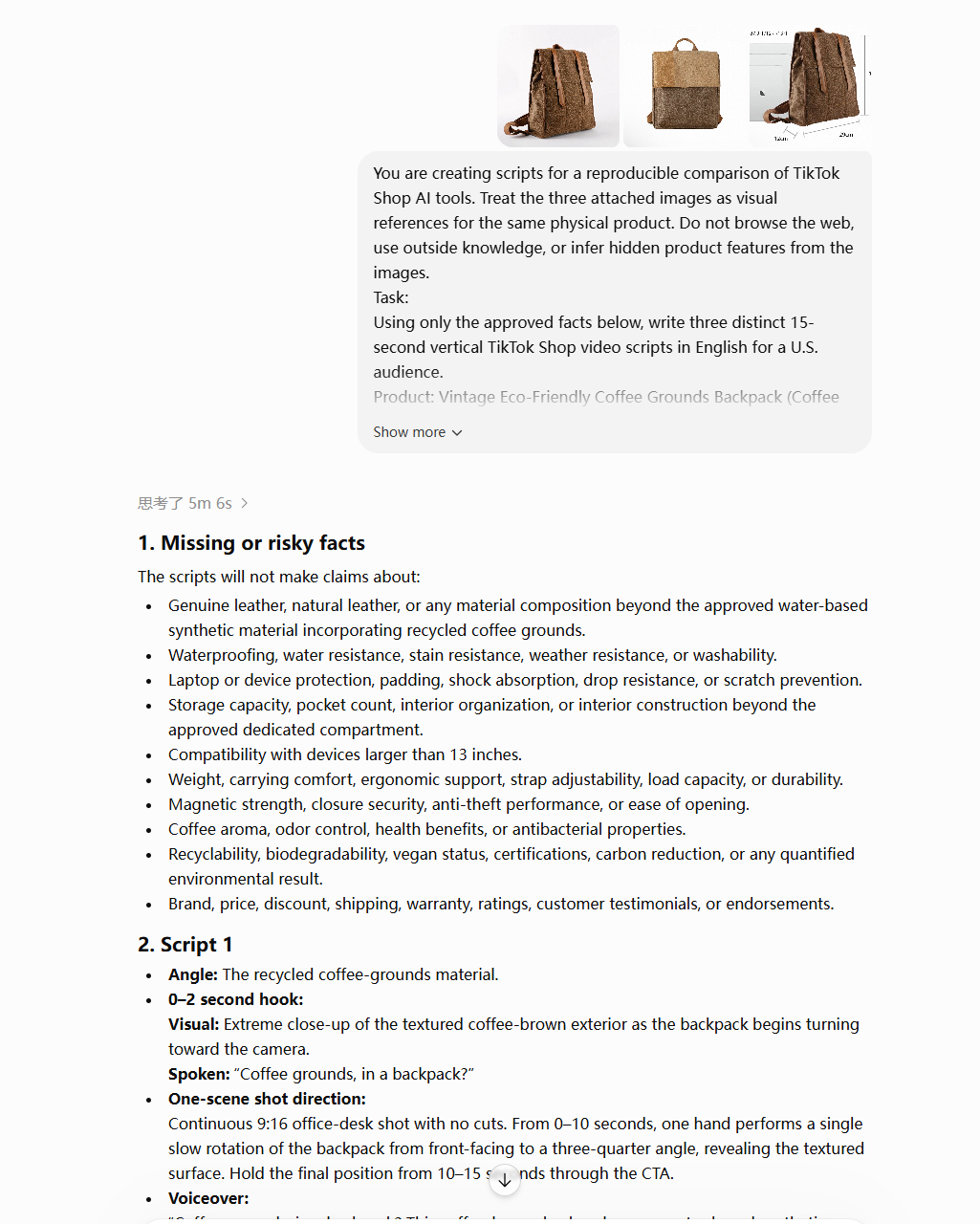
ChatGPT produced three structured scripts and explicitly excluded unsupported product claims; the hands-on run used ChatGPT Pro
6. HeyGen Free — guided avatar-preview candidate
Best for: testing a guided presenter-led concept before deciding whether avatar video fits the product.
The pricing screen observed on August 7, 2026 showed a Free plan with three videos per month, videos up to one minute, Video Agent and Avatar IV access, standard processing, stock digital twins and one custom digital twin. The same account could open a 15-second Video Agent project with three product images. Turning on Seedance 2.0, however, opened an upgrade prompt for the paid Creator plan. Turning Seedance off allowed the free workflow to continue.
The free Video Agent then asked four groups of setup questions: presenter style, visual source, voice tone, and avatar/voice/brand choices. For this run, the selected direction was an on-camera UGC creator, animation of the three supplied product photos, and a high-energy social-creator voice. HeyGen created a video plan with the Esposito avatar, a “Crisp, Energetic Creator” voice, portrait format, U.S. English and captions.
Observed free result: the plan targeted 15 seconds, but the completed download panel and player showed a 12-second video. The free preview was shareable from a HeyGen page, but both Download and Save to Google Drive displayed paid-access icons. HeyGen did not provide a downloadable original on the free path. Naomi supplied a screen recording of the player instead. Local inspection found a 13.119-second, 2,560 × 1,440, 30 fps recording with stereo audio; that metadata describes the browser recording, not the underlying 12-second HeyGen asset.
The creative itself was not suitable for a TikTok Shop product demo. Instead of showing a believable bag-in-use sequence, it placed a seated avatar over the supplied product photos, used large areas of empty white space and added word-by-word captions. The motion and compositing felt stiff, the product never moved or demonstrated a feature, and a visible HeyGen watermark repeated across the presenter and product imagery.
The earlier video-plan thumbnail did show a different rounded backpack with altered pockets, buckles and zippers. The actual 12-second preview in the recording, however, mainly reused the three supplied product images. We therefore treat the plan-stage redesign as a warning, not as proof that the final preview changed the SKU. We count the workflow as 1/1 completed free preview, but 0/1 usable publishable product videos because the output was watermarked, lacked a credible product demonstration and could not be downloaded on the free path.
Use HeyGen when an avatar is an intentional format and a share-page preview is enough for early review. Skip the free route when a realistic product demonstration or downloadable production asset is required. A realistic synthetic presenter also requires the appropriate AI disclosure and human review before publication
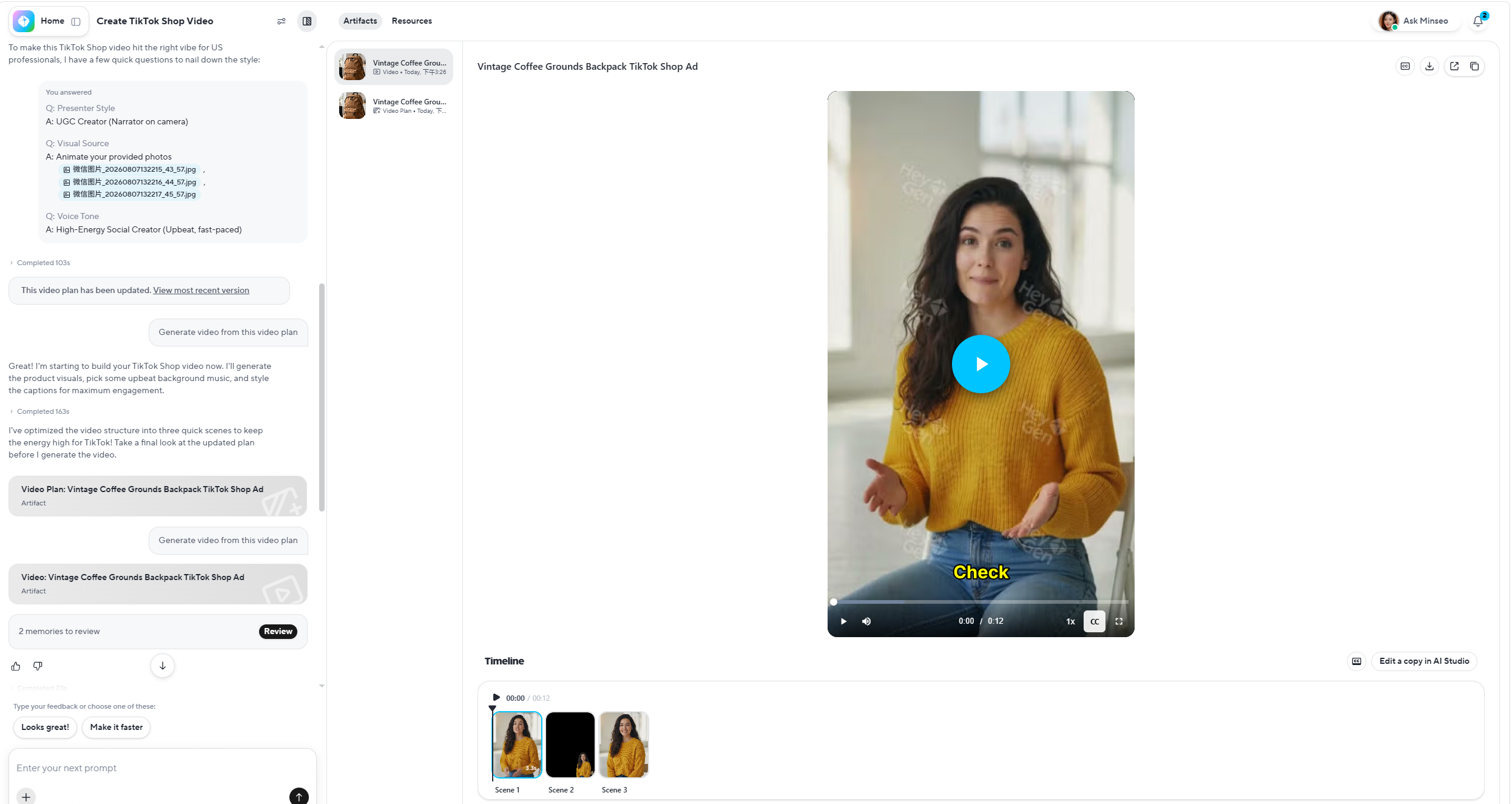
The free HeyGen result was a watermarked avatar-and-product-photo montage rather than a realistic product demonstration
The best TikTok Shop AI stack by seller stage
Starter: script, create and edit before paying
Start with three layers:
- ChatGPT Free for a fact-constrained script.
- TikTok Symphony Creative Studio for an official TikTok-native generation route.
- Canva Free for landing-page or display-style product-image assembly, or CapCut only when the required editing feature is available in the account or a paid plan is approved.
This stack tests the workflow before adding another subscription. It also exposes the handoffs: if the product facts or assets must be rebuilt at every step, an integrated workflow may be worth testing next.
That is the point at which Navos becomes more relevant than adding another single-purpose generator. Instead of moving a script, product images, review notes and the product link across separate tools, a seller can keep generation, TikTok Shop's official video pre-review, product linking and publishing in one connected workflow. Navos is credit-based rather than an unlimited free tool, so the decision should depend on whether those removed handoffs save meaningful production time.
Growing seller: optimize cost per usable output
Add a product-aware workflow when content volume creates operational waste. For a growing seller, Navos addresses a different problem from a script writer or editor: it connects the selected product to creation, official TikTok Shop pre-review, product linking and direct publishing. Compare that connected route with a multi-tool stack on:
- percentage of outputs that pass the product-fidelity check;
- time from selected SKU to reviewed asset;
- number of manual transfers;
- whether shop/ad-account authorization, product linking and publishing stay in the same workflow;
- whether official pre-review returns actionable violation flags;
- regeneration and editing cost;
- export or publishing readiness.
The relevant unit is not price per generated video. It is cost per usable, reviewed and publishable video. In our Navos run, one 15-second creative was generated in about four minutes for 240 web-side credits and was usable as a publishable creative. The larger operational value is that the same workflow avoids repeated asset transfers, review handoffs and product re-linking.
Agency or multi-shop team: add governance before volume
A larger team needs repeatability more than another generation model. Require approved facts, frozen prompts, brand controls, role permissions, review stages, version history, account boundaries and a clear publishing owner.
An avatar or batch generator can increase output volume. It can also multiply a product error across multiple shops if nobody owns the final check.
Navos can serve as the connected execution layer—from the selected SKU to generation, pre-review, product attachment and publishing—but it does not replace team governance. Keep one owner accountable for the approved product facts, the final visual check, the pre-review response and the linked product before release.
Where Navos creates the clearest operational advantage
Most tools in this comparison solve one production layer. ChatGPT prepares scripts, Canva assembles layouts, CapCut edits, HeyGen builds avatar-led videos, and Symphony provides an official TikTok-native generation route. Navos is differentiated by connecting the operating sequence after a seller has chosen the product:
Select or sync product → generate video → run official TikTok Shop pre-review → review potential violation flags → link the product → publish the shoppable videoThis does not mean every generated frame is automatically accurate. Our Navos output still created interior details that were not visible in the source images, so the real SKU remained the truth source. The advantage is that, once the creative passes that human check, the seller can continue through official pre-review, product linking and publishing without exporting the file into a disconnected backend or rebuilding the product association.
How to choose the right AI tool for your TikTok Shop
Start with the bottleneck
- No usable angles: test a script or creative-brief tool.
- Too few product videos: test product-to-video and batch generation.
- Too much rework: prioritize editability and product fidelity.
- Too many disconnected steps between a selected SKU and a shoppable post: test Navos as the connected generate-to-pre-review-to-publish workflow.
- Unclear results after publishing: use first-party analytics and a separate measurement workflow.
Inspect the inputs
A product-connected tool starts with different context from a generic model receiving one sentence. Ask whether it uses:
- the actual linked SKU;
- a product URL, images or clips;
- approved product facts and promotion conditions;
- first-party shop data or only user-supplied text;
- a previous creative or reference video.
Better input context can reduce errors, but it does not remove the need for review.
This is also where a product-connected workflow has an advantage. Navos can start from the selected or synced TikTok Shop product and preserve that product association through generation and publishing. The seller should still compare the generated product appearance and claims against approved SKU assets before proceeding.
Calculate cost per usable output
Use this simple model:
(subscription + credits + review time + correction time + failed generations) ÷ publishable outputsA free tool with heavy watermarking, failed exports or two hours of correction can cost more operationally than a focused paid workflow. A paid tool is still poor value if most outputs distort the product.
For Navos, do not compare 240 web-side credits with another platform's credit number as if the units were equivalent. Compare the full result: one usable creative, the review time it required, and whether official pre-review, product linking and publishing eliminated additional work.
Run one bounded test
Do not connect every shop, upload a full catalog or buy an annual plan before one SKU completes the workflow. Start with one product, one brief and one reviewer. Keep the original facts beside the result and record every material difference.
For a Navos pilot, use one approved SKU, generate one controlled variation, inspect the product details, review the official TikTok Shop pre-review feedback, attach the correct product and publish one bounded test. That sequence measures how much the connected workflow improves the seller's own process rather than judging Navos only as another video model.
TikTok Shop AI content, product fidelity and disclosure
TikTok Shop allows responsible AI use, including editing, translation, dubbing, subtitles, copywriting and accurate product demonstrations. The governing condition is truthfulness.
Navos adds an official TikTok Shop video pre-review step before publishing and surfaces potential violation flags inside the workflow. Use that feedback as an early risk check, then complete the product-fidelity and disclosure review below. Pre-review helps identify issues; it is not a substitute for the seller's final approval.
Before publishing an AI-assisted product video, check:
- Does every product attribute match the PDP and packaging?
- Are the price and promotion current, with all conditions stated?
- Did AI change the product’s appearance, components or performance?
- Does a synthetic presenter imply a real endorsement or expertise?
- Do you have permission for every likeness, voice, brand asset, music track and stock element?
- Is the correct product linked?
- Is AI disclosure required for realistic or significantly altered content?
- Has a human reviewed the final exported asset—not just the script?
TikTok documents an AI-generated-content toggle and on-content disclosure methods. It also says content is not restricted solely because the AI label is enabled when the content otherwise follows platform rules. The label is transparency, not approval.
A practical workflow: from product facts to a measurable creative
Step 1: Freeze the product truth
Copy the product name, physical attributes, included components, approved benefits, current price conditions and prohibited claims from the PDP and packaging. Assign an owner for this fact sheet.
Step 2: Validate the product and angle
Before generating more content, confirm that the SKU and angle justify a test. Use the separate TikTok Shop product research tools guide when the question is what to sell rather than how to create the asset.
Step 3: Generate a fact-constrained brief
Ask for multiple hooks but one source of truth. Tell the writing tool to flag missing facts instead of filling gaps. Freeze one approved script before comparing video tools.
Step 4: Create controlled variations
Use the same images, script, audience and restrictions in each applicable generator. Change one meaningful creative dimension at a time: hook, presenter, setting or pace.
In Navos, select or sync the approved TikTok Shop product, add the approved reference assets and generate the variation from that product context. Our first web run produced one coherent 15-second creative in about four minutes for 240 credits. Treat that as a workflow observation, not a guaranteed speed or quality benchmark for every SKU.
Step 5: Run the product-fidelity and policy check
Compare the result with the original product. Reject unsupported claims and misleading transformations even when the video looks polished.
For a Navos creative, also send the video through the connected official TikTok Shop pre-review and inspect any potential violation flags. Resolve the platform feedback and the human product check separately: a clean pre-review does not prove that an AI-generated pocket, lining or product feature matches the real SKU.
Step 6: Publish a bounded test
Choose a small number of approved outputs. In Navos, authorize the relevant account, attach the correct product and publish the shoppable video from the same workflow. Confirm the product link and required AI disclosure before release; do not scale every generated variation by default.
Step 7: Measure and decide
Use first-party shop and video data for your own results. Our TikTok Shop analytics guide explains how to separate first-party performance, profit data, external market estimates and file-based analysis.
Record the creative version, publish date, hook, SKU, spend or distribution context, and the decision threshold. Then iterate, pause or investigate based on real data.
Frequently asked questions
What is the best AI tool for TikTok Shop sellers?
There is no universal best tool. Choose by task. ChatGPT is a flexible script starting point; Symphony provides an official TikTok-native creation route; CapCut provides editing control when the required route is available; Canva quickly assembles display-style product visuals but its first result was not a TikTok-ready product demo; and HeyGen can validate an avatar-led concept but its tested free route did not create a publishable product demo. For sellers whose bottleneck is the full path from a selected product to a pre-reviewed, linked and publishable shoppable video, Navos is the clearest workflow fit in this comparison.
What are the best free AI tools for TikTok Shop?
TikTok Symphony Creative Studio is officially described as free. ChatGPT, Canva and HeyGen offer free starting points with different limits. In our HeyGen test, Video Agent could make a free share-page preview, but Seedance 2.0 and download required payment. In our CapCut desktop test, the Seedance 2.5 generation route required a paid subscription despite a
Try free badge. Navos uses earned and paid credits rather than an unlimited free plan; its value case is the connected product-to-publish workflow, not the lowest generation price. Check credits, paywalls, watermarks, exports and regional availability before committing to any production workflow.Does TikTok Shop allow AI-generated product videos?
Yes, when they follow TikTok Shop policies and Community Guidelines. The content must be truthful, must not misrepresent the product or impersonate people, and must use AI disclosure when required. AI-generated content can still be removed if it is misleading.
Can Navos check a video before TikTok Shop publishing?
Yes. Through its TikTok Shop API integration, Navos can send a generated video into TikTok Shop's official video pre-review environment and surface whether the system flags a potential violation. Users can then link the product and publish from the same workflow. A pre-review result helps identify risk but does not guarantee final approval.
Can AI tools find winning TikTok Shop products?
AI can organize product, creator, content and market signals, but it cannot guarantee a winning product. Validate public-market estimates against your supplier economics, listing quality, content test and first-party shop results. Use the dedicated product-research guide for that decision.
Do I still need a TikTok Shop analytics tool?
Yes, if you need to measure what happened after publishing. A video generator creates an asset; it does not replace Seller Center performance, order, settlement or profit data. Use the source that matches the decision and do not treat public competitor estimates as your own shop records.
How should I compare the cost of AI video tools?
Measure cost per usable output, not only the subscription. Include credits, failed generations, watermarks, export restrictions, review time, corrections and the percentage of outputs that accurately represent the product.
Final recommendation
Start free and narrow when you are still testing scripts, formats or editing styles. Use one approved SKU, one frozen fact sheet and one measurable content test. The first goal is not maximum output volume. It is a repeatable workflow that produces truthful creative without hiding its limits.
Once the recurring bottleneck is no longer idea generation but the handoff from product assets to review, product attachment and publishing, Navos is the strongest operational fit among these six tools. It keeps the selected product, generated creative, official TikTok Shop pre-review feedback, product link and publishing action in one workflow. That connected path is the core Navos advantage; human product verification remains the approval gate.