
TikTok Ads Manager says 40 purchases. A GA4 report shows 24.5. Another GA4 view shows 20. Your store has 100 paid orders. Which number belongs in Monday’s update?
A TikTok ads conversion discrepancy can come from different reporting definitions, incomplete data, or a tracking problem. Start by identifying what each number counts. Then investigate the differences that have supporting evidence. Choosing the smallest number does not automatically give you the most accurate answer.
This guide covers TikTok ads that send shoppers to your website. TikTok Shop orders and app campaigns need their own reporting rules. The examples use fictional data and show how Navos can help you organize and understand the reports.
Concept illustration: give advertising, analytics and order data a shared context.

First, decide what you need the number for
The three systems help answer different business questions. Give each one a clear role in your report before you try to reconcile them.
Your question | Start here | Keep this definition visible |
How many paid orders did the store receive? | Backend order ledger | Paid status, cancellations, refunds and payment date |
Which channels received credit in this GA4 report? | The relevant GA4 report | Metric, traffic-source dimension and attribution model |
What purchases did TikTok credit to these ads? | TikTok Ads Manager | Campaign filters, attribution window and reporting date basis |
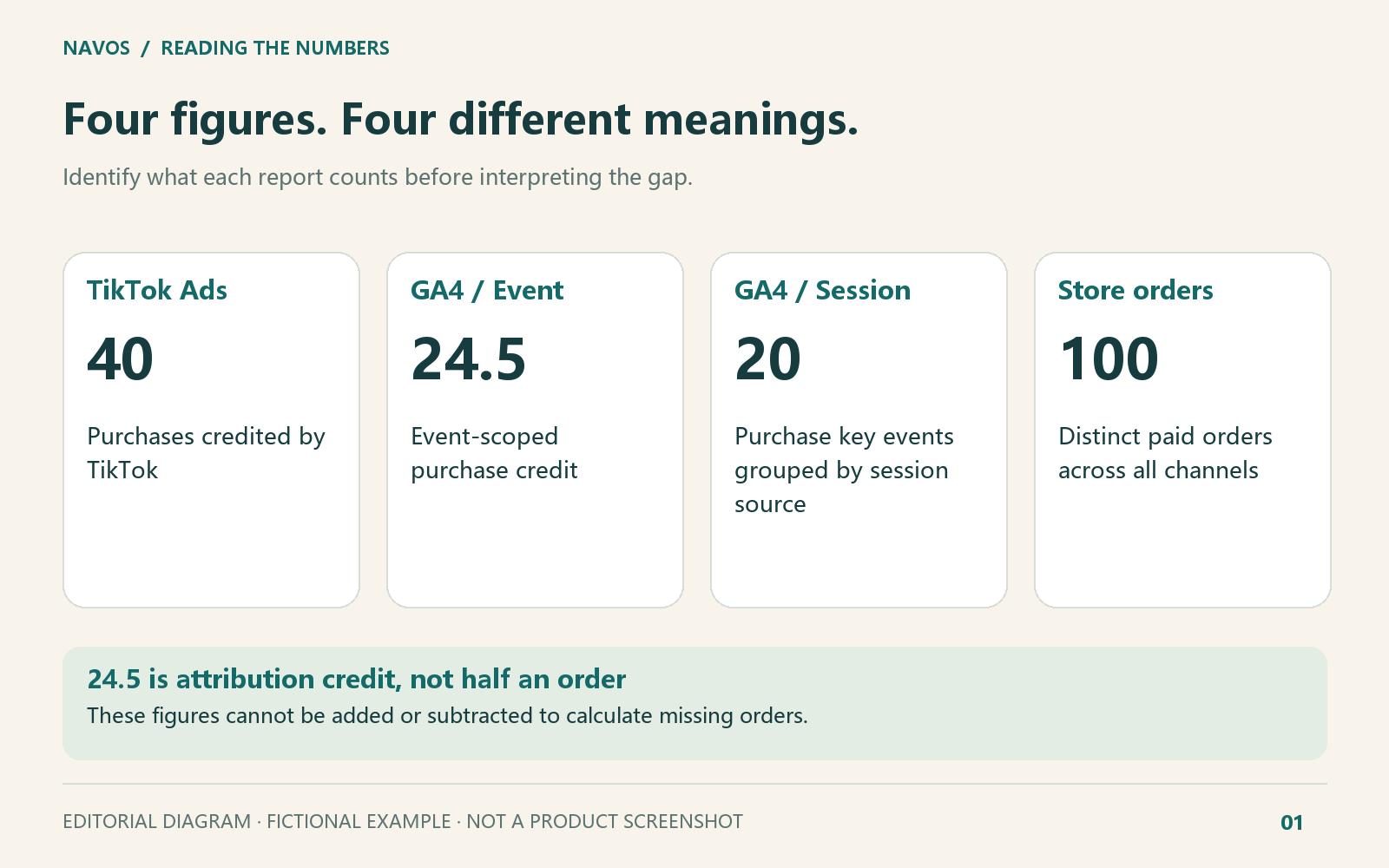
For the opening example, the figures mean:
- 40: purchases credited by TikTok under the supplied campaign settings.
- 24.5: purchase credit assigned to TikTok in a GA4 event-scoped attribution report.
- 20: purchase key events in a GA4 view grouped by session source and medium.
- 100: distinct paid orders from all store channels, including partially refunded paid orders.
The 24.5 is fractional attribution credit, not half an order. The 100 includes all acquisition channels. These figures are neither additive nor interchangeable, and the aggregate exports do not reveal how much of the difference comes from each cause.
The figures describe different reporting views; their differences do not measure lost orders.
A useful management update would say: “The store recorded 100 paid orders across all channels. TikTok credited 40 purchases under its campaign settings. GA4 assigned 24.5 purchase credits in the selected attribution report. We are checking the definitions and tracking evidence before interpreting the gap.”
That wording gives your team a usable picture without turning an unexplained difference into a claim about missing sales.
Nine reasons TikTok Ads and GA4 can disagree
1. The reports count different things
A purchase event, a purchase key event, an attributed credit and a distinct paid order are different units. A report filtered to one campaign also has a different population from a store ledger covering every channel.
Write down the actual metric and filters beside each export. “Conversions” alone is too vague. Check whether your GA4 number includes only purchase or other key events, and whether the backend excludes unpaid cancellations.
Start with these definitions before asking someone to reinstall a tag. If the store truly has no paid orders despite receiving ad clicks, use a separate post-click sales diagnosis to investigate the shopping journey.
2. You changed the GA4 view, not just the date
GA4 can tell you where a user first came from, where a particular visit started, or which marketing interactions received credit for a purchase. These are its First user, Session and event-scoped views. A report using Session source answers a different question from an attribution report using event-scoped Source.
Google’s traffic-source documentation distinguishes these scopes. The property’s reporting attribution model applies to event-scoped dimensions; changing it does not uniformly change user- and session-scoped reports. Data-driven attribution can also distribute fractional credit.
Save the dimension name as well as the report name. In our example, the session-scoped report still uses once-per-event counting. “Session” in the dimension does not mean “count each session once.” Keeping scope and counting method separate explains why two legitimate GA4 views need not match.
3. The systems award credit differently
A customer can see an ad, return through another route and later buy. Each platform has rules for deciding which interactions get credit and how far back to look. These are its attribution model and window.
In the fictional example, TikTok uses a seven-day click window and a one-day view window; engaged view is off. The GA4 event-scoped report has a 30-day key-event lookback setting. Those are supplied settings for this example, not recommended defaults for every account.
Ask the media buyer to capture the actual campaign settings. A view-attributed TikTok purchase might still be recorded by GA4 while receiving different channel credit. Without the relevant journey data, you cannot identify the orders behind that difference. Avoid changing the window simply to make the totals look closer.
4. The sale lands on a different reporting day
The interaction with an ad, the purchase event and the payment can happen at different times. The date basis of the selected report matters even when everyone chooses the same calendar range.
Time zones add another boundary. A payment at 00:30 UTC on October 27, 2026 occurred at 17:30 in Los Angeles on October 26. That illustrates why a midnight cutoff can move a transaction between dates. It does not prove the size or direction of a gap in your account.
A time-zone boundary can change the reporting date without changing when the payment happened.
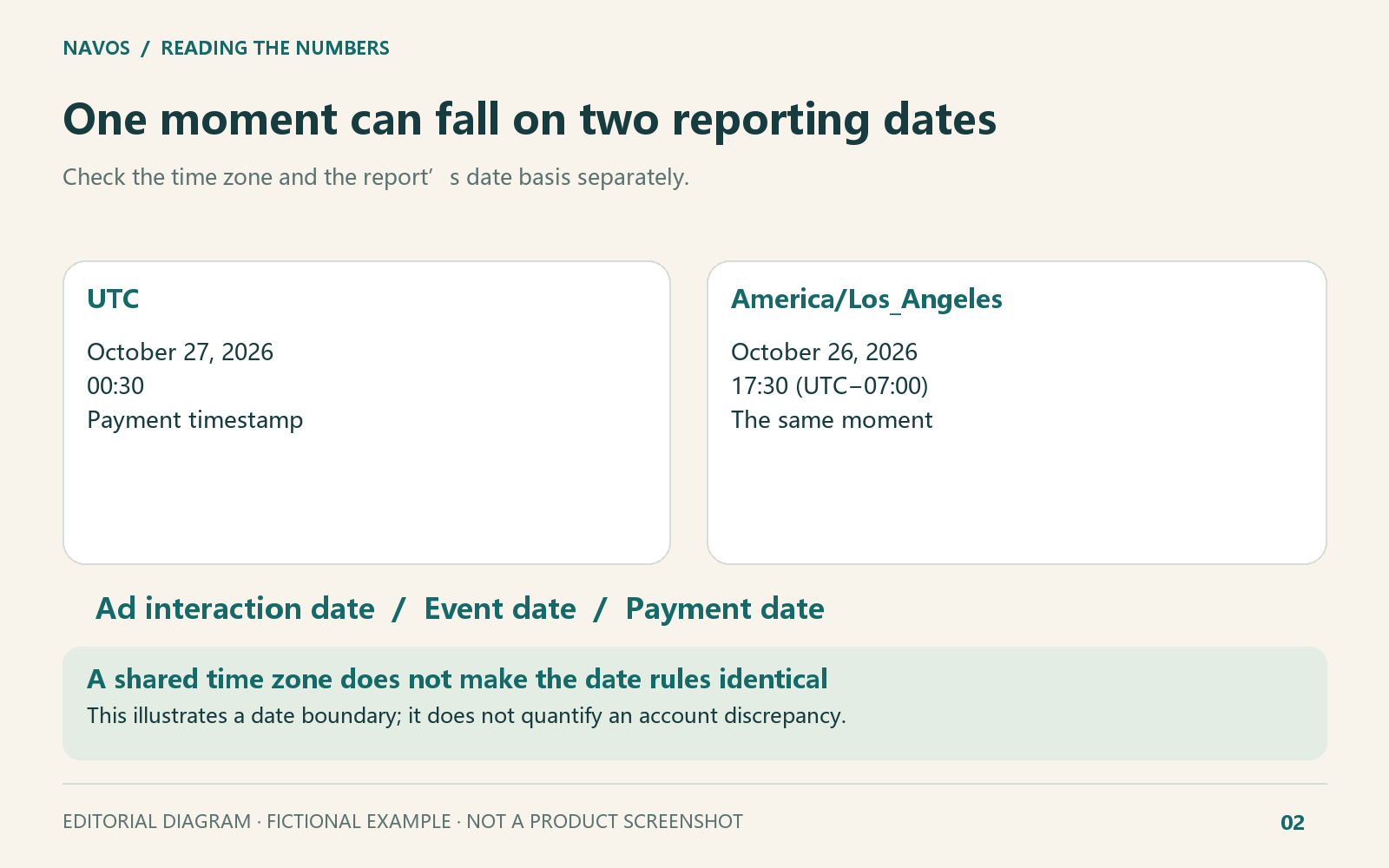
Record the time zone and whether the report uses the ad interaction, event or payment date. If individual timestamps are available, an analyst can regroup the records by date. A total alone is not enough to convert the report to another time zone. Even if all three reports use UTC, check which date each one counts against.
5. One snapshot is incomplete
An export taken this morning can change as reporting and attribution processing continue. A finished calendar day is not a promise that every number has stopped changing.
In a separate fictional example, the snapshot ends at 03:00 UTC on November 2: TikTok shows 12, the backend shows 15, and the GA4 export is unavailable. The GA4 value stays unknown, not zero. There is no evidence in those files establishing why the export failed.
Google notes that reports can change during processing and attribution updates. Keep the export time, then request data for the same date and hours again where possible. If you switch to a full day, save new full-day reports from all three systems. Comparing a whole day with three hours would give you a misleading change.
6. Campaign parameters disappear on the way to the site
UTM parameters are labels added to an ad link to help identify where the visit came from. A website redirect can drop those labels. Check the final page address as well as the link entered in Ads Manager.
Our supplied URL pair begins with
utm_source, utm_medium, utm_id and utm_content. After the redirect, only utm_medium remains. That is a concrete issue for the landing-page owner to investigate. It does not establish the final GA4 channel assignment or how many orders were affected.Observed parameter loss gives the landing-page owner a concrete issue to investigate.
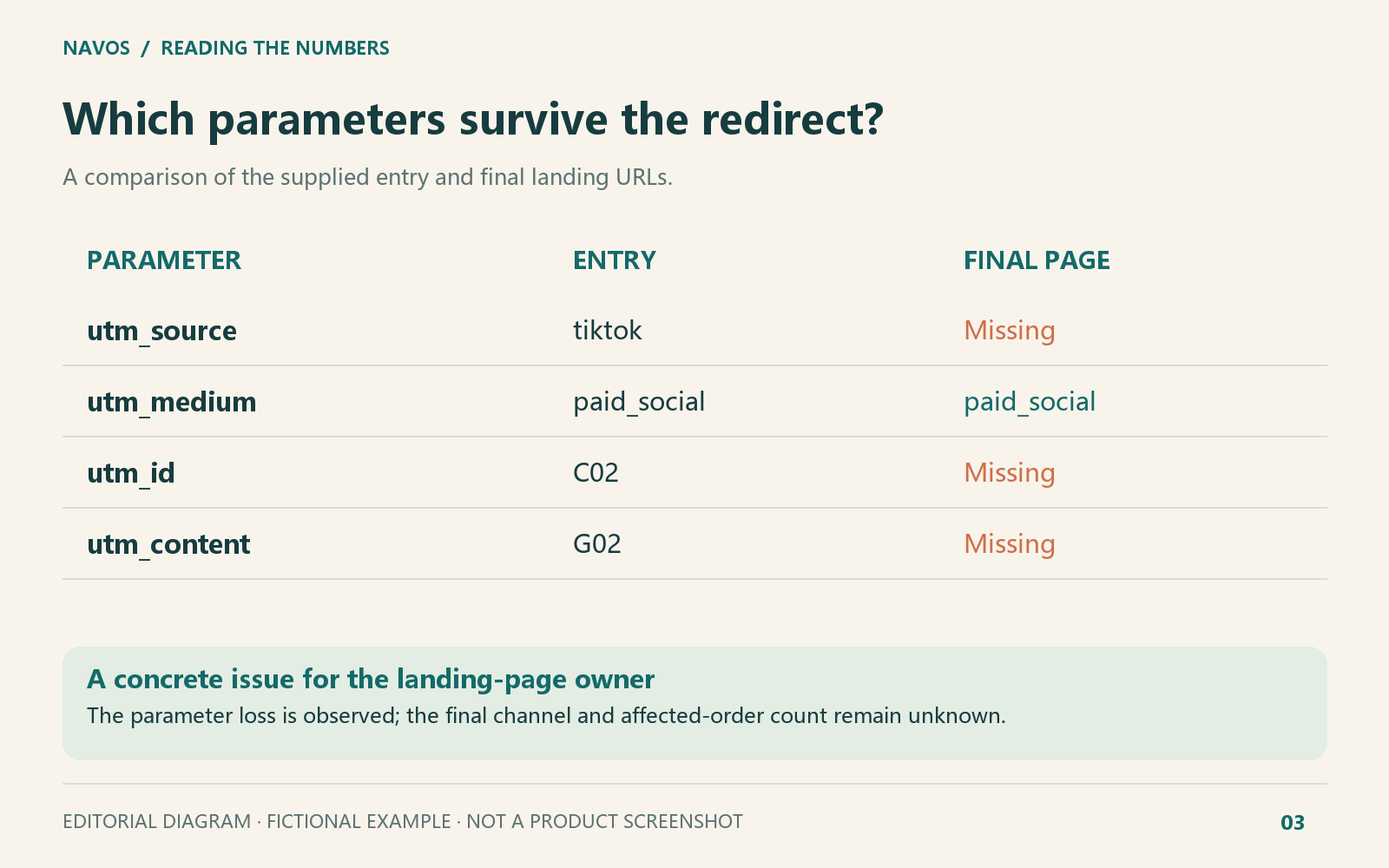
Send the before-and-after links to the site owner and ask them to preserve the source labels during the redirect. TikTok’s Google Analytics connection guidance also calls for these parameters to be retained. After the change, ask the analyst to check the recorded source in a GA4 report that supports it, as well as checking the link itself.
7. Consent and checkout can affect tracking
Cookie choices, browser settings and a checkout that moves to another website can affect how a purchase journey is recorded. They are worth checking, but the difference between two totals cannot tell you which one caused a problem.
Ask the web team what happens to tracking when a shopper accepts or rejects cookies. If checkout moves to another domain, check whether the journey stays connected. Google’s basic and advanced consent modes behave differently, and TikTok needs a separate check. One rule will not cover every setup.
The example did not include consent records. Navos listed them as information to request from the web team, rather than blaming the conversion gap on shoppers declining consent.
8. The wrong site is connected, or order details are missing
A “connected” badge still needs a closer look. A GA4 property holds your analytics data; a TikTok pixel is tracking code installed on the site. Check that the connection pairs the right property and pixel for the same website.
The example pairs a GA4 property for one store with a pixel configured for another site. One purchase also sends no
transaction_id, the identifier used to recognize a transaction. The media team can check the connection, while the web team checks that the order details are being sent.The records also show the same transaction being sent to GA4 twice. Google uses transaction IDs to deduplicate website purchases, so “sent twice” does not necessarily mean “counted twice.” Check the transactions recorded in GA4 before calling it overcounting. Likewise, an order missing from a partial log may still have been reported elsewhere in the complete record.
9. Paid status, refunds and currency change the comparison
Order counts and revenue need separate definitions. A partially refunded order may remain one paid order while its net product amount falls. An unpaid cancellation may be excluded altogether.
The fictional order ledger contains five paid orders and one unpaid cancellation:
Currency | Paid orders | Product payments | Refunds as of the snapshot | Net product amount |
USD | 4 | 350 | 20 | 330 |
EUR | 1 | 60 | 0 | 60 |
The order count is 4 + 1 = 5. The USD and EUR amounts stay separate unless you define an exchange-rate policy. These amounts exclude tax and shipping, and the net product amount is not profit.
Five paid orders in total; currency amounts remain separate and net product amount is not profit.
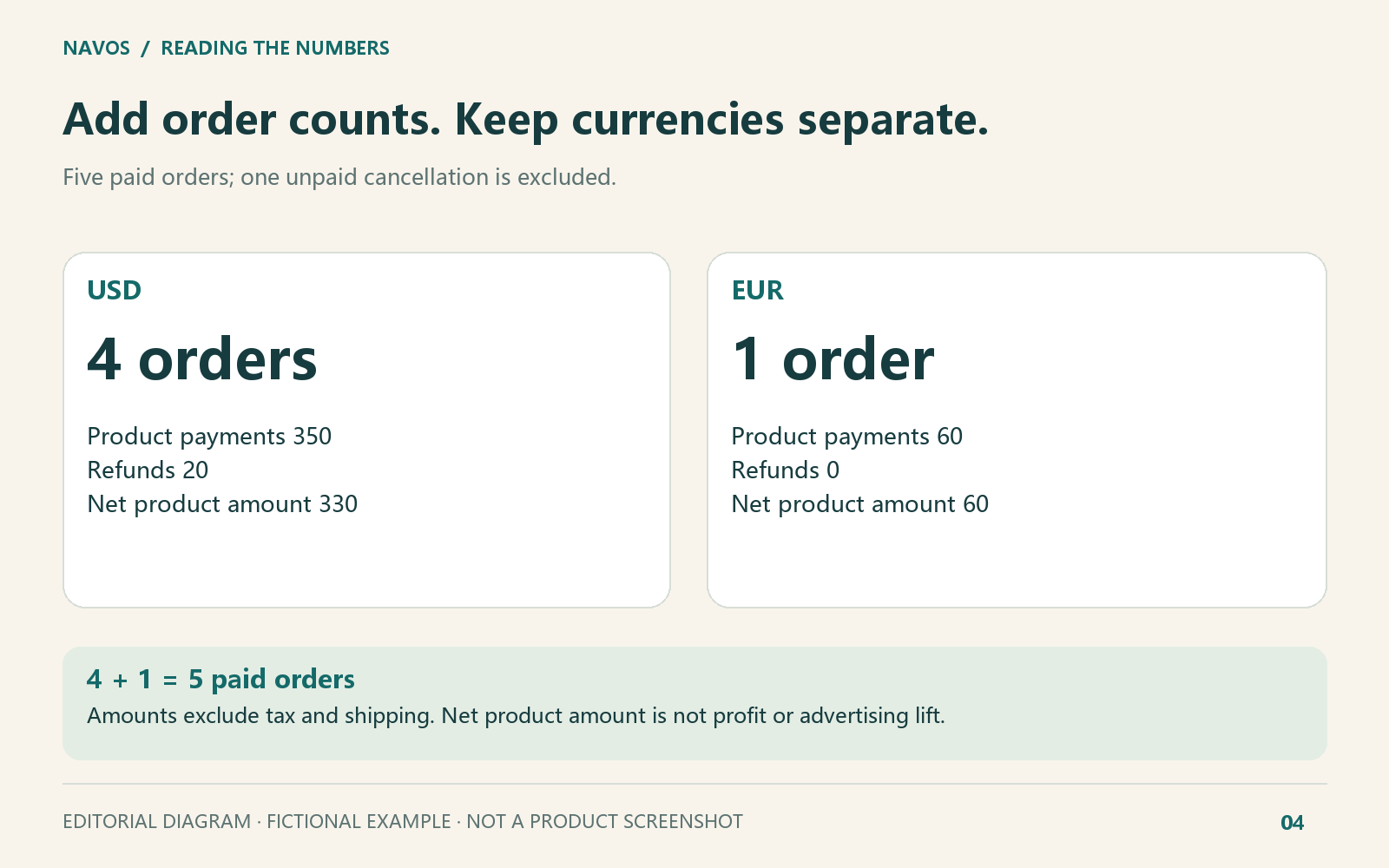
Keep this order reconciliation separate from advertising credit. The ledger verifies payment and refund facts; it does not establish which ad caused the sale or how many additional sales the campaign created.
Does connecting GA4 to TikTok solve the mismatch?
TikTok provides a Google Analytics connection in Events Manager. Its July 2026 guidance describes sending GA data to support attribution comparisons and, where eligible, campaign optimization.
The prerequisites include access to both the Google Analytics account and the selected property, purchase configured as a key event, and a pixel associated with the same website. Traffic selection and the property-to-pixel pairing also matter. Check the current account’s availability and permissions before planning changes.
The connection can provide another useful comparison, but it does not make two attribution models identical or explain every historical difference. In the example above, the next task is to verify the actual same-site pairing and received events, rather than treating “connected” as the end of the investigation.
Use Navos to understand the gap and decide what to do next
You have downloaded the ad report, GA4 data and store orders, but still cannot explain why they differ. The media buyer points to the website. The web team asks you to identify the problem. You need something more specific to take back to them.
Give Navos the reports, and it can help explain what each figure means, identify problems supported by the files, and suggest what to check next and who to ask. You get a report and tables you can read, download and share with colleagues.
For this article, we provided fictional ad and GA4 reports, order records, and information about website redirects and purchase tracking. Here is how the results help with everyday questions:
Your question | How Navos helps |
How do I explain these figures in my update? | Separates ad credit, GA4 purchase credit and paid orders so you can label each number clearly |
Is there anything we can address now? | Points to issues in the files, such as source labels disappearing from an ad link |
What do I still need from a colleague? | Lists the missing reports or records and the questions they could help answer |
Who should take the next step? | Suggests a responsible person, a concrete task and what to check afterward |
Editorial diagram based on the supplied-file workflow; it is not a product interface screenshot.
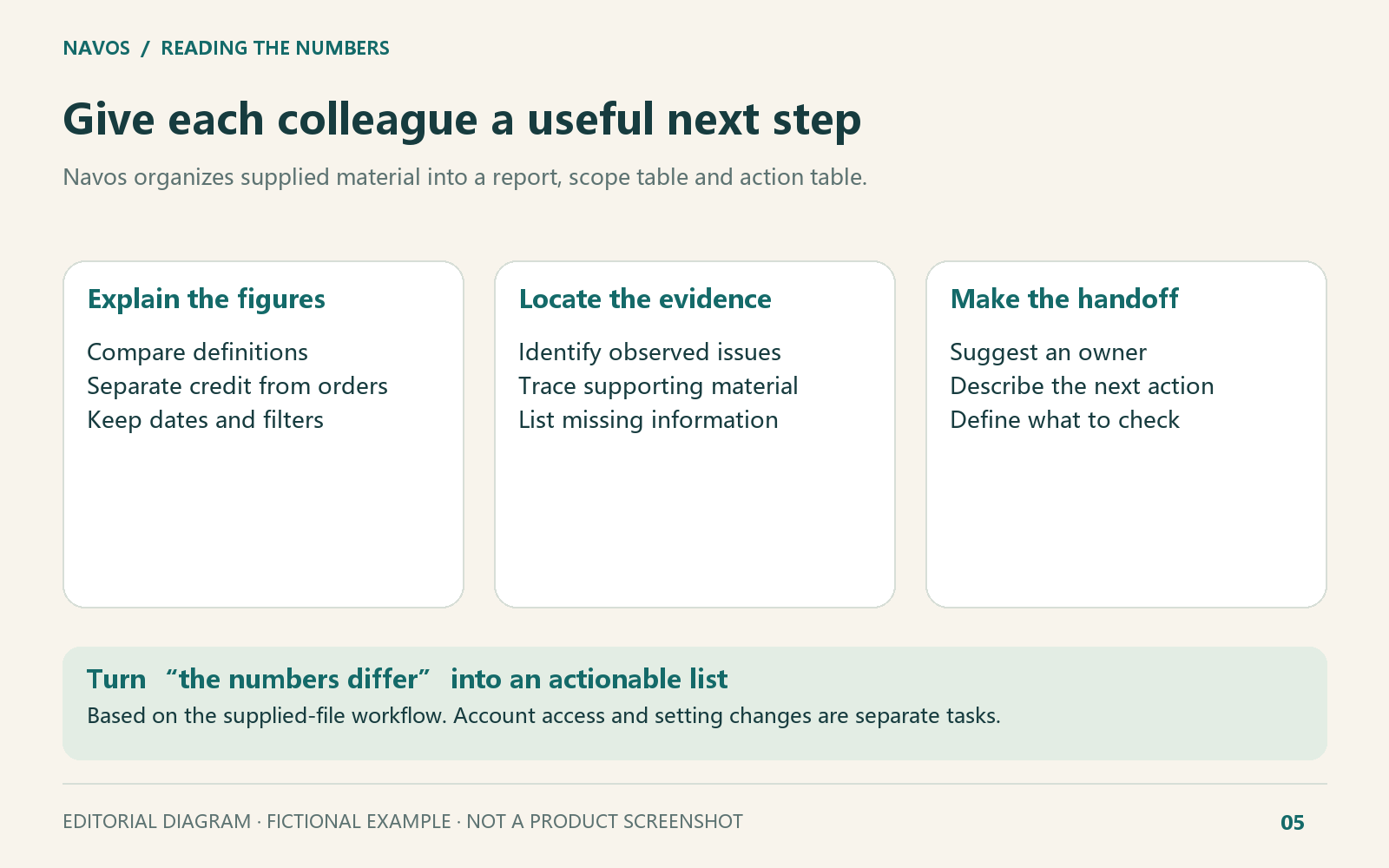
For example, if the report shows that an ad link loses its source labels, you can send both URLs to the web team and ask them to check the redirect. If GA4 transaction details are missing, Navos puts them on the list of records to request from the analyst. “The numbers differ” becomes a specific question a colleague can work on.
In Navos, select Ad Growth Attribution Tracking Measurement, attach the reports you have, and ask:
Help me understand why my TikTok, GA4 and store-order numbers differ. What problems can you see in these files, what should I check next, and who should I ask? Give me a report and a to-do table.
Keep the report names, dates and time zones. Remove customer names, phone numbers and other personal details. Use consistent anonymous IDs if orders need to be matched across files. Tell Navos which reports are missing so it can help you list what to request next.
This example shows Navos analyzing uploaded files; website changes still belong with the relevant owner. It helps you explain the problem and prepare for that conversation without having to assemble the whole explanation from several files yourself.
Make the next review easier
For each issue, note who is handling it, what they plan to do and when you will review the result. If someone cannot access a report yet, leave that task open so it is not mistaken for a resolved problem at the next meeting.
After a change, compare the same metrics and date range. If the fix was to a redirect, first check that the source labels now survive. If it was a site connection, confirm the right site is connected before discussing changes in purchase numbers.
Bring the decisions into your ecommerce weekly marketing report. Once you understand what the figures mean, use a TikTok creative testing template to compare creatives on consistent terms.
Frequently asked questions
Should TikTok Ads and GA4 show the same conversions?
Not necessarily. Different populations, date rules, models and windows can produce different totals. Investigate the definitions and any concrete tracking evidence before expecting equality.
Does GA4 always use last-click attribution?
No. Traffic-source scope matters. Event-scoped attribution can use the selected reporting model, including data-driven attribution. Do not apply a session-scoped interpretation to every GA4 report.
Which number should I show my manager?
Use paid orders and clearly defined amounts for store performance, TikTok’s attributed results for its campaign view, and the selected GA4 report for that channel-analysis question. Label each figure; do not blend them into one unexplained “true conversions” total.
Is a 20% discrepancy normal?
There is no universal acceptable percentage for every setup. A small difference can contain a tracking problem, and a large difference can reflect incompatible definitions. Check what changed and whether the comparison is meaningful.
Can Navos explain the difference from exported files?
It can help organize and explain them. In this example, Navos explained the figures, identified specific issues in the files, and listed missing information and suggested owners. More complete records allow more specific answers; order or customer-journey records that were not supplied still need to be obtained.
You do not need another unexplained total. Start with a clear view of what each report means and a list your team can act on.