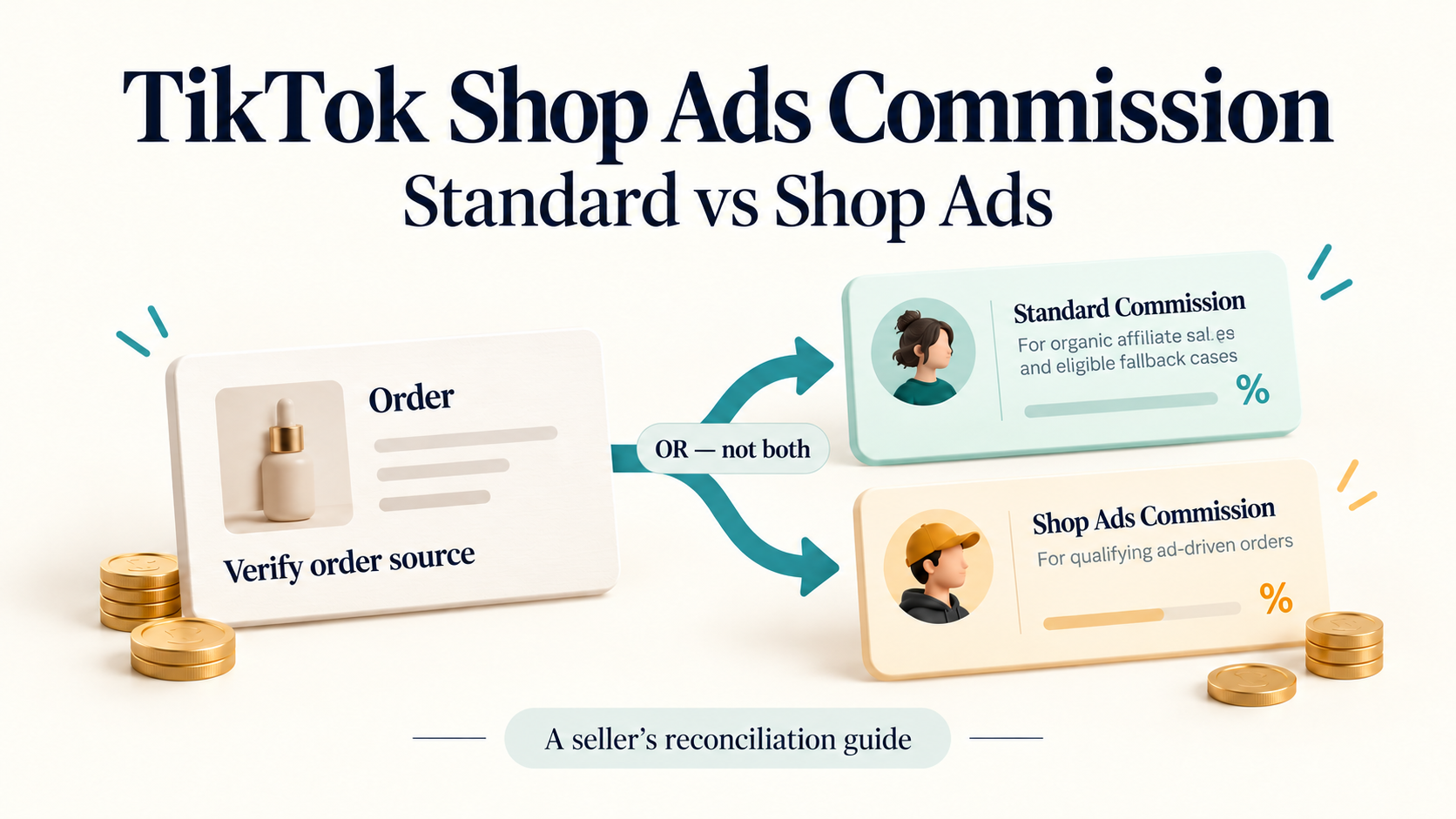
TikTok Shop Ads commission is a creator commission for qualifying ad-driven orders. Standard commission applies to organic affiliate sales and can also apply to eligible ad sales when no separate Shop Ads rate is configured. Neither is your advertising budget, and you do not add the two creator rates together for the same eligible sale.
The difficult part is identifying which rate actually applies. An order appearing in a GMV Max report, or an 8% rate visible in today's settings, is not enough to settle that question.
This guide focuses on US sellers: three simple order examples, the evidence to check, and a practical way to reconcile commission with other costs. All dollar examples below are fictional teaching data in USD. The rates are examples, not recommendations.
Standard commission vs Shop Ads commission: the difference
Both rates concern the creator's earnings. Platform fees and the cost of buying advertising are separate items.
Item | What it represents | What to check |
Standard affiliate commission | The creator rate for organic affiliate sales and applicable fallback cases | Collaboration terms and the rate effective for the order |
Shop Ads affiliate commission | A separately configured creator rate for qualifying ad-driven sales | Order eligibility, collaboration path and effective ads rate |
Advertising spend | Money spent on advertising delivery | Campaign billing period and any documented allocation method |
Platform fees | Separate charges shown in the seller's financial records | Actual fee entries, adjustments and settlement period |
“Standard” does not mean a fixed commission percentage across TikTok Shop. “Shop Ads” does not mean the rate must be lower. A seller can have different product and creator arrangements, so begin with the applicable records rather than a general percentage.
TikTok's March 2026 Business Help Center explanation distinguishes the two rates and describes the standard-rate fallback. For the broader work of recruiting creators and planning collaborations, see our TikTok Shop affiliate program guide for sellers.
Three order scenarios with the same $100 base
Assume each order has a confirmed eligible commission base of $100, a standard rate of 15%, and—where explicitly applicable—a separate Shop Ads rate of 8%. Eligibility, effective dates and the absence of an overriding protected rate have been confirmed for these examples.
Scenario | Confirmed facts | Applicable rate | Creator commission |
Organic affiliate order | The order follows the qualifying organic affiliate route | 15% standard | $15.00 |
Eligible seller-run affiliate ad order | A separate 8% ads rate applies to this order | 8% Shop Ads | $8.00 |
Eligible ad order without a separate rate | The records explicitly confirm that no separate ads rate was set | 15% standard | $15.00 |
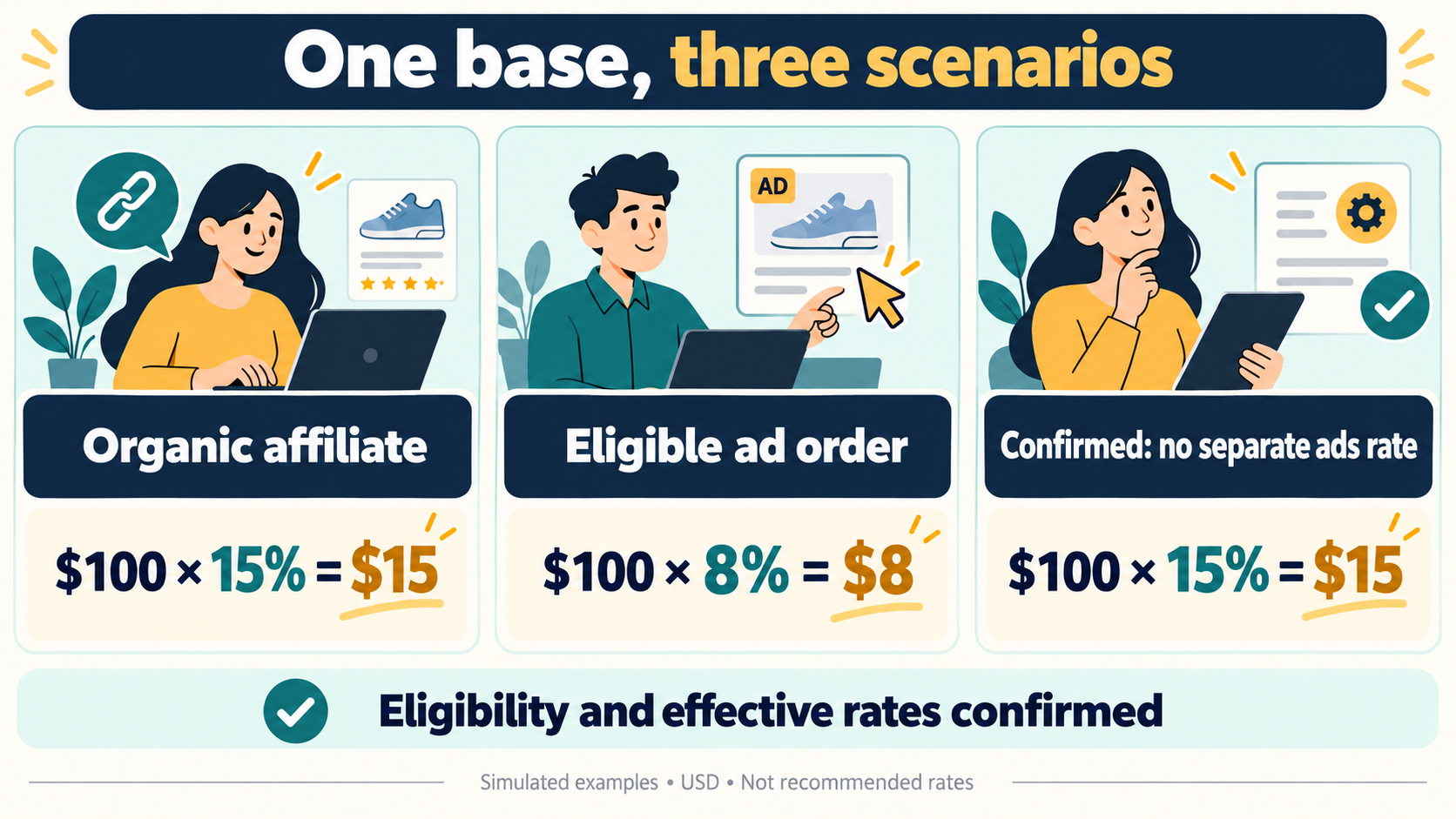
Simulated examples. The third case requires confirmed absence of a separate rate; an empty export field is not that confirmation.
The second order does not generate $15 plus $8 of creator commission. It uses the applicable 8% rate. Advertising spend remains a separate cost.
The third example is where a spreadsheet can quietly go wrong. “No separate rate was configured” is a fact. “The ads-rate field is missing from my file” is a data gap. If you cannot establish the rate through another reliable record, leave the result pending instead of automatically applying 15%.
Where to check Shop Ads commission settings
TikTok's March 2026 setup guide says the setting is available to invited sellers. Its documented route is Seller Center → Affiliate → Open collaboration or Target collaboration → select the product → Edit.
Use that page to inspect the standard rate and the Shop Ads commission setting. Before applying an edit, confirm the product, creator and collaboration you are viewing. A Target arrangement is creator-specific; the product's Open settings may not tell the whole story.
If the control is missing, check your shop's eligibility and the current interface. This guide cannot confirm access for a particular account. Changing a rate is also a separate decision from investigating an old order: capture the relevant records before changing anything.
Why the displayed rate may differ from the order's rate
Treat rate selection as an evidence check, not a universal ranking of fields.
Check the collaboration. TikTok describes a creator-specific Target Shop Ads rate as taking precedence over the Open Shop Ads rate for the same product. Partner campaigns require their own campaign terms; do not fill those gaps with an unrelated Open rate.
Check the effective period. The US September 14, 2026 commission guide describes protection for existing creators affected by Open Collaboration rate reductions. Review the creator's commission history, status and active period rather than assuming that today's setting applies to every order.
These two fictional rows show why that matters:
Case | Current ads rate | Protection evidence | Decision |
C05 | 8% | Active protected rate of 10% is explicitly confirmed | $100 × 10% = $10.00 |
C06 | 8% | Protection status, protected rate and effective date are missing | HOLD; commission remains unknown |
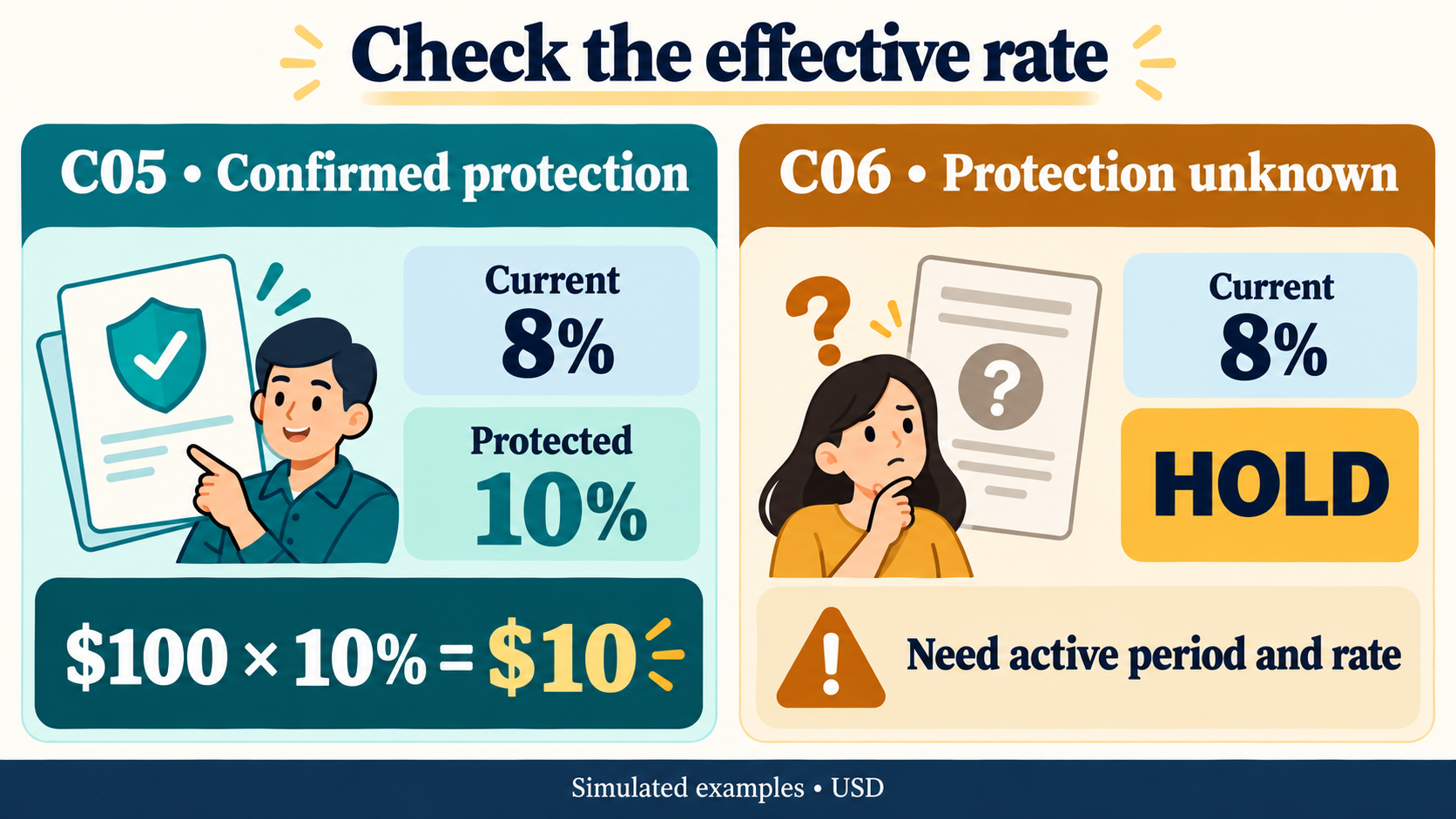
The current 8% setting is visible in both simulated cases. Only one has enough evidence for a calculation.
An older February 2026 ACA course says ads-rate changes take effect immediately. That wording should not override the later Open protection guidance. It also does not establish the timing for every other collaboration. Use the record relevant to the creator and order date.
What is the minimum Shop Ads commission rate?
The official pages are not fully aligned. The US recommendation guide dated May 13, 2026 describes a minimum of one third of the standard rate. The older October 2025 Open Collaboration setup page says 30% of the standard rate. Those are different thresholds.
For a live change, confirm the current account validation and applicable terms rather than treating either number as a universal rule. In our teaching case, a proposed 5% ads rate against an 18% standard rate is below both 6% and 5.4%. The correct review action is to flag it—not silently replace it with a rate the seller never approved.
Why GMV Max orders can still show standard commission
TikTok's Product GMV Max reporting guide includes both organic and paid orders in campaign reporting. A campaign total therefore does not establish an individual order's commission eligibility.
Keep two questions separate:
- Reporting: Is this order included in a campaign's reported performance?
- Commission: Which qualifying route, authorization and collaboration terms apply to this order?
The affiliate creative commission guidance also distinguishes seller-run ads from creator-run Showcase ads, for which it describes standard commission on Affiliate GMV. An “ad” label alone is too broad to choose a rate.
In our fictional C07 row, the only available signal is a GMV Max inclusion flag. Order-source and route evidence are missing. The row stays on hold; neither an ads rate nor zero commission is justified.
Build a commission reconciliation sheet
Use one row per order line and preserve the original exported amounts. Keep the calculated commission in a separate column so a disagreement remains visible.
Field group | Information to collect | Why it matters |
Identity and period | Order-line ID, SKU, anonymized creator ID, market, currency, order and settlement dates | Prevents mixing products, currencies or periods |
Qualification | Order source, authorization evidence, collaboration or campaign terms | Establishes which rule can apply |
Rate evidence | Standard and ads settings, protected rate, status and active period | Separates a current setting from an effective rate |
Commission base | Confirmed eligible base, refund or reversal entries, evidence reference | Avoids reconstructing the base from a retail price |
Reconciliation | Calculated commission, recorded commission, difference and settlement status | Makes unmatched entries reviewable |
Other costs | Allocated advertising spend, allocation method and platform fee entries | Keeps costs separate from creator commission |
Follow-up | Missing evidence, suggested owner and next check | Turns an unknown value into an actionable request |
The calculations for this teaching sheet are:
Calculated commission = confirmed commission base × applicable rate / 100
Difference = recorded commission − calculated commission
Known-cost subtotal = calculated commission + allocated ad spend + platform fees
Rates in this sheet use percentage points: enter
8 for 8%. Round calculated commission to US cents. If a required component is unknown, do not replace it with zero or produce a complete subtotal.For advertising, an allocated amount is a bookkeeping assumption, not proof of the cost of acquiring that order. Record the campaign total, allocation basis and period. Our teaching exercise supplies fixed row-level amounts; it does not derive actual attributed CPA.
The subtotal above also excludes product cost, fulfillment, taxes and overhead. Use the GMV Max ROI and profit guide when moving from a commission check to a fuller profitability model.
Refund example: calculate the difference without inventing its cause
For fictional case C08, the supplied records confirm:
- Adjusted commission base: $60.
- Applicable rate: 8%.
- Recorded commission: $8.00.
- Allocated advertising cost: $4.00; supplied platform fee: $3.00.
Calculated commission is $4.80. Recorded minus calculated is +$3.20. The known-cost subtotal is $11.80.
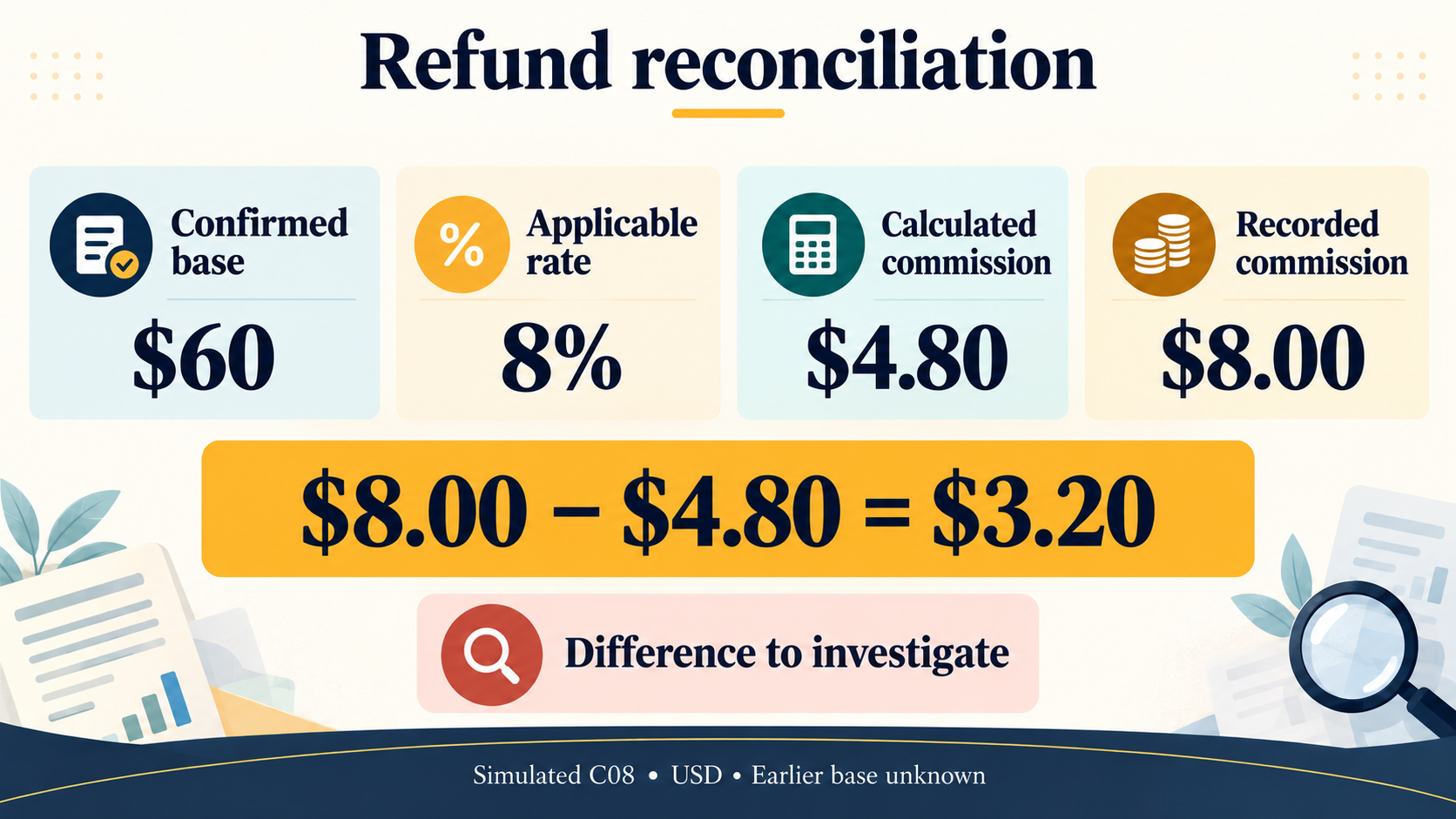
The earlier commission base is unknown. These amounts do not establish how the $8 entry was originally created.
Ask the finance or affiliate operations owner to match the settlement period, refund adjustment entries and booking timestamps. A difference is a reason to investigate; it is not proof of an overcharge.
Use separate statuses for calculation completeness and reconciliation. C08 is complete enough to calculate, but it is not reconciled. A refund-pending order with an unknown final base is different: its commission calculation remains on hold.
For a cancellation, use the actual reversal records. In fictional C10, the supplied commission and platform fee are zero after reversal, while the $4 advertising allocation remains. That describes this input; it is not a universal promise about refunding platform fees or advertising charges.
A file-based commission review with Navos
We tested Navos's Ecommerce Growth Pricing Promotion Strategy Skill with 14 fictional order lines, a field guide and a supplied rule brief. After human review and revisions, the accepted output included an HTML report, an Excel workbook, two CSV files and a Markdown summary.
The final review separated 8 calculable rows from 6 rows on hold. Seven calculated rows matched their supplied ledger amounts; C08 had the $3.20 reconciliation difference.
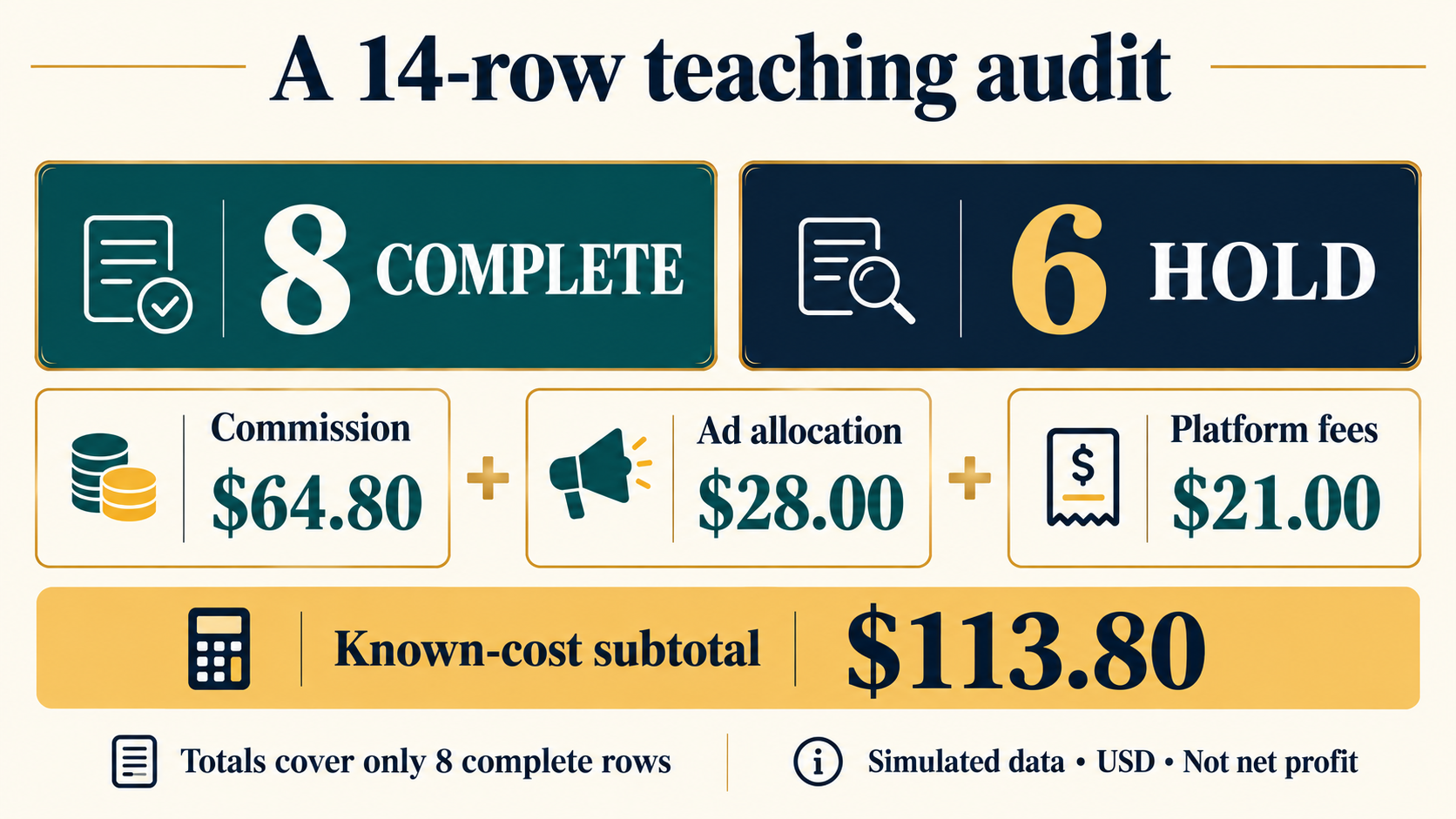
The $64.80 commission, $28 advertising allocation and $21 platform fees cover only the eight complete rows. They are simulated amounts, not a shop's total costs or net profit.
The useful output was a reviewable set of rows and evidence requests. The test did not connect to Seller Center, change a rate, validate a real settlement or independently refresh TikTok's policies. The workbook contains static results: editing its inputs does not automatically recalculate them.
Prepare a small batch before you start
Export a manageable set of order lines from the same market and period. Remove customer names, addresses and other unnecessary personal information. Add the rate history, evidence references and cost-allocation explanation that the rows need.
Ask for an input check before requesting a finished report:
Read the attached order file, field guide and rule notes. Confirm the row and field counts. Identify missing order-source, rate, protection, refund-base and campaign-term evidence. Keep unknown values unknown. Do not connect to an account or change settings. Return the gaps before calculating.
After reviewing the gaps, ask for the row-level commission calculation, a separate reconciliation status and an issue list with suggested owners. Require the original ledger values to remain unchanged and all totals to state which rows they include.
Download Navos Desktop to try a file-based commission review. Use the field checklist above to prepare your inputs, and verify the output before using it for a financial decision.
Frequently asked questions
Do I pay standard commission and Shop Ads commission on the same sale?
Do not add the two creator rates together for the same eligible sale. Identify the applicable rate. Advertising spend and platform charges can still exist separately.
Does turning off the separate Shop Ads rate remove creator commission?
No. TikTok's setup guide describes a return to the standard rate for eligible ad orders. Turning off a separate rate should not be treated as proof that an ad has stopped or a commission obligation has disappeared.
Is an empty ads-rate field the same as “not set”?
No. It might reflect an incomplete export or missing evidence. Confirm the setting through another reliable record before selecting a fallback rate.
What if the commission changed after the order?
Compare the order with its applicable collaboration, active rate period and protection evidence. Today's configuration alone cannot resolve a historical discrepancy.
Can a refund difference be called an overcharge?
Not from the arithmetic alone. Check whether the ledger and calculation cover the same settlement stage and whether adjustment entries have posted.
What should I check first when the numbers disagree?
Start with the order's source, commission base, effective rate and settlement period. Once those match, investigate the adjustment entries. Changing a rate before understanding the difference can make the historical record harder to review.
Sources reviewed for this US-focused guide on October 26, 2026: TikTok Business Help Center's commission, setup, authorization and GMV Max reporting guides; US Seller University commission protection, recommendation and ACA materials. Confirm current terms and account availability before making changes.