数秒でダウンロード
TikTok リンクを貼り付け、ダウンロードをクリックし、MP3 を取得します。ほとんどのファイルは 2 秒以内に準備が完了します。待機、キュー、リダイレクトはありません。

トレンドのサウンド、BGM、ナレーションを TikTok から保存します。任意の TikTok リンクを貼り付け、音声を MP3 としてダウンロードします。オンラインで簡単に使用できます。
TikTok MP3 ダウンローダーとは何ですか?
TikTok MP3 ダウンローダーは、TikTok ビデオからオーディオ トラックを抽出し、MP3 ファイルに変換するオンライン ツールです。 TikTok ビデオ URL を貼り付けると、ツールがオーディオ ストリームを取得して、ビデオなしでサウンドをダウンロードできるようになります。これは、トレンドのサウンド、BGM、ナレーション、またはポッドキャスト クリップを保存するのに役立ちます。ビデオ全体を透かし付きで保存する TikTok の組み込みビデオ保存機能とは異なり、MP3 ダウンローダーはオーディオのみを分離するため、ファイル サイズが小さくなり、音楽プレーヤーでの再生が容易になります。
トリックやアップセルはありません。リンクを貼り付けるだけで、MP3 を取得できます。
TikTok リンクを貼り付け、ダウンロードをクリックし、MP3 を取得します。ほとんどのファイルは 2 秒以内に準備が完了します。待機、キュー、リダイレクトはありません。
プレミアム枠もクレジットカードのプロンプトも、「4.99 ドルでより速くダウンロード」もありません。このページのすべての機能は無料です。公開リンク TikTok を貼り付け、それを解析し、利用可能な MP3 をダウンロードします。
iPhone、Android、Windows、Mac、Chromebook — ブラウザがあれば機能します。アプリをインストールしたり、拡張機能を追加したりする必要はありません。このページを開いて貼り付けるだけです。
バナー広告、ポップアップ、スパムを引き起こす偽のダウンロード ボタンはありません。このページは 1 つのことを行い、邪魔にならないようにします。
再エンコードや圧縮を行わずに、オーディオ ストリームを直接抽出します。 TikTok が内部で使用するのと同じ 128 ~ 192 kbps の品質が得られます。
1 日あたりの上限や、「3 回無料でダウンロードしてから有料」という壁はありません。 TikTok MP3 を毎日、永久に必要なだけダウンロードしてください。
クリエイターやマーケティング チームが汎用の ssstik や snaptik クローンではなく Navos を選択する理由をご覧ください。
| 特徴 | Navos | ssstik | snaptik | その他のツール |
|---|---|---|---|---|
| 広告やポップアップはありません | ✓ | ✗ | ✗ | ✗ |
| オリジナルのオーディオ品質 | ✓ | ◐ | ◐ | ◐ |
| データ保持ゼロ | ✓ | ✗ | ✗ | ✗ |
| 組み込みの AI マーケティング ワークフロー | ✓ | ✗ | ✗ | ✗ |
| クリエイターの検索とアウトリーチ | ✓ | ✗ | ✗ | ✗ |
スワイプして比較→
TikTok リンクをコピーしてコンバーターに貼り付け、抽出したオーディオを MP3 として保存します。
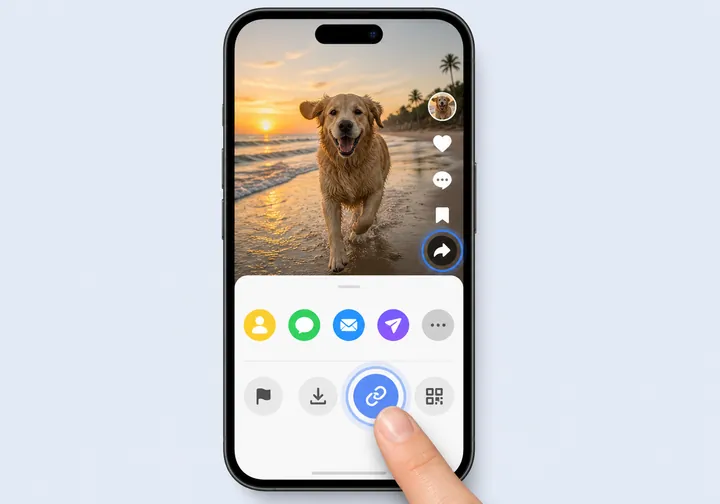
TikTok を開き、必要なサウンドが含まれるビデオを選択し、[共有] をタップして、[リンクのコピー] を選択します。
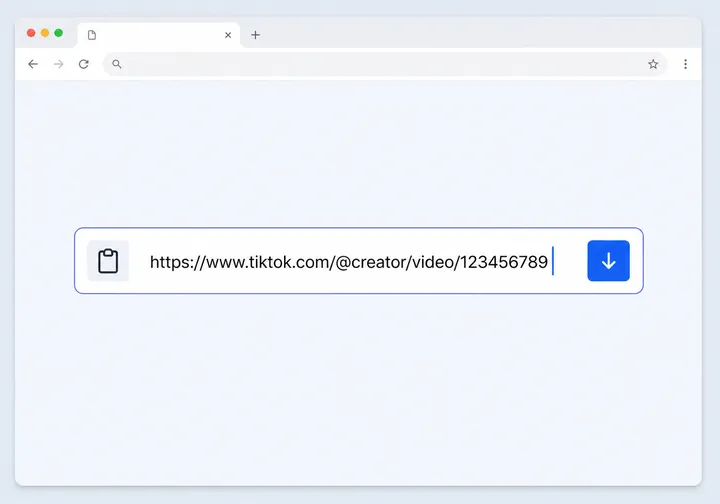
このページに戻り、TikTok URL を上の入力フィールドに貼り付けます。
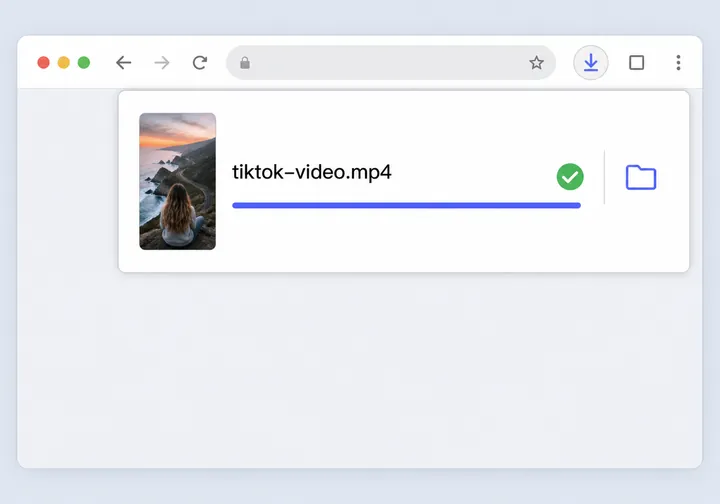
解析後に [ダウンロード MP3 をクリックし、抽出したオーディオ ファイルをデバイスに保存します。
このページでは、ユーザーが TikTok オーディオを保存する実際的な理由を取り上げながら、MP3 のダウンロードの目的に重点を置いています。
後で勉強したいフック、ナレーション、ペース、音楽キュー、サウンド形式のリファレンスを保存してください。
トレンド調査、キャンペーンレビュー、競合分析、クリエイティブブリーフ用の音声サンプルを収集します。
内部レビュー、リミックス計画、スクリプト開発、UGC キャンペーン調査のためにオーディオ リファレンスを保存します。
ダウンロードする準備はできましたか?
上に TikTok リンクを貼り付けて、数秒で音声をダウンロードします。無料のオンライン、迅速な抽出。
TikTok のインスピレーションを実行可能なキャンペーンに変える AI マーケティング アシスタント。 10,000以上のブランドや代理店で使用されています。
1,000 万人以上のクリエイターをニッチ、視聴者、エンゲージメント別に検索します。このサウンドを使ってインフルエンサーを見つけてください。
トレンドのサウンド、ハッシュタグ、フォーマットを追跡します。あなたの業界で何が起こっているのかを見てみましょう。
このサウンドをビデオスクリプトに変換します。 AI がフック、CTA、シーンごとの内訳を作成します。
トレンドのコンテンツから広告キャンペーンを作成します。 AI を使用してターゲットを絞り、予算を立て、最適化します。
焦点を絞った TikTok から MP3 ツール — 混乱も驚きもありません。
これらのブランドのマーケティング担当者は Navos を使用します
オンラインで TikTok 動画を MP3 に変換することについて明確な答えを示します。
TikTok アプリから TikTok ビデオ リンクをコピーするには、[共有] をタップして [リンクのコピー] を選択します。次に、それを上記のダウンローダーに貼り付け、リンクが解析されたら、[ダウンロード MP3 をクリックします。このツールは、利用可能なオーディオ トラックを抽出し、MP3 ファイルとして保存します。プロセス全体にかかる時間はわずか数秒で、TikTok サウンドを必要なだけダウンロードできます。
はい、Navos TikTok MP3 ダウンローダーは完全に無料で使用できます。隠れた料金、サブスクリプションプラン、ダウンロード制限はありません。公開 TikTok リンクを貼り付けて解析し、利用可能な MP3 オーディオをページから直接ダウンロードします。
いいえ。 TikTok から MP3 へのコンバーターはブラウザで直接動作するため、モバイル アプリ、デスクトップ アプリ、またはブラウザ拡張機能をインストールする必要はありません。 Web ブラウザを使用して任意のデバイスでこのページにアクセスし、TikTok リンクを貼り付けてダウンロードするだけです。これにより、ストレージスペースを占有することなく、iPhone、Android、PC、または Mac で便利に使用できます。
はい。 TikTok アプリから TikTok リンクをコピーし、Safari または任意のブラウザでこのページを開いてリンクを貼り付け、MP3 をダウンロードをタップします。通常、ファイルはファイル アプリのダウンロード フォルダーに表示されます。 iOS のバージョンと Safari の設定によっては、ダウンロード フォルダーまたは iCloud ドライブを確認して、保存された MP3 ファイルを見つける必要がある場合があります。
はい。 TikTok を開き、[共有してリンクをコピー] をタップしてビデオ リンクをコピーし、Chrome または別のブラウザのこのページに貼り付けて、MP3 をダウンロードをタップします。ファイルはダウンロード フォルダーに保存され、ファイル マネージャー アプリからアクセスできます。このプロセスは、すべての Android デバイスとブラウザで同じように機能します。
TikTok MP3 ダウンローダーは、オーディオ トラックのみを MP3 ファイルとして抽出して保存することに重点を置いているため、ファイル サイズが小さくなります (通常は 2 ~ 5 MB)。 TikTok ビデオ ダウンローダーは、完全なビデオ ファイルを MP4 として保存します。これにはビデオとオーディオの両方が含まれ、より大きなファイル (通常は 10 ~ 50 MB) になります。サウンド、音楽、ナレーションのみが必要な場合は、MP3 ダウンローダーを使用してください。
TikTok リンクにアクセスでき、オーディオ トラックを抽出できる場合に機能します。プライベートビデオ、削除されたコンテンツ、地域制限されたビデオ、またはダウンロードがブロックされているアカウントからのビデオは失敗する可能性があります。さらに、一部の TikTok 動画は、音声なしでアップロードされた場合、個別のオーディオ トラックを持たない場合があります。ダウンロードを試みる前に、ビデオが公開されていてアクセス可能であることを必ず確認してください。
TikTok リンクが公開されており正しいことを確認し、ページを更新するか、別のブラウザを試すか、TikTok アプリからリンクを再度コピーしてください。問題が解決しない場合は、ビデオが非公開、削除、または地域制限されている可能性があります。ブラウザのキャッシュをクリアするか、別のデバイスを使用してみることもできます。引き続き問題が発生する場合は、ビデオの音声を抽出できない可能性があります。
オーディオの品質は、元の TikTok ビデオのオーディオ トラックによって異なります。ほとんどの TikTok ビデオは、128 ~ 192 kbps のビットレートで AAC または MP3 エンコードを使用しており、ほとんどのリスニング用途に高品質を提供します。当社のツールは、再エンコードや圧縮を行わずに元の品質でオーディオを抽出するため、ソースビデオから最高の品質を得ることができます。
いいえ、TikTok ライブ ストリームはリアルタイム ブロードキャストであり、ダウンロードできる永続的なビデオ URL を持ちません。このツールは、ユーザーのプロフィールに投稿された通常の TikTok 動画でのみ機能します。ライブ ストリームが終了すると、通常のビデオとして保存され、ダウンロードできるようになります。
PC では、任意のブラウザ (Chrome、Firefox、Edge、Safari) でこのページを開き、TikTok Web サイトまたはアプリから TikTok ビデオ リンクをコピーし、上の入力フィールドに貼り付けて、[ダウンロード MP3 をクリックします。ファイルはデフォルトのダウンロード フォルダーに保存されます。このプロセスは、Windows、Mac、Linux コンピューターでも同じです。
いいえ、毎日または毎月のダウンロード制限はありません。 TikTok MP3 ファイルは必要なだけ、完全に無料でダウンロードできます。
いいえ。ビデオ、URL、抽出されたオーディオ ファイル、個人のダウンロード データは保存されません。リクエストされたアクションの処理はリアルタイムで行われ、サーバーにファイルは保存されません。これによりプライバシーが確保され、ダウンロードは完全にプライベートに保たれます。 MP3をダウンロードすると、一時処理データは直ちに破棄されます。
個人的な参照目的で音声をダウンロードすることは場合によっては許可される場合がありますが、権利はコンテンツと場所によって異なります。常にクリエイター、音楽の権利、TikTok の利用規約を尊重してください。オリジナルの作成者または著作権者の許可なく、オーディオを再投稿、再配布、または商業的に使用しないでください。ダウンロードしたオーディオを独自のコンテンツで使用する予定がある場合は、適切な権利またはライセンスを持っていることを確認してください。
ダウンロードした TikTok オーディオを商業的に使用するには、オリジナルの作成者および音楽権利所有者からの許可が必要です。ほとんどの TikTok ビデオには、著作権で保護された音楽や知的財産法で保護されたオリジナル コンテンツが含まれています。適切なライセンスまたは許可なしに商用利用すると、著作権法および TikTok の利用規約に違反する可能性があります。商用プロジェクト、広告、または収益化されたコンテンツでオーディオを使用する前に、必ず必要な権利を取得してください。
はい。解析後にビデオ ファイルが利用できる場合、結果カードにはプライマリの [ダウンロード] MP3 ボタンの横に 2 番目の [ビデオのダウンロード] ボタンが表示される場合があります。これにより、必要に応じてオーディオとビデオの両方を保存できます。ただし、このページの主な焦点は依然として MP3 オーディオ抽出です。
NavosAI は、TikTok または ByteDance Ltd. と提携、承認、または接続されていません。これは、ユーザーが個人使用のために TikTok 動画から音声を抽出できるように作成された独立したツールです。すべての TikTok の商標およびロゴは、それぞれの所有者の財産です。
ウォーターマークはビデオ ファイルにのみ表示される視覚要素であるため、TikTok から抽出されたオーディオ ファイルにはウォーターマークは含まれません。 MP3 オーディオをダウンロードすると、TikTok ブランド サウンドやウォーターマーク サウンドのないクリーンなオーディオ ファイルが得られます。これにより、オーディオは個人的なリスニングやリファレンスに適したものになります。
いいえ。非公開 TikTok アカウントはコンテンツへのアクセスを制限しており、そのアカウントをフォローし、コンテンツを表示する権限を持っていない限り、非公開アカウントからの動画をダウンロードすることはできません。 TikTok にログインしているときにプライベート ビデオを表示できたとしても、私たちのツールはパブリック アクセシビリティを必要とするため、そのビデオにアクセスできません。公開されている TikTok ビデオのみをダウンロードできます。
TikTok ビデオが音声なし、またはサウンド トラックなしでアップロードされた場合、MP3 のダウンロードは失敗し、音声が見つからないことを示すエラー メッセージが表示されます。一部の TikTok ビデオは、テキストのみのビデオや音楽のないビジュアル コンテンツなど、設計上サイレントになっています。このような場合、抽出する音声がないため、ツールは MP3 ファイルを作成できません。
TikTok のダウンロード、クリエイティブなリサーチ、出版、クリエイターのプランニングのための実際の Navos ツールを探索してください。
プライバシーと著作権に関する通知: NavosAI は、TikTok または ByteDance Ltd. と提携、承認、または接続されていません。TikTok のビデオ、URL、抽出された音声、または個人データは保存されません。このツールは個人的な参照のみを目的として提供されています。オーディオをダウンロード、再投稿、または商業的に使用する前に、常にクリエイター、音楽の権利、および該当するプラットフォーム規約を尊重してください。