Téléchargement en quelques secondes
Collez un lien TikTok, cliquez sur télécharger, obtenez votre MP3. La plupart des fichiers sont prêts en moins de 2 secondes. Pas d'attente, pas de file, pas de redirection.

Sauvegardez les sons tendance, musiques de fond et voix off de TikTok. Collez n'importe quel lien TikTok et téléchargez l'audio en MP3 — en ligne et facile à utiliser.
Qu'est-ce qu'un téléchargeur MP3 TikTok ?
Un téléchargeur MP3 TikTok est un outil en ligne qui extrait la piste audio d'une vidéo TikTok et la convertit en fichier MP3. Vous collez l'URL d'une vidéo TikTok, l'outil récupère le flux audio et vous permet de télécharger le son sans la vidéo. C'est utile pour sauvegarder des sons tendance, de la musique de fond, des voix off ou des extraits de podcast. Contrairement à la fonction Sauvegarder de TikTok qui enregistre la vidéo complète avec filigrane, un téléchargeur MP3 isole uniquement l'audio — taille de fichier plus petite, lecture plus facile sur les lecteurs musicaux.
Pas d'astuces, pas de ventes additionnelles. Collez le lien et obtenez votre MP3.
Collez un lien TikTok, cliquez sur télécharger, obtenez votre MP3. La plupart des fichiers sont prêts en moins de 2 secondes. Pas d'attente, pas de file, pas de redirection.
Pas de version premium, pas de demande de carte bancaire, pas de « téléchargement plus rapide pour 4,99 € ». Toutes les fonctionnalités sont gratuites. La connexion sert uniquement à prévenir les abus.
iPhone, Android, Windows, Mac, Chromebook — s'il y a un navigateur, ça fonctionne. Aucune appli à installer, aucune extension. Ouvrez la page et collez.
Pas de bannières publicitaires, pas de pop-ups, pas de faux boutons de téléchargement qui ouvrent du spam. La page fait une chose et reste discrète.
Nous extrayons le flux audio directement — sans réencodage, sans compression. Vous obtenez la même qualité 128-192 kbps que TikTok utilise en interne.
Pas de limite quotidienne, pas de murs « 3 téléchargements gratuits puis payez ». Téléchargez autant de MP3 TikTok que vous voulez, chaque jour, pour toujours.
D'autres outils téléchargent l'audio. Navos le transforme en flux de travail.
| Fonctionnalité | Navos | ssstik | snaptik | Autres |
|---|---|---|---|---|
| Gratuit sans filigrane | ✓ | ✗ | ✗ | ✗ |
| Extraction audio MP3 | ✓ | ◐ | ◐ | ◐ |
| Analyse de tendances pour créateurs | ✓ | ✗ | ✗ | ✗ |
| Génération de scripts et publicités | ✓ | ✗ | ✗ | ✗ |
| Pas de pubs intrusives | ✓ | ✗ | ✗ | ✗ |
Glissez pour comparer →
Copiez le lien TikTok, collez-le dans le convertisseur et sauvegardez l'audio extrait en MP3.
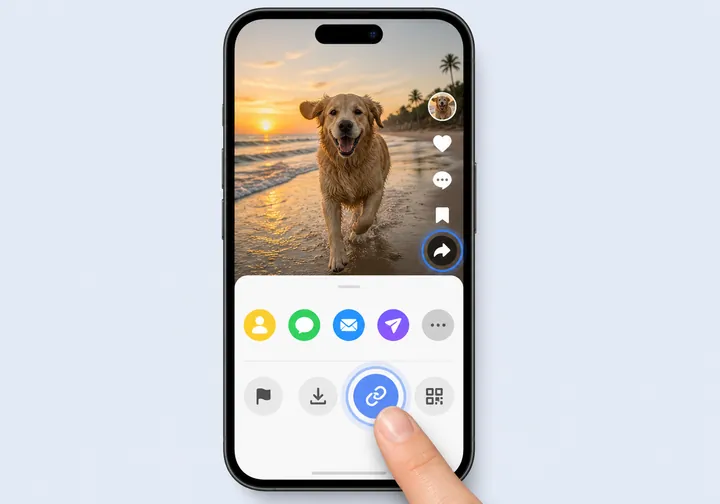
Ouvrez TikTok, choisissez la vidéo avec le son désiré, appuyez sur Partager, puis sélectionnez Copier le lien.
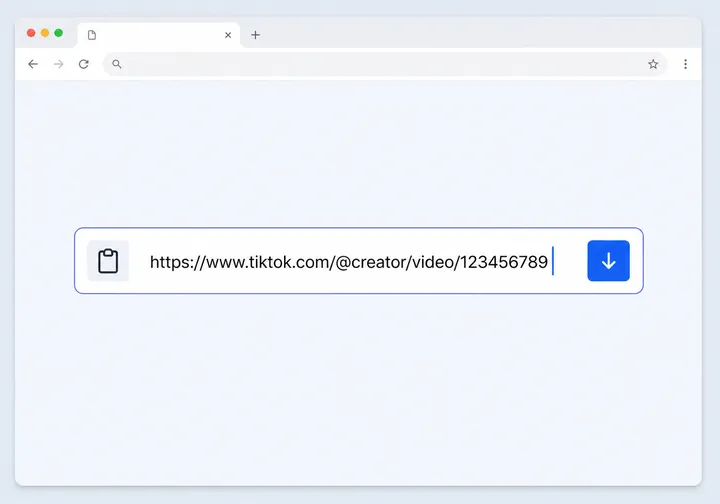
Revenez sur cette page et collez l'URL TikTok dans le champ de saisie ci-dessus.
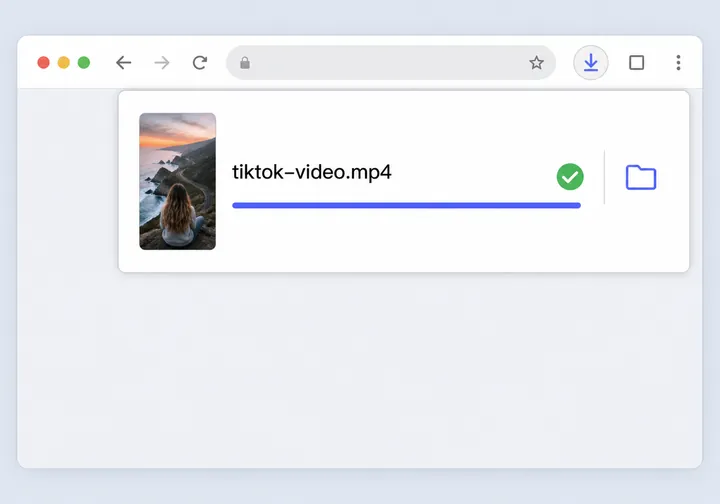
Après l'analyse, cliquez sur Télécharger MP3 pour sauvegarder le fichier audio extrait sur votre appareil.
La page reste centrée sur l'intention de téléchargement MP3 tout en couvrant les raisons pratiques pour lesquelles les gens sauvegardent l'audio TikTok.
Conservez des références pour les accroches, voix off, rythmes, repères musicaux et formats sonores que vous voulez étudier plus tard.
Collectez des exemples audio pour la recherche de tendances, les revues de campagne, l'analyse concurrentielle et les briefings créatifs.
Sauvegardez des références audio pour les revues internes, la planification de remix, le développement de scripts et la recherche de campagnes UGC.
Prêt à télécharger ?
Collez votre lien TikTok ci-dessus et téléchargez l'audio en quelques secondes. Gratuit en ligne, avec connexion Navos lorsque demandé.
Navos AI est une plateforme complète de marketing TikTok — découverte de tendances, contact créateurs, stratégie publicitaire et génération créative dans une seule suite.
Trouve les créateurs TikTok qui correspondent à votre marque et les contacte automatiquement.
Analyse ce qui rend les produits viraux sur TikTok — accroches, sons, visuels.
Génère des scripts, accroches et storyboards basés sur les formats TikTok tendance.
Planifie vos campagnes publicitaires TikTok — ciblage, budget, tests créatifs.
La même confiance qui pousse les marques à choisir Navos pour leurs flux TikTok.
Les marketeurs de ces marques utilisent Navos
Tout ce que vous devez savoir pour télécharger l'audio TikTok en MP3.
Copiez le lien de la vidéo TikTok, collez-le dans le téléchargeur ci-dessus et cliquez sur Télécharger MP3. L'audio est extrait en quelques secondes et téléchargé en MP3 sur votre appareil — aucune installation requise.
Oui, totalement gratuit. Pas de version premium, pas de frais cachés, pas de limite de téléchargement. La connexion n'est demandée que pour prévenir les abus.
Oui. Ouvrez Safari, collez le lien TikTok et cliquez sur Télécharger MP3. Le MP3 sera sauvegardé dans l'app Fichiers, dans Téléchargements.
Oui. Ouvrez Chrome ou tout autre navigateur, collez le lien TikTok et appuyez sur Télécharger MP3. Le fichier sera sauvegardé dans le dossier Téléchargements de votre appareil.
Non. Cet outil fonctionne entièrement dans votre navigateur. Pas d'installation d'appli, pas d'extension de navigateur.
Oui. Que ce soit 15 secondes ou 10 minutes, le téléchargeur extrait toute la piste audio.
Vous obtenez le flux audio original que TikTok fournit, généralement 128-192 kbps. Nous ne réencodons pas et n'ajoutons pas de compression supplémentaire.
La connexion empêche les abus (bots, téléchargements automatisés en masse) et garde le service gratuit pour les vrais utilisateurs. Vous pouvez vous connecter gratuitement en 5 secondes.
Non. Seules les vidéos TikTok publiques peuvent être téléchargées. Si le créateur a rendu la vidéo privée, le téléchargeur ne peut pas y accéder.
Actuellement uniquement avec les liens TikTok (tiktok.com, vm.tiktok.com, vt.tiktok.com). Douyin (TikTok chinois) n'est pas supporté.
Le téléchargeur vidéo sauvegarde le fichier vidéo MP4 complet. Ce téléchargeur MP3 extrait uniquement la piste audio et la sauvegarde en fichier MP3 plus petit — idéal si vous voulez seulement le son.
Pour usage personnel et non commercial, généralement oui. Pour la publication, l'usage commercial ou les plateformes comme YouTube, vérifiez le statut du droit d'auteur du son — beaucoup de sons TikTok sont protégés par licence ou créateur.
Non. Nous traitons votre lien en temps réel et ne le sauvegardons pas. Les fichiers audio téléchargés vont directement du CDN de TikTok à votre appareil — nous ne stockons aucune copie.
Le téléchargement pour usage personnel (écoute, étude, inspiration) est généralement acceptable dans la plupart des juridictions. Cependant, republier, remixer ou utiliser commercialement de l'audio protégé sans permission peut violer la loi. En cas de doute, consultez un avocat.
Tout appareil avec un navigateur moderne : iPhone, iPad, Android, Windows, Mac, Linux, Chromebook. Fonctionne avec Safari, Chrome, Firefox, Edge, Brave et plus.
Non. Les lives ne sont pas supportés — seulement les vidéos enregistrées.
Si TikTok ne renvoie pas de piste audio, l'outil affiche un message d'erreur. Vous pouvez télécharger la vidéo à la place.
Non. Nous extrayons uniquement l'audio — pas de filigrane TikTok, pas de marqueurs sonores intégrés, pas de balises supplémentaires.
Nous utilisons une analytique minimale pour comprendre la performance de l'outil (pages vues, taux de réussite). Nous ne suivons aucun identifiant personnel et ne vendons pas de données à des tiers.
Causes courantes : la vidéo est devenue privée, supprimée par le créateur, géo-restreinte, ou le CDN de TikTok est temporairement injoignable. Réessayez dans un instant ou testez avec une autre vidéo.
Navos AI offre la recherche de tendances, la découverte de créateurs, la génération de scripts et plus — le tout sur une seule plateforme.
Essayer Navos gratuitementExplorez de vrais outils Navos pour les téléchargements TikTok, la recherche créative, la publication et la planification de créateurs.
Avis : cet outil est destiné à un usage personnel et équitable. Respectez les droits d'auteur et les conditions de service de TikTok. Ne redistribuez pas de contenu protégé sans permission.